X just made a massive chunk of its code public
On Thursday, X announced it’s significantly expanding its open source codebase — and for the first time, users will be able to see if their account or posts have been quietly suppressed by the platform’s ranking systems.
The company is releasing the source code for the “For You” timeline — the default feed you see when you open the app — on GitHub under the Apache v2 license. That’s a big deal on its own, but the move goes further. X is also opening up parts of its code that were previously closed, including model configuration, filters, and core ranking system details. That means the parameters used to weight different signals — the stuff that determines which posts actually surface — are now out in the open.
This makes the codebase roughly 10 to 15 times larger than it was before. Not exactly a small gesture.
What’s actually in the open source release?
According to X’s VP of Product, Keith Coleman, the release gives you the core ranking code that pulls posts, ranks them for any given user, and assembles the feed. But that’s not all.
“You can see the systems that filter out potentially problematic, rule-violating content,” Coleman told TechCrunch. “And some of those systems, like the ranker and the score, you can even run yourself outside the company.”
That’s a notable shift. Previously, X’s algorithm was a black box — even to developers who wanted to understand why certain posts got buried. Now, anyone with the technical chops can run the ranking system themselves.
Coleman admitted this level of openness might surprise people. “This is the kind of thing that I think people will be fairly shocked that we are releasing,” he said.
A new transparency tool for regular users
Of course, not everyone is going to dig through GitHub repositories. So X is also rolling out a transparency tool that’s actually accessible to everyday users.
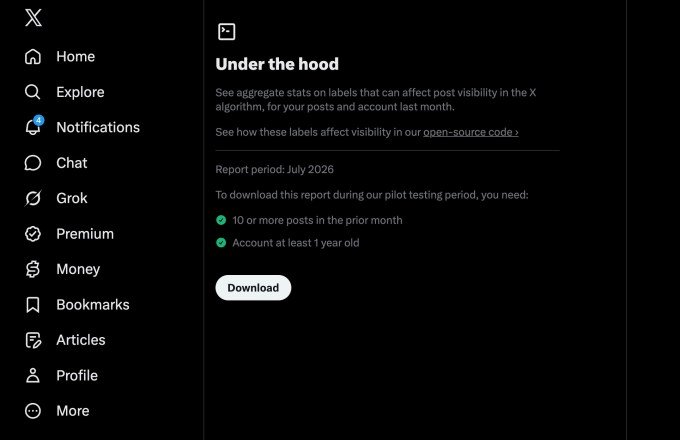
The new feature lives on an “Under the Hood” page in the app’s settings. It’s currently being tested with a pilot group of accounts that are at least a year old, and it will roll out more broadly later.
Here’s how it works:
- If you’ve posted 10 or more times in the past month, you can download your aggregate stats as a JSON file.
- The file shows whether any labels have been applied to your account or posts over the past calendar month.
- That tells you if you’ve been shadowbanned or otherwise impacted by X’s ranking systems.
Not a technical user? No problem. X suggests you can drop the JSON file into an LLM of your choice, point the AI at X’s GitHub repo, and ask for an interpretation. It’s a practical workaround for people who want answers without learning to code.
External researchers already tested the code
Before the public release, X previewed the codebase to external researchers who specialize in recommendation systems. Those researchers were able to train and run X’s Phoenix scoring system using the open source code — a major milestone, according to Coleman.
Developers can now submit pull requests to the GitHub repository, and X engineers will consider incorporating those updates into the algorithm. Not every suggestion will make the cut, but Coleman is clearly excited about the possibility.
“That would be amazing to have people submitting code that improves the algorithm,” he said. “I mean, how cool would it be for the X algorithm to be not just visible to the public, but also, like, by the public?”
What’s not included (and why)
There are some gaps. Systems that use Grok to predict whether a post might violate a rule are not part of this release. X says that’s intentional — to prevent bad actors from using the code to work around the rules and flood the network with spam.
So while the release is substantial, it’s not total. The company is keeping some cards close to its chest.
Why this matters for shadowban concerns
The changes are aimed at addressing long-standing concerns about how X’s algorithm influences politics, elections, and the spread of misinformation. The platform has been home to political figures and high-profile individuals for years, and it’s now owned by a trillionaire who helped President Trump get elected.
But the transparency issues predate Musk’s ownership. Republicans in Congress alleged years ago that Twitter leaned too far left and claimed the network had “shadowbanned” their posts — making them invisible or undiscoverable without the user’s knowledge. Twitter consistently denied those claims.
Coleman says the goal is to let the public assess how posts are distributed, vet that it’s a level playing field, and critique it if it’s not.
“That’s the whole goal of this: [the code] can be audited; it can be critiqued,” he said. “We’re going to listen, and we want to make the system one that people like and trust, and feel is fair.”
The bigger picture: transparency vs. privacy
There’s some irony here. While X is pushing for more transparency around its code, the company has arguably become less transparent overall under Musk. As a private company, it’s no longer required to report to the SEC, and it’s been less forthcoming about user metrics, growth, revenue, and government takedown requests.
Now that X has merged with SpaceX, its monthly active users are once again public. But the broader picture is mixed — more open in some ways, less in others.
Still, for users who’ve wondered whether their posts were being suppressed, this is a meaningful step. The ability to check your own account’s status, combined with the open source code, gives people a way to verify what’s happening rather than just speculating.
Whether it’s enough to rebuild trust remains to be seen. But it’s a start — and it’s a lot more than most social platforms offer.







 CyberSecurity5 months ago
 How To4 months ago
 CyberSecurity5 months ago
 CyberSecurity5 months ago
 Social Media5 months ago
 Infosecurity5 months ago
 CyberSecurity5 months ago
 Video3 months ago