Connect with us

Video

5 Claude AI Side Hustles That Can REPLACE a Six-Figure Job: A Blueprint for Financial Freedom

Published

on

Imagine waking up without an alarm, brewing coffee in peace, and opening your laptop to a stream of income that doesn’t require a boss, a commute, or a daily grind. For many, that dream feels distant—but a new wave of AI-powered side hustles is making it more accessible than ever. In a recent deep-dive video, entrepreneur Shane Hummus outlines five Claude AI side hustles that, according to his research and real-world examples, can potentially replace a six-figure job. Building on his proven strategies, this article unpacks each method, explains why they work, and shows you how to launch your own profitable venture today.

Why Claude AI Is the Secret Weapon for Side Hustlers

Claude AI, developed by Anthropic, isn’t just another chatbot. It excels at nuanced reasoning, long-form content generation, and complex data analysis—skills that are in high demand across multiple industries. As a result, Claude AI side hustles offer a unique edge: you can automate tedious tasks, create high-value deliverables, and scale your services without hiring a team. The video emphasizes that the key is not just using the tool, but packaging it into a service that clients are eager to pay for. In addition, Claude’s safety and accuracy features make it ideal for professional use, reducing the risk of errors that could damage your reputation.

The 5 Lucrative Claude AI Side Hustles You Can Start Today

1. AI-Powered Content Creation and Ghostwriting

One of the most accessible Claude AI side hustles is content creation. Businesses, influencers, and authors constantly need blog posts, newsletters, social media captions, and even book chapters. Claude can draft high-quality, research-backed content in minutes. The video highlights a client who used Claude to write a complete ebook in a weekend, then sold it for a four-figure sum. Your role is to refine, personalize, and deliver—turning raw AI output into polished work. You can charge per project or offer monthly retainers, and with a bit of marketing, land clients on platforms like Upwork or through cold outreach.

2. Automated Lead Generation and Outreach Services

Every business needs leads, but few have the time to hunt them down. Claude can analyze target audiences, craft personalized email sequences, and even qualify prospects based on criteria you set. The video calls this the “lead engine that works on autopilot forever.” By offering lead generation as a service, you can charge $500 to $2,000 per month per client. In addition, Claude’s ability to mimic human tone makes outreach feel authentic, boosting response rates. This side hustle scales beautifully: once you build a system for one client, you can replicate it for many.

3. Custom AI Chatbots for Small Businesses

Small businesses are desperate for affordable automation, but custom chatbots can cost thousands. Claude’s API allows you to build tailored chat assistants that handle customer support, booking, or FAQ. The video describes this as “the gold mine almost nobody is talking about.” You can charge a setup fee plus a monthly maintenance cost. For example, a local dentist might pay $300 to set up a booking bot, then $50/month for updates. With 10 clients, that’s a steady $500 monthly recurring revenue—from a few hours of work.

4. Data Analysis and Report Generation

Claude excels at digesting spreadsheets, survey results, and market research, then producing clear, actionable reports. Consultants, marketers, and executives often need these insights but lack the time to compile them. You can offer a “data-to-report” service: clients send raw data, and you return a polished PDF with charts, summaries, and recommendations. The video notes that this is “the boring secret hiding in plain sight”—a high-value, low-competition niche. Charge $200–$500 per report, and use Claude to handle 80% of the work.

5. AI-Assisted Course Creation and Coaching

If you have expertise in any field—from fitness to finance—you can create an online course with Claude’s help. The AI can outline modules, write scripts, generate quiz questions, and even draft marketing emails. The video calls this “the method that turns this AI tool into the product.” You can sell courses on platforms like Udemy or your own website. Alternatively, offer one-on-one coaching where Claude helps you prepare personalized plans for clients. This side hustle has high profit margins because once the course is built, you sell it repeatedly with minimal effort.

How to Launch Your First Claude AI Side Hustle in 7 Days

Starting doesn’t require a tech background or a big budget. The video provides a step-by-step timeline: Day 1–2: Choose one hustle from the list and research your target market. Day 3–4: Set up a simple landing page or profile on freelance platforms. Day 5–6: Use Claude to create a sample deliverable (e.g., a sample blog post or a mock report) to show potential clients. Day 7: Reach out to 10–20 prospects via email or LinkedIn, offering a discounted first project. The video emphasizes that consistency and follow-up are the real secrets—most people give up after one rejection.

The Untapped Opportunity: Why Now Is the Perfect Time

Most people are still treating AI as a novelty, not a business tool. Therefore, early adopters of Claude AI side hustles have a massive advantage. The video points out that “the untapped resource sitting inside every business” is their need for efficiency—and Claude is the key. As AI becomes more mainstream, competition will increase, but for now, you can carve out a niche and build a reputation. In addition, Claude’s recent updates have made it even more powerful, allowing for longer documents, better reasoning, and safer outputs. This means the services you offer today will only improve tomorrow.

Ready to Replace Your Day Job?

The path to financial freedom is no longer reserved for Silicon Valley founders or celebrity influencers. With Claude AI side hustles, anyone with a laptop and a willingness to learn can build a six-figure income stream. The video is packed with actionable tactics, real client stories, and the exact workflows that work. Watch the full breakdown below, and take the first step toward a life where your income isn’t tied to a clock. Your future self will thank you.

Continue Reading
Click to comment

Leave a Reply

Your email address will not be published. Required fields are marked *

Video

How to Factory Reset a Tenda Router: A Step-by-Step Guide

Published

on

factory reset Tenda router

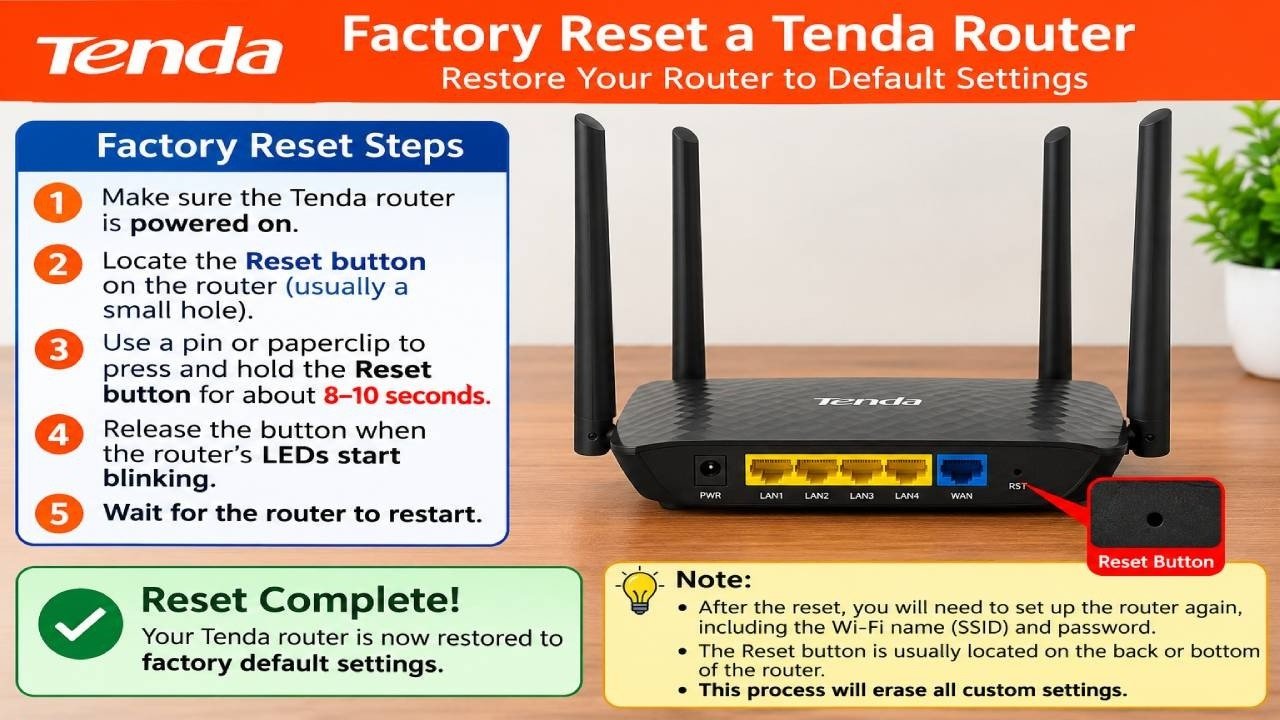
Is your Tenda router acting up? Slow speeds, dropped connections, or a forgotten admin password can bring your whole network to a halt. Before you call your internet service provider or buy new hardware, there’s a simple fix: a factory reset. This process wipes all custom settings and returns the router to its original state, often resolving stubborn issues. In this guide, we’ll walk you through exactly how to factory reset a Tenda router, using both the web interface and the physical reset button. Whether you’re a tech novice or just need a refresher, you’ll have your network back on track in minutes.

Why You Might Need to Factory Reset a Tenda Router

There are several scenarios where a factory reset becomes necessary. For example, if you’ve forgotten the administrator password, you can’t access the router’s settings—a reset is the only way back in. Similarly, if you’re experiencing frequent disconnections or sluggish performance, restoring default settings can clear out corrupted configurations. Additionally, when selling or giving away your router, a factory reset ensures your personal data and network credentials are completely erased. Therefore, knowing how to perform this task is essential for any Tenda router owner.

Step-by-Step: Factory Reset via the Web Interface

The most common method to factory reset a Tenda router is through its web-based control panel. This approach is straightforward and doesn’t require any special tools. Here’s what you need to do:

1. **Connect to the router**: Use your phone or computer to join the Tenda Wi-Fi network. Alternatively, plug an Ethernet cable into one of the LAN ports for a wired connection.
2. **Open the admin page**: Launch a web browser and type `192.168.0.1` into the address bar. This is the default gateway for most Tenda routers.
3. **Log in**: Enter your administrator password. If you haven’t changed it, check the router’s label for the default credentials.
4. **Navigate to Administration**: Look for the “Administration” option in the left-hand menu and click on it.
5. **Find the Reset option**: Within the Administration section, you’ll see a “Reset” button. Click it, then confirm by selecting “OK” or “Save.”

The router will reboot automatically, and all settings will revert to factory defaults. This process usually takes less than a minute. After that, you can log in with the default password and reconfigure your network as needed.

Alternative Method: Using the Physical Reset Button

If you can’t access the web interface—perhaps because you forgot the password—you can use the physical reset button on the router. This method is universal and works on all Tenda models. Here’s how:

– Locate the reset button, which is typically a small pinhole on the back or bottom of the device.
– With the router powered on, use a paperclip or a similar pointed object to press and hold the button for about 10 seconds.
– Release the button when the power LED starts blinking. This indicates that the reset process has begun.
– Wait for the router to reboot completely. The lights will stabilize, and the router will be back to factory defaults.

This method is particularly useful when you’re locked out of the admin panel. However, note that it resets everything, including your Wi-Fi name and password, so you’ll need to set those up again.

What to Do After the Reset

Once the factory reset is complete, your Tenda router will have the default settings from the factory. To get back online, follow these steps:

– Connect to the default Wi-Fi network (the name is usually on the router’s label).
– Open a browser and go to `192.168.0.1` again.
– Log in with the default username and password, often “admin” for both.
– Reconfigure your internet connection settings, Wi-Fi name, and password to your preferences.

If you’re unsure about the default credentials, check the router’s user manual or the manufacturer’s website. It’s also a good idea to update the firmware after resetting to ensure you have the latest security patches and features.

Final Thoughts

Performing a factory reset on your Tenda router is a quick and effective way to resolve many network problems. Whether you choose the web interface or the physical button, the process is simple and user-friendly. Therefore, don’t hesitate to try it the next time your connection acts up. And if this guide helped you, consider subscribing to the channel for more tech tutorials. Watch the full video above for a visual walkthrough, and feel free to comment below if you have any questions. Happy networking!

Continue Reading

Video

CCNA from Start to Finish: One Massive Packet Tracer Lab to Master Networking

Published

on

CCNA Packet Tracer lab

If you’ve ever felt overwhelmed by the sheer volume of CCNA topics—routing, switching, VLANs, inter-VLAN routing, DHCP, NAT, and more—you’re not alone. The Cisco Certified Network Associate (CCNA) exam demands not just theoretical knowledge but hands-on fluency. That’s why this 90-minute, end-to-end Packet Tracer lab is a game-changer. In one continuous session, you’ll build a complete network from scratch, configuring every layer as you go. Whether you’re cramming for the exam or refreshing your skills, this video turns abstract concepts into a tangible, working infrastructure.

Why a Single Lab Beats a Dozen Mini-Tutorials

Most CCNA study plans chop topics into isolated chunks—here’s a VLAN config, there’s a static route. But the real exam—and real networking—requires integration. As a result, a single massive lab forces you to connect the dots. In this session, you’ll start with a blank canvas and end with a fully routed, switched network. This approach mirrors how network engineers actually work: you don’t just configure a switch; you configure it to talk to a router, which talks to another router, which reaches the internet.

Building on this, the lab covers the essential CCNA blueprint: initial device setup, IP addressing schemes, VLAN creation, trunking, Spanning Tree Protocol (STP), static and dynamic routing (OSPF), DHCP services, and Network Address Translation (NAT). Each step builds on the previous one, so you’ll see how a small misconfiguration can ripple through the entire network—and how to troubleshoot it.

What You’ll Master in This CCNA Lab Walkthrough

The video is structured as a live, guided session, which means you can follow along in your own Packet Tracer instance. Here’s what you’ll tackle, step by step:

1. Building the Physical Topology

First, you’ll lay out routers, switches, and PCs. But this isn’t just dragging icons—you’ll learn how to choose the right hardware for the job, plan IP subnets, and document your design. The instructor emphasizes a logical addressing scheme from the start, saving you headaches later. This is where your CCNA lab practice begins to feel like real-world planning.

2. Switching Fundamentals: VLANs and Trunks

Next, you’ll configure VLANs on switches, assign access ports, and set up trunk links between switches. You’ll also see how to use the `show vlan` and `show interfaces trunk` commands to verify your work. This section is crucial because VLANs are a cornerstone of the CCNA exam, and the lab format makes it stick.

3. Routing Between VLANs and Beyond

With VLANs in place, you’ll configure inter-VLAN routing using a router-on-a-stick setup. Then, you’ll move to static routes and OSPF to connect different subnets and remote networks. The instructor explains the routing logic clearly, showing how each path is chosen and how to verify with `show ip route`. This is where your CCNA lab practice transitions from switching to routing—a seamless flow that mirrors the exam’s integrated questions.

4. DHCP, NAT, and Internet Connectivity

Finally, you’ll set up DHCP servers on routers to automatically assign IP addresses to hosts. Then, you’ll configure NAT (specifically PAT) to allow internal devices to reach the internet using a single public IP. The instructor also demonstrates how to test connectivity from end to end using `ping` and `traceroute`. By the end, you’ll have a complete, functional network—exactly what you’ll be expected to configure in the exam’s simulation questions.

Why This CCNA Packet Tracer Lab Matters for Your Exam

The CCNA exam isn’t just multiple-choice; it includes simulation questions where you must configure devices in a simulated environment. Therefore, hands-on practice is non-negotiable. This video gives you 90 minutes of focused, realistic practice that reinforces the commands and concepts you’ll need. Moreover, you’ll pick up troubleshooting techniques—like checking interface status, verifying routing tables, and using `debug` commands—that are invaluable in both the exam and the field.

In addition, the instructor’s pacing is perfect for learners at any level. Beginners will appreciate the clear explanations, while those closer to the exam will benefit from the rapid-fire configuration review. The video also ties into the larger “Summer of CCNA” course, which provides structured study plans and additional labs, so you can keep your momentum going after this session.

Don’t Just Watch—Build Alongside the Instructor

Here’s the secret to getting the most out of this video: don’t just watch. Open Cisco Packet Tracer, download the same topology (if available), and configure every device as the instructor does. Pause after each step, try it yourself, and then compare your output. This active learning approach will cement the commands in your memory far better than passive viewing.

So, if you’re ready to take your CCNA prep to the next level, hit play and dive into this comprehensive lab. You’ll walk away with a working network, a deeper understanding of how all the pieces fit together, and the confidence to tackle any configuration challenge the exam throws at you. Happy configuring!

Continue Reading

Video

5 Companies So Desperate for Workers They’ll Train You for Free

Published

on

companies that train you for free

The job market can feel like a locked door, especially when every listing demands five years of experience for an entry-level role. But what if some of the biggest employers were not only willing to open that door but also teach you everything you need to know on their dime? Shane Hummus’s latest video uncovers a hidden side of hiring: five major organizations are so desperate for workers that they’ve built entire training academies, dropped interview requirements, and even made job offers in under half an hour. This isn’t a fantasy—it’s a shift in how companies approach recruitment, and it could be your ticket to a new career.

If you’ve ever felt stuck in a cycle of rejection or thought your lack of a degree was a permanent barrier, this video offers a refreshing alternative. It’s not about begging for a chance; it’s about knowing where to look. In this article, we’ll break down the key insights from the video, explore why these companies are investing so heavily in training, and show you how to position yourself to take advantage of these opportunities. Whether you’re a recent graduate, a career switcher, or someone re-entering the workforce, these companies that train you for free might just change your life.

Why Companies Are Offering Free Training: The New Hiring Reality

The traditional hiring process is crumbling. As the video points out, many employers are abandoning the usual walls—like degree requirements and years of experience—because they simply can’t find enough workers. This isn’t just a temporary trend; it’s a structural shift driven by labor shortages, changing demographics, and the rising cost of recruitment. Instead of fighting over a shrinking pool of qualified candidates, these companies are choosing to build their own talent from scratch.

Building on this, industries like logistics, healthcare, and aviation are facing acute staffing crises. For example, the state agency featured in the video has been recruiting so aggressively that it launched its own YouTube channel to attract applicants. That’s a clear signal: they’re not just posting jobs; they’re marketing careers. As a result, they’re offering paid training programs that cover everything from technical skills to certifications, making it easier than ever to break in without prior experience.

The Companies Leading the Charge: Who’s Training and Why

Let’s dive into the specifics. The video highlights several standout examples, each with a unique approach to free training. One company, for instance, has built its own free trade school—a move that seems almost unheard of in the corporate world. This isn’t just a few online modules; it’s a full curriculum designed to turn novices into skilled workers, all while paying them a salary during training. This kind of investment signals a long-term commitment to workforce development, not just a quick fix.

Another highlight is the airline that gives verbal offers on the spot, a process that feels more like a conversation than an interview. This speed is a direct result of desperation—they need people now, not in three months. Additionally, the video mentions a nurse who turned everyday questions into a new career path, emphasizing that sometimes the right role is hiding in plain sight. These stories aren’t just anecdotes; they illustrate a broader trend where companies are willing to take a chance on people who show initiative and a willingness to learn.

How to Leverage These Opportunities: Practical Steps for Job Seekers

So, what does this mean for you? First, it’s crucial to recognize that the old rules don’t apply anymore. You don’t need a perfect resume or a fancy degree to land a role with these companies. Instead, focus on demonstrating your soft skills—reliability, communication, and a positive attitude. The video suggests that the “least attractive roles” often create the biggest openings, so be open to positions you might have overlooked, like shift work or entry-level technical jobs.

In addition, consider the “hobby angle” that the video mentions. Something you already enjoy doing—like tinkering with gadgets, driving, or even playing video games—could translate into a paid career with the right training. The key is to research which companies in your area are offering free training programs and then apply early. Many of these programs have limited seats, and the demand is high. Also, don’t underestimate the power of networking; the video’s community consistently finds success by sharing tips and referrals, so engage with online forums or local job fairs.

The Hidden Downside: What to Know Before You Apply

However, it’s not all sunshine and roses. The video doesn’t shy away from the downsides, and you shouldn’t either. Some of these roles come with high turnover rates, demanding schedules, or physical labor that can be taxing. For example, the “giant that deleted the interview completely” might offer a fast hire, but the job itself could involve repetitive tasks or long hours. It’s essential to read the fine print: understand the salary range, the training commitment, and whether you’ll be bonded to the company for a certain period after training.

Moreover, the video notes that the “perk almost nobody talks about” is often the flexibility or benefits that come with these roles, but these can vary widely. Before you accept any offer, make sure to ask about the training duration, the work environment, and the potential for advancement. As the salary disclaimer reminds us, reported figures are just averages; your actual earnings will depend on your location, experience, and performance. So, go in with your eyes open, but don’t let fear hold you back—these opportunities are real, and they’re designed for people exactly like you.

Why This Matters: The Future of Work

In the end, this video is more than just a list of job openings; it’s a glimpse into the future of work. As automation and AI reshape industries, the demand for human skills—empathy, problem-solving, and adaptability—will only grow. Companies that train you for free are betting on that future, and so should you. By taking advantage of these programs, you’re not just getting a job; you’re investing in your own employability.

Therefore, if you’re ready to stop spinning your wheels and start building a career, watch the full video. Shane Hummus breaks down each company, the application process, and the exact steps to get hired. He also shares the “exact type of person this works best for,” so you can see if you’re a fit. Don’t let another job posting pass you by—click play and discover how to turn your potential into a paycheck.

Watch the video now and take the first step toward a career you didn’t think was possible.

Continue Reading

Trending