Connect with us

Artificial Intelligence

Android 17 Beta Fixes a Major AI Assistant Annoyance

Published

on

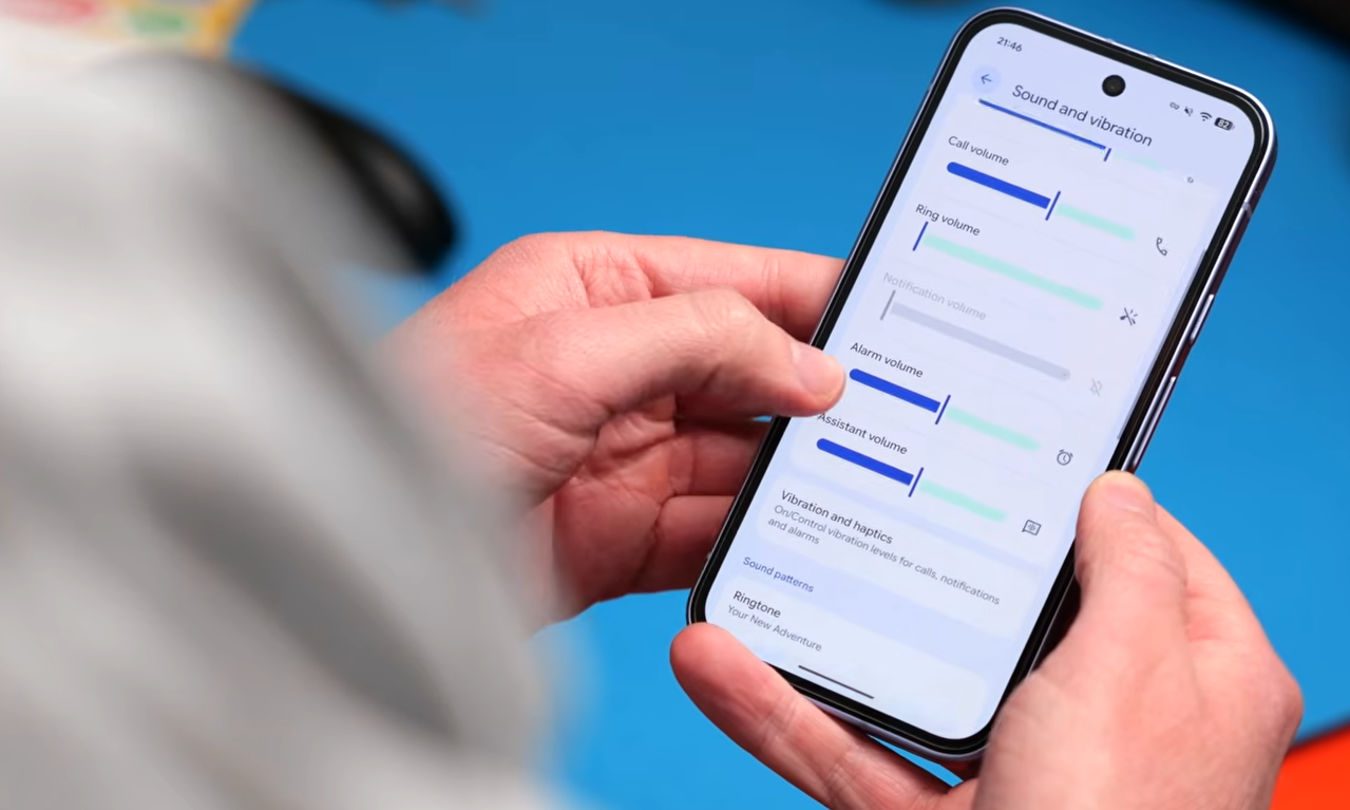
Android 17 Silences Screaming AI Assistants

You know the jarring moment. You’re lost in a song, volume cranked high in your headphones. Then your AI assistant chimes in with a weather update or a search result. Its voice blasts at the same deafening level, shredding your eardrums and your concentration. It’s a small, sharp pain point of modern smartphone life.

Android 17 is finally addressing this audio assault. The latest beta release, Android 17 Beta 3, introduces a clever fix that fundamentally changes how your phone handles sound. It’s a subtle tweak with an immediate impact on daily comfort.

How Android 17 Separates Assistant Audio

The core of the update is a new, independent audio channel. Think of it as giving your AI assistant its own dedicated volume knob, completely separate from the one controlling your music, podcasts, and videos.

In previous Android versions, assistant voice responses were tied directly to your media volume. Turn up a quiet podcast, and you’d also turn up Gemini’s voice. Lower your music for a conversation, and the next time you asked for directions, the assistant would whisper back. This all-or-nothing approach is now history.

The new system allows each audio type to live on its own level. You can keep your workout playlist roaring while your assistant’s replies come through at a calm, conversational volume. Conversely, you can make the assistant easier to hear in a noisy cafe without suddenly blowing out your eardrums when the next song starts.

A Fix for How We Actually Use Phones

This change reflects a shift in how integrated AI assistants have become. They’re no longer a novelty you summon once in a while. Services like Gemini are woven into search, messaging, and system-wide features, making their audio behavior impossible to ignore when it’s out of sync.

Media volume is inherently dynamic. It changes with your activity, your environment, and the content itself. Assistant responses, however, serve a different purpose. They are brief, functional, and best delivered at a consistent, predictable level. Separating these two streams of sound makes the entire device feel more polished and less disruptive.

Why This Update Feels So Significant

On paper, it’s a minor settings adjustment. In practice, it’s a quality-of-life upgrade that reduces daily friction. It eliminates those sudden audio spikes in your earbuds that make you wince. It prevents awkward moments where an assistant loudly announces a text message in a quiet library.

Most importantly, it cuts down on the constant micro-adjustments we make to our phone’s volume. When sound behaves predictably, you stop thinking about it. The technology fades into the background, which is exactly where a good assistant should be.

One lingering question is accessibility. The beta confirms the feature exists, but the final user interface for controlling this separate volume isn’t fully clear. If the setting is buried deep in menus, many users might never benefit from it. Google’s challenge will be to make this control intuitive and easy to find.

When Can You Expect the Update?

For now, this smarter audio management is exclusive to developers and testers running Android 17 Beta 3. There’s no official release date for the final, stable version of Android 17, but it typically arrives in the late summer or early fall.

Rollout will then depend on your device manufacturer. Pixel phones will get it first, with other brands following on their own schedules. There’s also some uncertainty about how different assistant apps—Google’s Gemini, Samsung’s Bixby, or others—will implement the new system, as their integration may vary.

Despite these unknowns, the direction is clear. This is precisely the kind of thoughtful software polish that makes a phone feel more refined. If you regularly use voice commands with headphones or in varied environments, you’ll appreciate the difference the moment you get the update. Your ears will thank you.

Continue Reading
Click to comment

Leave a Reply

Your email address will not be published. Required fields are marked *

Artificial Intelligence

NCAA Bracket Challenge: How My AI Model Performed in March Madness

Published

on

The Bracket Experiment: Trading Gut Feel for Data

Last week, I abandoned my usual March Madness rituals. No more picking teams based on mascots, uniform colors, or which squad looked good during a random Saturday game. Instead, I approached my NCAA tournament pool like an analyst evaluating an investment portfolio.

The goal was simple: separate raw probability from strategic value. I created two distinct brackets. The first aimed for maximum accuracy—the most likely path if the tournament followed predictable patterns. The second focused on expected value, designed specifically to win a 70-person pool rather than just look reasonable on paper.

Both brackets came from the same AI-driven model. Both promised more discipline than my usual haphazard approach. The question wasn’t whether this method would work perfectly. The question was whether it would work at all.

Results: Right More Often Than Wrong

The model performed better than I expected. It correctly predicted 13 of the Sweet 16 teams. In a tournament engineered to produce chaos, that’s objectively impressive.

The framework identified the true contenders. It recognized which teams had the talent and consistency to survive the opening weekend. The basic architecture held up under pressure. This wasn’t random guessing dressed up in technical language—the system genuinely understood team quality.

Yet March Madness earned its name. Three glaring misses stood out: Ohio State, Wisconsin, and defending champion Florida. Each loss followed a similar script. Ohio State fell 66-64 to TCU on a last-second layup. Wisconsin dropped an 83-82 heartbreaker to 12th-seeded High Point. Florida, a number one seed, lost 73-72 to Iowa on a late three-pointer.

These weren’t blowouts. They were single-possession games decided in the final moments. The model saw the forest clearly but missed some dangerous trees.

What the Model Missed About Tournament Volatility

Two interpretations emerged from those three losses. Either the model was fundamentally flawed, or single-elimination basketball is simply hostile to certainty. The truth, as usual, landed somewhere in between.

The model’s strength became its weakness. It leaned too heavily on the principle that better teams usually advance. Over a full season, that’s statistically sound. Over forty minutes in a neutral arena? Not so much.

Wisconsin’s loss tells the clearest story. A more sophisticated upset model wouldn’t necessarily have predicted a High Point victory. But it might have flagged Wisconsin as vulnerable—a team susceptible to an opponent getting hot from three-point range, stretching the defense, and turning the final minutes into a coin flip.

Florida’s exit delivered a similar lesson at championship level. No one expects a top seed to be “likely” to lose early. Yet there’s a crucial difference between being strong and being bulletproof. The model correctly respected Florida’s pedigree. It incorrectly treated the Gators as safe.

The Gap Between Being Right and Winning

This distinction matters enormously in bracket pools. There’s a vast difference between being broadly correct and being strategically positioned. You can have the smartest forecasting framework and still fail because you underestimated where real fragility exists.

The tournament doesn’t award style points for elegant models. It rewards those who accurately price risk—who recognize when a live underdog can create just enough chaos to topple a giant.

Building a Better Bracket for Next Year

What would I change? Not the core philosophy. Separating probability forecasting from expected-value strategy remains the right approach. Most people blend these unconsciously, picking a champion they believe in while making arbitrary upset selections for “excitement.” That’s not strategy—it’s admitting you have no process.

The improvement would come in measuring volatility. A better model would distinguish between genuinely sturdy favorites and those who merely look impressive in spreadsheets.

It would explicitly account for three-point shooting variance, turnover risk, foul trouble, reliance on a single scorer, and game-to-game performance swings. It would still respect top seeds. It would just view them with more suspicion.

The Real Lesson: Making Uncertainty Visible

The brackets are locked now. No one gets credit for saying they “would have picked Iowa” unless they actually picked Iowa. That’s the beautiful, brutal reality of March Madness. Once games begin, your brilliant framework becomes a historical artifact.

Yet the exercise remains valuable. Many pools offer second chances at the Sweet 16 or Final Four. These reset opportunities are gifts for process-oriented thinkers. They strip away the pretense of knowing everything beforehand. Now you have new information, a smaller field, and a fresh chance to separate true contenders from fortunate survivors.

The fundamental lesson transcends basketball. Disciplined forecasting isn’t about eliminating uncertainty. It’s about making uncertainty visible—understanding where your knowledge ends and randomness begins.

The model performed well. March still delivered madness. That’s not failure. That’s the entire point of the tournament. And if there’s a second-chance pool available? I’ll be entering with slightly less trust in vulnerable favorites, no matter what their seed line says.

Continue Reading

Artificial Intelligence

Gemini’s Chat Import Feature: How I Ditched AI Repetition for Good

Published

on

Gemini’s Chat Import Feature: How I Ditched AI Repetition for Good

Ever had an AI assistant completely derail a conversation? You’re deep into solving a coding problem or crafting a story, and suddenly it’s offering recipes for lasagna. We’ve all been there. My solution used to be the digital equivalent of musical chairs—hopping between ChatGPT, Claude, and Gemini, hoping one would finally get it.

The real frustration wasn’t the occasional hallucination. It was the exhausting repetition. Explaining my project’s background for the third time felt like being stuck in a tech support nightmare. “Have you tried turning it off and on again?” became “Have you tried explaining your entire life story again?”

Breaking the AI Reset Cycle

Google’s Gemini recently introduced a feature that changes everything. You can now import your entire chat history from other AI applications directly into Gemini. This isn’t just about transferring files—it’s about continuity.

Imagine walking into a meeting where the new participant has already read the minutes from all your previous discussions. That’s what this feels like. Gemini arrives already briefed on that half-written novel, that stubborn bug in your Python script, or that philosophical debate about whether a hot dog qualifies as a sandwich.

The feature extends beyond simple chat logs. It can incorporate broader context—your preferences, your recurring questions, your particular way of phrasing problems. The AI builds a memory of you, not just the conversation.

How to Transfer Your AI Conversations

Setting up the import is straightforward, though it requires a few specific steps. You’ll need to use the desktop browser version of Gemini for this to work.

The Direct Copy-Paste Method

First, navigate to Gemini in your web browser and ensure you’re signed into your Google account. Look for the Settings option typically found in the bottom-left corner of the interface. Within Settings, you’ll find “Import memory to Gemini.”

Clicking this presents you with two text boxes. Gemini generates a specific prompt in the first box. Your job is to copy this exact prompt, then switch over to your other AI application—whether that’s ChatGPT, Claude, or another service.

Paste Gemini’s prompt into a new chat in your other AI app. The app will then generate a response summarizing your conversation history based on that prompt. Copy this generated summary, return to Gemini, and paste it into the second text box. Gemini processes this information, effectively absorbing the context of your past dialogues.

The File Upload Alternative

If you prefer a bulk method, many AI platforms allow you to export your data. You can download your chat history as a file (often in JSON or text format), compress it into a ZIP file, and upload it directly to Gemini. Just remember the 5GB file size limit. This method is ideal if you have months or years of conversations you want to preserve.

The Real-World Experience: Patience Pays Off

I approached this feature with healthy skepticism. Google’s announcements don’t always translate to seamless user experiences. To my surprise, the import process worked exactly as advertised.

It’s not instantaneous. If you’re importing lengthy, complex conversations spanning thousands of messages, be prepared to wait. The processing time depends entirely on how much data you’re bringing over. My import of several months’ worth of technical discussions took about seven minutes.

Those few minutes of waiting, however, save hours of future frustration. The true value became apparent in my very next interaction. I asked Gemini to “continue with the API integration we discussed,” and it immediately knew which project, which programming language, and which specific error I was referencing. No preamble. No re-explanation.

The quality of the continuation felt natural. Gemini didn’t just parrot back old information; it used the imported context to provide more relevant, personalized assistance. It remembered my tendency to forget semicolons in JavaScript and my preference for bullet-point summaries over paragraphs.

A New Standard for AI Assistants

This feature addresses a fundamental flaw in how we interact with AI. We treat these powerful tools as disposable sessions—chat windows we close without a second thought. Gemini’s import function acknowledges that our interactions have value beyond a single query.

It creates a persistent thread of understanding. Your AI assistant becomes less of a tool and more of a collaborator with institutional knowledge. This shift is subtle but profound. It means you can switch devices, take a week-long break, or even experiment with other apps, then return to exactly where you left off.

Will other platforms follow suit? They’ll have to. Once you experience an AI that remembers, going back to one that forgets feels like a technological step backward. The era of repeating ourselves to our digital helpers might finally be coming to an end.

Continue Reading

Artificial Intelligence

Siri’s Big AI Upgrade: iOS 27 to Open Voice Assistant to Third-Party Tools

Published

on

From Walled Garden to AI Hub: Siri’s Platform Transformation

Remember when Siri felt like the only voice assistant in town? That era is ending. According to a recent Bloomberg report, Apple is engineering one of the most dramatic shifts in Siri’s history. The upcoming iOS 27 update won’t just tweak the assistant—it will fundamentally change its role.

Instead of remaining a closed system, Siri is poised to become a central hub. It will route user queries to external AI services, potentially including Google’s Gemini or Anthropic’s Claude. This isn’t just an update; it’s a complete philosophical reversal. Apple is building bridges where it once maintained walls.

Why Apple is Opening the Gates

Pressure creates diamonds—or in this case, strategic pivots. Siri, launched in 2011, has watched newer AI assistants powered by advanced language models sprint ahead. Apple’s response? If you can’t beat them all, become the conductor of the orchestra.

The company appears to be applying its App Store playbook to artificial intelligence. Control the platform, the user experience, and the interface. Let the best AI models compete for attention within Apple’s ecosystem. It’s a clever sidestep in the AI arms race, focusing on integration rather than trying to out-build every competitor.

This approach acknowledges a simple truth: no single company has a monopoly on AI brilliance. Different models excel at different tasks. Why force users to choose one when Siri could intelligently connect them to several?

What This Means for Your iPhone Experience

Imagine asking Siri to help draft a creative story, and it seamlessly taps Claude’s strengths. Need precise technical information? Perhaps Gemini gets the nod. The assistant becomes less of a single tool and more of a skilled dispatcher, matching your request with the most capable AI for the job.

This promises more than just accurate answers. It could mean personalized interactions that learn which AI you prefer for different types of queries. The friction of switching between apps disappears. Siri becomes your unified AI interface, simplifying what is currently a fragmented experience.

Will it work seamlessly? That’s the billion-dollar question. Apple’s track record with AI rollouts has faced criticism and delays. The success of this ambitious plan hinges entirely on execution—how smoothly these integrations function in daily use.

Ripples Across the AI Industry

Apple’s move sends shockwaves beyond Cupertino. It reshapes the competitive landscape overnight. Suddenly, AI developers aren’t just competing for app downloads; they’re vying for prime placement within Siri’s new ecosystem. Innovation will likely accelerate as companies strive to become the go-to service for specific queries.

This strategy clearly differentiates Apple from Google and Microsoft, who are pouring resources into their proprietary models. Apple seems to be betting that seamless integration, privacy safeguards, and a polished user experience will trump raw model performance alone.

Financially, it opens new avenues. Could Apple take a share of subscriptions for premium AI services accessed through Siri? The potential business model extends far beyond the current setup.

The Road Ahead for Siri and iOS 27

Mark your calendar for WWDC later this year. That’s where we expect to see this new Siri paradigm unveiled alongside iOS 27. Rumors suggest a broader overhaul is coming—a more conversational interface, deeper system integration, and the foundational architecture for third-party AI connections.

Looking further ahead, this could evolve Siri into a true AI agent. Think complex, multi-step tasks that span across applications and services, all coordinated through a simple voice command. The assistant that once set reminders might soon plan entire vacations.

This represents a fundamental shift in how we view digital assistants. They’re no longer destination apps. They’re becoming the intelligent connective tissue of our digital lives. Apple’s gamble is clear: controlling the gateway to AI may ultimately prove more valuable than trying to build every AI behind it.

Continue Reading

Trending