Connect with us

Artificial Intelligence

Google Meet’s AI Note-Taking Feature Now Works in In-Person Meetings as Well

Published

on

Google Meet’s AI Note-Taking Feature Now Works in In-Person Meetings as Well

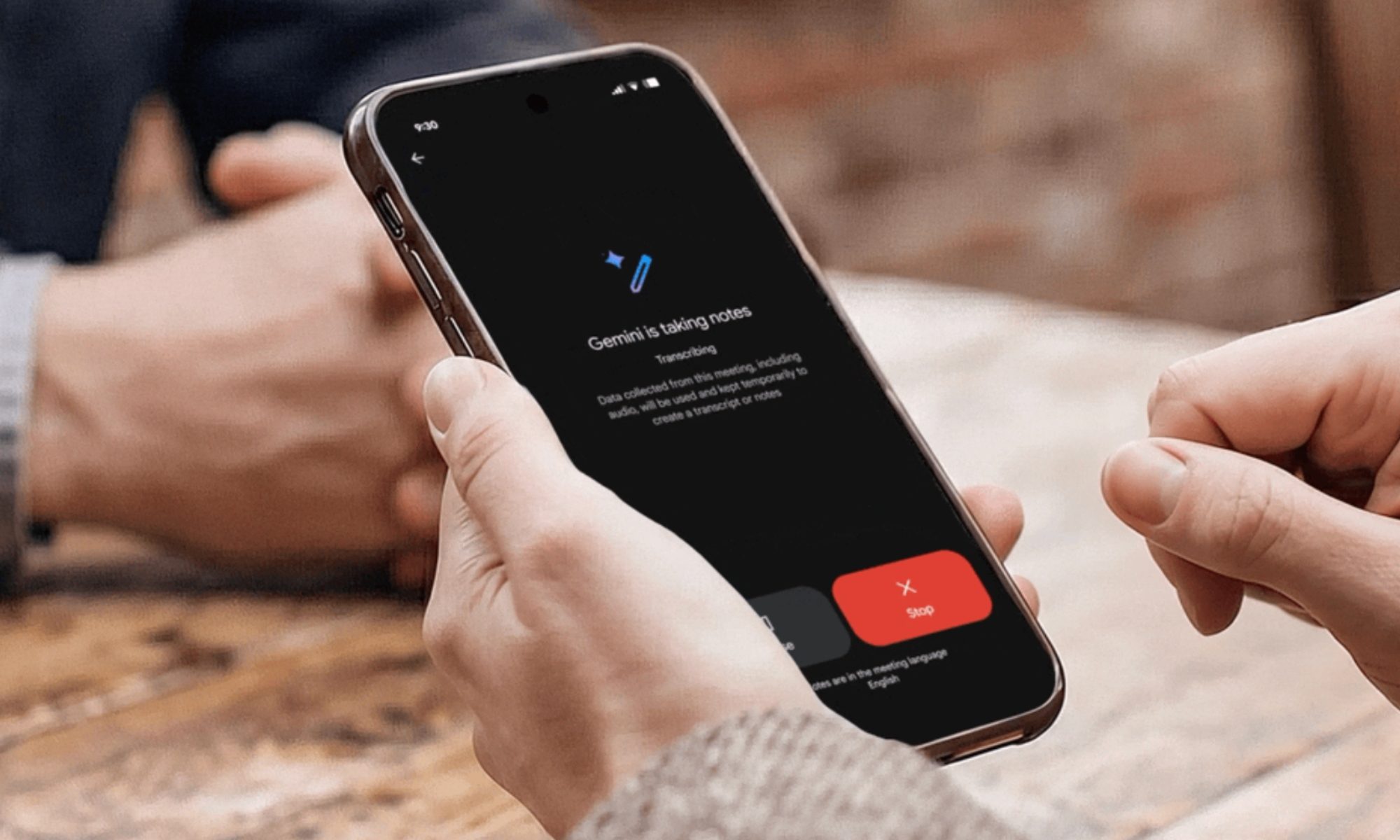
Have you ever walked out of a meeting with only a blurry recollection of what was said, clutching a notebook filled with scribbles that barely make sense? Google Meet AI note-taking is about to change that. At Google Cloud Next 2026 in Las Vegas, the tech giant unveiled a major upgrade to its “Take Notes for Me” feature. The most exciting part? It now functions seamlessly in physical meetings, not just virtual ones.

This means you can use the tool whether you are huddled around a conference table, chatting at a coffee shop, or sitting in a boardroom. The feature leverages Gemini, Google’s advanced AI model, to listen, transcribe, and summarize conversations in real time.

How Does Google Meet’s AI Note-Taking Work in Real Life?

The process is refreshingly straightforward. You simply open Google Meet on your smartphone or desktop, tap the “Take Notes for Me” button before or during a discussion, and let the AI do the heavy lifting. There’s no need for a pre-scheduled meeting or a specific setup—it works on the fly.

Once activated, Gemini starts listening to the conversation. It transcribes everything and then extracts key decisions, action items, and important points. Within moments, all that information is automatically compiled into a Google Doc. This makes the feature incredibly accessible, as the notes are instantly available for review or sharing.

Building on this simplicity, the tool is designed for any setting. Whether you are in a quiet office or a noisy café, the AI adapts to capture the essence of the discussion without manual effort.

Cross-Platform Capability: It Works Beyond Google Meet

One of the most compelling aspects of this update is its platform-agnostic nature. Google Meet AI note-taking now functions during Zoom and Microsoft Teams meetings as well. This positions Gemini as a universal note-taker that does not care which software you prefer for your workplace conversations.

As a result, the feature directly competes with paid transcription services like Otter.ai and Fireflies.ai. For now, it is available on select Google One, Google Workspace Business, and Workspace Enterprise plans. The full rollout is expected over the next few weeks, making it widely accessible to users.

However, this move feels less about note-taking and more about positioning Gemini as an omnipresent AI layer for all workplace conversations. It is not just a tool for Google’s ecosystem; it is a cross-platform assistant that can integrate into your daily workflow.

Why This Matters for Professionals and Teams

For professionals who juggle multiple meetings across different platforms, this feature is a game-changer. It eliminates the need to switch between apps or rely on separate transcription services. Instead, you have a single AI assistant that works everywhere.

Furthermore, the automatic generation of Google Docs means your notes are always organized and searchable. This can save hours of manual note-taking and reduce the risk of missing critical details. For teams, it fosters better collaboration by ensuring everyone has access to the same accurate record of discussions.

On the other hand, some users may have privacy concerns. The AI listens to conversations, which could raise questions about data security. Google has stated that the feature complies with its privacy policies, but it is wise to review these before using it in sensitive meetings.

How to Get Started with Google Meet’s AI Note-Taking

To use the feature, ensure you have a compatible Google Workspace plan. Open Google Meet on your device, start or join a meeting, and click the “Take Notes for Me” button. The AI will begin processing immediately. You can also activate it before a meeting to capture the entire conversation.

It is worth noting that the feature works without a pre-scheduled meeting, making it ideal for impromptu discussions. Whether you are brainstorming with colleagues or meeting a client at a café, the tool adapts to your needs.

For those who want to maximize productivity, consider exploring other Google Workspace features that integrate with Gemini, such as Smart Compose and automated summaries. These tools can further streamline your workflow and reduce administrative tasks.

In conclusion, Google Meet AI note-taking represents a significant step toward frictionless meeting documentation. By working across platforms and in physical settings, it aims to become an indispensable tool for modern professionals.

Continue Reading
Click to comment

Leave a Reply

Your email address will not be published. Required fields are marked *

Artificial Intelligence

Why the Open Source AI Boom Isn’t Squeezing Anthropic — at Least Not Yet

Published

on

open source AI Anthropic

The Two-Speed AI Economy Nobody’s Talking About

Here’s a riddle for the AI era: If companies are ditching expensive frontier models for cheaper open source alternatives, why is Anthropic still raking in more than half of all AI spending on major platforms?

That contradiction sits at the heart of a provocative new argument from Decagon CEO Jesse Zhang. In a post titled “Everyone is wrong about open source AI in the enterprise,” Zhang proposes that frontier labs and open source models aren’t really competing. They’re playing different roles in a single lifecycle.

Expensive frontier models handle the messy, high-risk early stages of a new use case. Once the process is proven and predictable, companies hand it off to leaner, cheaper open source models. The result? Frontier spending barely dips, because new discovery projects keep popping up to replace the ones that mature.

“The frontier labs will keep owning discovery,” Zhang writes. “Open source will increasingly own production.”

What the Data Actually Shows

Zhang doesn’t offer hard numbers, but the data is easy to find — and it largely backs up his thesis.

Take Vercel‘s AI gateway dashboard. Over the past week, DeepSeek has surged to the lead in token volume, processing just over a third of all tokens flowing through Vercel’s infrastructure. Z.ai, the lab behind the popular GLM-5.2 model, jumped to fourth place in the same period.

But scroll down to spend, and the picture flips. Anthropic still accounts for more than half of all AI spending on the platform. That share has slipped slightly — partly because Anthropic raised prices — but hasn’t collapsed.

OpenRouter tells a similar story across a broader, slightly less enterprise-focused slice of the market. DeepSeek V4 Flash dominates by raw usage, processing 5.3 trillion tokens weekly. The most popular frontier model, Opus 4.8, handles just over 2 trillion. But the price gap is enormous: Opus costs roughly 23 times more per token ($1.37 per million tokens versus DeepSeek’s 6 cents). That means Opus likely still captures the majority of actual dollars spent.

And that’s before factoring in Nvidia’s Nemotron, which is poised to leapfrog competitors thanks to Nvidia’s deep enterprise relationships and the model’s extreme adaptability.

Why Frontier Labs Aren’t Panicking

The numbers don’t fully prove Zhang’s lifecycle theory, but they do explain why Anthropic isn’t sweating the open source surge — at least not yet.

One reason: the total pool of AI-addressable problems is expanding so rapidly that frontier labs can maintain their position simply by dominating new, unproven use cases. Every time a mature workflow migrates to open source, a fresh batch of harder problems appears to take its place.

Another explanation: some use cases are genuinely too difficult for lighter models. Even as clients experiment with cheaper alternatives, they keep a foot in the frontier door for the toughest tasks. That creates a sticky, high-margin revenue base that open source models can’t easily erode.

What This Means for Enterprise AI Buyers

For companies building on AI, the implication is clear: don’t treat frontier and open source models as an either/or choice. Use frontier models to explore and validate. Once the process is stable, switch to open source for production. It’s a hybrid strategy, not a migration.

This two-tiered economy could become a stable feature of the AI market. Frontier labs keep the premium pricing they need to fund R&D. Open source models get the volume that drives ecosystem growth. And enterprises get a cost-effective path from experimentation to deployment.

As recently as last September, many analysts — including this one — predicted that foundation labs would end up as commodity providers, selling “coffee beans to Starbucks” while the application layer captured the value. Some of that prediction came true: vertical AI startups did switch to lighter models, and the economics of “GPT wrapper” companies have remained stable.

But we’re also seeing that frontier providers have held onto the most desirable part of the marketplace: the premium token price. And that doesn’t look likely to change anytime soon.

For a deeper look at how companies are balancing cost and capability, check out our analysis of enterprise AI adoption strategies. And for more on the specific models driving this shift, see our breakdown of how DeepSeek is reshaping the open source AI landscape.

Continue Reading

Artificial Intelligence

Your AI Year in Review: Anthropic Launches Claude Reflect, a Usage Dashboard With a Wellness Twist

Published

on

Claude Reflect

Anthropic just gave Claude users a new kind of year-in-review tool — and it’s designed to make you think twice about how much you lean on AI.

It’s called Claude Reflect. Think of it as your personal AI usage analytics dashboard, but with a twist: instead of just showing you numbers and topics, it pushes you to reconsider your relationship with the technology. Available now in beta, the feature rolls out to free, Pro, and Max users who have enabled memory on Anthropic’s Anthropic platform.

Reflect isn’t called “Claude Wrapped,” even though it does the same seasonal recap that streaming services and AI tools have made famous. The name matters. Anthropic wants this to be more than a vanity metric dump. It’s a prompt for mindfulness.

What Claude Reflect actually shows you

Head to Settings in the Claude web or desktop app and you’ll find Reflect waiting. It generates a summary of your activity over one, three, six, or twelve months. The breakdown goes beyond counting chats.

It surfaces the topics you engage with most, spots usage patterns, and categorizes your interactions using Anthropic’s 4D AI Fluency Framework. Those four dimensions are: delegation, description, discernment, and diligence. So instead of just seeing “you talked about coding 40% of the time,” you get a structured view of how you work with the AI — whether you’re handing off tasks, asking for explanations, or critically evaluating outputs.

Think of it as a report card for your AI habits, not just a spreadsheet of queries.

Privacy and exclusions

Anthropic is careful about what gets counted. Incognito conversations and any health-integration chats are excluded entirely. The company also states that the data stays inside your dashboard and is not used for any other purpose. That’s a meaningful distinction at a time when every AI company is hungry for training data.

The feature was developed in collaboration with MIT Media Lab, the Digital Wellness Lab at Boston Children’s Hospital, and the Family Online Safety Institute. That lineup signals that the wellness angle isn’t an afterthought — it’s baked into the design from the start.

The wellness angle: Why it stands out

Here’s the part that makes you stop. An AI company building a tool that actively nudges you to use AI less? That’s rare. And honestly, it’s refreshing.

Reflect surfaces questions like: “What’s one thing you want to keep doing yourself, even if Claude could do it faster?” It lets you set quiet hours, and it can schedule nudges that remind you to step away from the screen. A time-spent view is coming soon, which will track how many minutes or hours you spend inside Claude conversations.

All of this feels counterintuitive for a business that makes money when people use its product more. But it also aligns with a growing conversation around digital wellness — the idea that technology should serve us, not consume us. Anthropic is betting that users will appreciate a tool that respects their autonomy, even if it means slightly less engagement.

How to get started with Claude Reflect

If you’re already a Claude user with memory enabled, you can access Reflect right now through the Settings menu in the web or desktop apps. It’s in beta, so expect some rough edges and iterative updates. The time-spent view isn’t live yet, but it’s on the roadmap.

For new users, enabling memory is the first step. Once that’s on, Reflect will begin tracking your patterns and building your personalized dashboard. The summaries are generated on-device or in your account — Anthropic says the data doesn’t leave your dashboard.

What this means for the AI industry

Anthropic’s move is a small but telling signal. Most AI companies are racing to increase usage metrics — more conversations, longer sessions, higher retention. Reflect flips that script by asking: are you using AI well, not just a lot?

It’s too early to tell whether users will embrace the nudge to take breaks or ignore it. But the feature itself is a bet that trust and transparency matter more than raw engagement numbers. In an industry that’s been criticized for addictive design patterns, that’s a notable stance.

If you’re curious about how your own AI habits stack up, or just want a tool that occasionally tells you to log off, Claude Reflect is worth a look. It’s one of the few dashboards that might actually make you feel better about your screen time — not worse.

Continue Reading

Artificial Intelligence

ChatGPT just got a lot less needy: Meet the GPT-5.6 family (Sol, Terra, Luna)

Published

on

GPT-5.6 Sol

OpenAI just dropped three new models — and the biggest change is how little you’ll need to babysit them

If you’ve ever asked OpenAI‘s ChatGPT to plan a weekend trip, you know the drill. First you ask for destination ideas. Then you ask for hotels. Then restaurants. Then an itinerary. Then you stitch it all together yourself. It’s like managing an intern who needs step-by-step instructions for everything.

That era might be ending. Today, OpenAI officially unveiled the GPT-5.6 family — three new models rolling out across ChatGPT, Codex, and the API. The flagship is GPT-5.6 Sol, joined by two cost-efficient siblings: Terra and Luna. The pitch is simple: these models do more on their own, with far fewer follow-up prompts.

Sol is the workhorse — and it comes with an Ultra mode

GPT-5.6 Sol is built for heavy lifting. OpenAI says it delivers better performance while burning fewer tokens than previous models. That’s a big deal for developers and businesses watching their compute costs.

The headline feature is Ultra mode. Instead of running a single AI process, Ultra splits complex tasks across multiple AI agents working in parallel. Think of it like assigning research, writing, editing, and fact-checking to four specialists instead of asking one person to do everything. OpenAI claims this speeds up problem-solving and improves final output quality.

For example, a coding project that used to require a dozen back-and-forth prompts might now get handled in one go. The model writes small programs, uses tools, checks its own progress, and decides what to do next — all with less hand-holding from you.

Terra and Luna: cheaper, faster, still capable

Not everyone needs the full power of Sol. That’s where GPT-5.6 Terra and GPT-5.6 Luna come in. These models are designed to handle everyday AI tasks — answering questions, summarizing text, light code work — at a significantly lower cost.

OpenAI says both models outperform competing options in their respective price brackets. For developers building AI-powered apps, that could mean better results without blowing the budget. The company hasn’t released exact pricing yet, but the message is clear: you no longer have to pay for Sol-level power just to get decent responses.

Max mode for accuracy, Ultra for complexity

OpenAI is also introducing a Max mode alongside Ultra. Max gives GPT-5.6 extra time to think through difficult questions, test different approaches, and double-check its work before responding. If accuracy matters more than speed — say, for legal research or financial analysis — Max is the setting to use.

Ultra goes further by deploying multiple AI agents simultaneously, trading extra computational power for better results on demanding jobs. The two modes give users a clear choice: speed, accuracy, or brute-force parallel processing.

Safety testing gets a major upgrade

OpenAI says the GPT-5.6 family went through its most extensive safety evaluation yet. The company combined human red-team exercises with automated evaluations to make the models more resistant to misuse — without restricting legitimate use. That’s a balancing act the industry has struggled with, but OpenAI says the new approach yields better guardrails.

When can you try it?

The GPT-5.6 family is rolling out today across ChatGPT, Codex, and the OpenAI API. Global availability should expand over the next 24 hours. For most ChatGPT users, the benchmark numbers won’t matter much. What will matter is whether the model actually saves you time.

Fewer prompts. Bigger tasks handled autonomously. Answers that require less back-and-forth. If OpenAI’s claims hold up, that could be the most practical upgrade in years. No more babysitting an AI that needs constant instructions — just give it the job and let it run.

For a deeper look at how OpenAI’s models compare, check out our guide to ChatGPT vs. Claude vs. Gemini: which AI assistant wins in 2025. And if you’re curious about image generation, read about how to send HD photos on WhatsApp — yes, AI is creeping into every app now.

Continue Reading

Trending