Connect with us

Artificial Intelligence

Microsoft Copilot Agent Mode: Now It Can Actually Do Real Work Inside Word, Excel, and PowerPoint

Published

on

Microsoft Copilot Agent Mode: Now It Can Actually Do Real Work Inside Word, Excel, and PowerPoint

Microsoft has just rolled out a significant upgrade for Office users: Microsoft Copilot Agent Mode. This new feature, which the company calls “vibe working,” transforms Copilot from a passive assistant into an active agent that can directly edit, restructure, and enhance your documents, spreadsheets, and presentations. For subscribers of Microsoft 365 Copilot and Microsoft 365 Premium, this is now the default experience—and it’s also available on Personal and Family plans.

What Is Microsoft Copilot Agent Mode?

Until recently, Copilot within Office apps was largely a Q&A tool. It could answer questions about your data or suggest ideas, but it struggled to take direct action inside your files. Sumit Chauhan, President of the Office Product Group at Microsoft, acknowledged this gap. She noted that when Copilot first launched, the underlying AI models simply weren’t capable enough to command the applications directly.

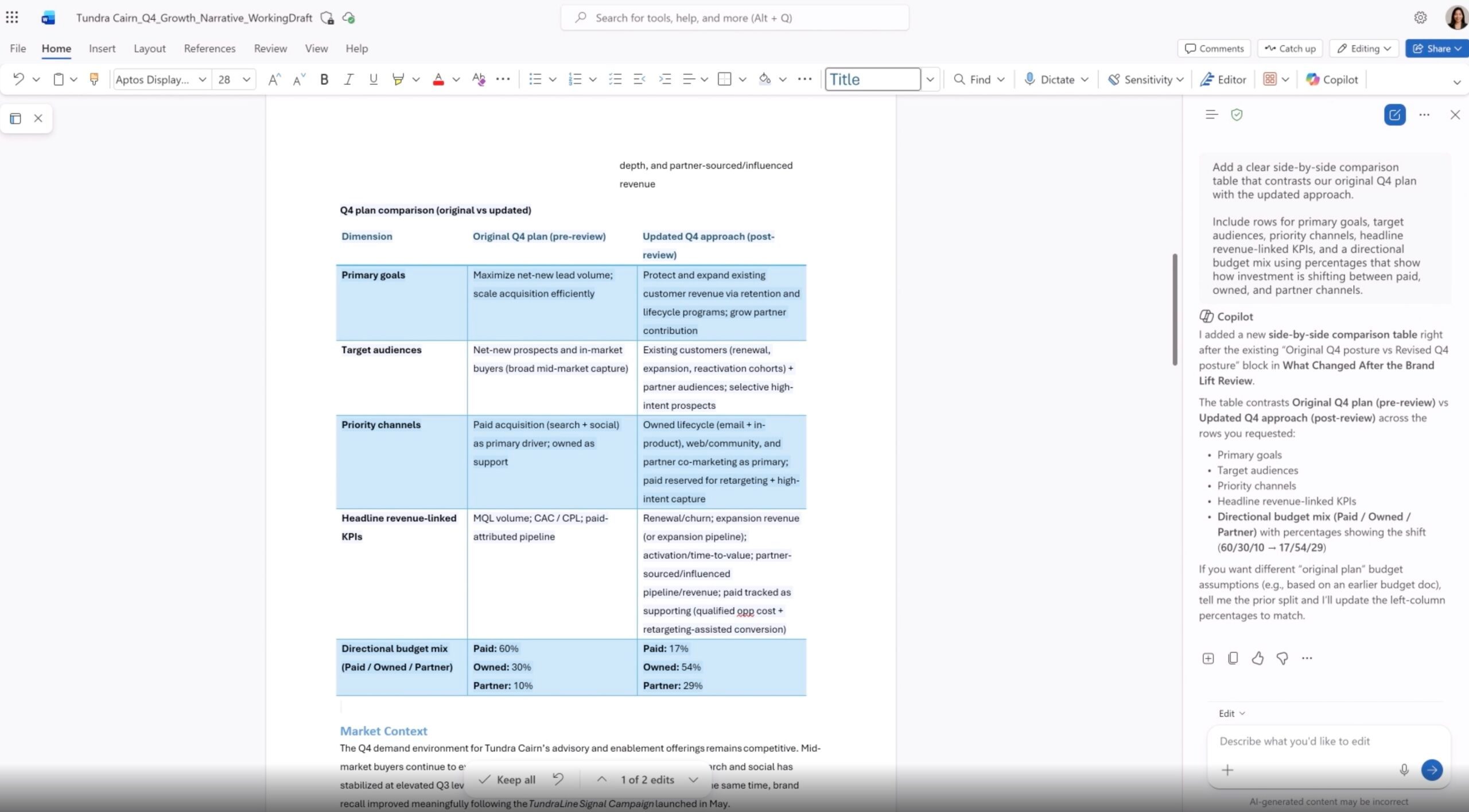
However, models have shown remarkable improvement in instruction following and multi-step reasoning over the past year. Agent Mode is built on those improvements and can now execute complex edits without losing your original intent. A sidebar shows you every step Copilot is taking in real time, so you’re never left guessing what it changed.

For more on how AI assistants are reshaping productivity, check out our guide on AI productivity tools for 2025.

How Agent Mode Works in Word, Excel, and PowerPoint

In Word: Drafting, Rewriting, and Restructuring

In Microsoft Word, Agent Mode can draft entire sections, rewrite existing paragraphs, restructure documents, and adjust tone—all without you lifting a finger. It understands context, so if you ask it to “make this more formal” or “shorten this section,” it does exactly that. The sidebar lets you approve or reject each change, giving you full control.

In Excel: Direct Edits, Formulas, and Visuals

Excel users will see the biggest transformation. Agent Mode makes changes directly inside your workbook, adding formulas, tables, and visuals to turn raw data into actionable insights. Early data from Microsoft shows that engagement in Excel jumped 67%, satisfaction rose 65%, and new user retention increased 50% after the rollout. This means you can ask Copilot to “calculate quarterly growth” or “create a pivot table from this data,” and it will do the work for you.

If you’re interested in similar tools, read our comparison of Copilot vs. ChatGPT for Excel automation.

In PowerPoint: Update Decks While Preserving Templates

In PowerPoint, Agent Mode can update existing decks with fresh information while respecting your company’s template styling. Need to refresh a quarterly report? Just tell Copilot to “update sales figures from the latest dataset,” and it will replace charts, text, and images while keeping your brand consistent.

What’s Next for Microsoft Copilot Agent Mode?

Microsoft says deeper editing for complex workflows and more transparency around changes are next on the roadmap. The company has been making several Copilot-related moves lately, from launching smarter research tools in Copilot Cowork to cleaning up its presence in Windows 11 apps. All of this positions Copilot as a serious productivity tool—not just a gimmick.

Building on this, businesses should expect tighter integration with other Microsoft services, such as Teams and SharePoint, in the coming months. For now, Agent Mode is a game-changer for anyone who spends hours formatting documents or crunching numbers.

To see how this fits into the broader Microsoft ecosystem, explore our article on Microsoft 365 AI updates for 2025.

Final Thoughts: Is Agent Mode Worth It?

Yes, if you’re already a Microsoft 365 subscriber. Agent Mode turns Copilot from a passive helper into an active participant in your workflow. It saves time, reduces errors, and lets you focus on strategy rather than manual edits. As Microsoft continues to refine the experience, expect even more powerful capabilities—like multi-step reasoning and deeper transparency—to arrive soon.

Continue Reading
Click to comment

Leave a Reply

Your email address will not be published. Required fields are marked *

Artificial Intelligence

X Shuts Down Communities: AI Timelines and Group Chats Take Over

Published

on

X Shuts Down Communities: AI Timelines and Group Chats Take Over

Social media platform X is making a bold move by shutting down its Communities feature, a tool designed to let users gather around shared interests. However, the company isn’t leaving users empty-handed. Instead, it’s rolling out two new features: custom timelines powered by Grok AI and expanded group chats through XChat. This shift marks a significant change in how the platform approaches community building, moving from static groups to dynamic, real-time interactions.

As X closes Communities, the focus is now on faster, AI-driven connections. This decision reflects a broader trend in social media, where platforms are prioritizing engagement and moderation efficiency. Let’s break down what this means for users and why X is making this change.

Why Is X Closing Communities?

X has confirmed that the Communities feature, which launched as a forum-like space for niche topics, is being discontinued. The reason? Low adoption and high maintenance costs. According to internal data, less than 0.4% of users actively participated in Communities, while the feature became a breeding ground for spam, scams, and moderation challenges.

In other words, it was a resource-heavy feature that didn’t deliver enough value. As a result, X is cutting it loose to focus on more efficient ways to connect people. This decision aligns with the platform’s push for simplicity and scalability.

What Is Replacing Communities on X?

Instead of Communities, X is introducing two distinct features: custom timelines and group chats. These tools aim to replicate the community experience but in a more dynamic and manageable way.

Custom Timelines Powered by Grok AI

Custom timelines allow users to pin topic-based feeds directly to their home screen. These feeds are curated by Grok, X’s AI system, which reads and categorizes posts based on content rather than hashtags or keywords. With over 75 topics to choose from, users can dive deep into their favorite niches without relying on static groups.

This means that instead of joining a fixed community, you can follow a live feed of posts about, say, “space exploration” or “vegan recipes.” The AI continuously updates the feed, ensuring fresh content. This approach reduces moderation headaches because the AI filters out spam and irrelevant posts automatically.

Enhanced Group Chats via XChat

On the other side, X is doubling down on group chats through XChat. These chats now support joinable public links, making it easy to invite others into conversations instantly. Group sizes are expanding, with limits expected to grow beyond the current few hundred users. This shift encourages real-time discussions rather than slower, forum-style interactions.

For example, a sports fan can create a public link for a chat about a live game, allowing hundreds of fans to join in real time. This feature is designed for speed and spontaneity, contrasting with the structured nature of Communities.

What Does This Shift Mean for Users?

This change is less about removing Communities and more about redefining them. Instead of fixed groups, users will now follow topics through AI-driven feeds or jump into real-time conversations via group chats. This reflects a broader strategy shift at X: betting on AI and messaging as the future of the platform.

For everyday users, this means a more personalized and dynamic experience. You no longer need to find and join a community for a specific interest; you can simply pin a topic feed or create a group chat. However, it also means losing the sense of belonging that comes with a dedicated community space. For power users, this might feel like a trade-off between convenience and community depth.

Building on this, X is simplifying its offerings to focus on what works: fast, engaging, and scalable features. As the platform evolves, users can expect more AI-driven tools and messaging enhancements. For more insights on social media trends, check out our guide on social media strategy tips or explore how AI is transforming social platforms.

In conclusion, X closes Communities to make way for a leaner, more efficient approach to online interaction. While the change may disappoint some, it signals a clear direction: AI and real-time communication are the cornerstones of X’s future. Users should prepare for a platform that prioritizes speed, automation, and instant connections over static groups.

Continue Reading

Artificial Intelligence

Google Meet’s AI Note-Taking Feature Now Works in In-Person Meetings as Well

Published

on

Google Meet’s AI Note-Taking Feature Now Works in In-Person Meetings as Well

Have you ever walked out of a meeting with only a blurry recollection of what was said, clutching a notebook filled with scribbles that barely make sense? Google Meet AI note-taking is about to change that. At Google Cloud Next 2026 in Las Vegas, the tech giant unveiled a major upgrade to its “Take Notes for Me” feature. The most exciting part? It now functions seamlessly in physical meetings, not just virtual ones.

This means you can use the tool whether you are huddled around a conference table, chatting at a coffee shop, or sitting in a boardroom. The feature leverages Gemini, Google’s advanced AI model, to listen, transcribe, and summarize conversations in real time.

How Does Google Meet’s AI Note-Taking Work in Real Life?

The process is refreshingly straightforward. You simply open Google Meet on your smartphone or desktop, tap the “Take Notes for Me” button before or during a discussion, and let the AI do the heavy lifting. There’s no need for a pre-scheduled meeting or a specific setup—it works on the fly.

Once activated, Gemini starts listening to the conversation. It transcribes everything and then extracts key decisions, action items, and important points. Within moments, all that information is automatically compiled into a Google Doc. This makes the feature incredibly accessible, as the notes are instantly available for review or sharing.

Building on this simplicity, the tool is designed for any setting. Whether you are in a quiet office or a noisy café, the AI adapts to capture the essence of the discussion without manual effort.

Cross-Platform Capability: It Works Beyond Google Meet

One of the most compelling aspects of this update is its platform-agnostic nature. Google Meet AI note-taking now functions during Zoom and Microsoft Teams meetings as well. This positions Gemini as a universal note-taker that does not care which software you prefer for your workplace conversations.

As a result, the feature directly competes with paid transcription services like Otter.ai and Fireflies.ai. For now, it is available on select Google One, Google Workspace Business, and Workspace Enterprise plans. The full rollout is expected over the next few weeks, making it widely accessible to users.

However, this move feels less about note-taking and more about positioning Gemini as an omnipresent AI layer for all workplace conversations. It is not just a tool for Google’s ecosystem; it is a cross-platform assistant that can integrate into your daily workflow.

Why This Matters for Professionals and Teams

For professionals who juggle multiple meetings across different platforms, this feature is a game-changer. It eliminates the need to switch between apps or rely on separate transcription services. Instead, you have a single AI assistant that works everywhere.

Furthermore, the automatic generation of Google Docs means your notes are always organized and searchable. This can save hours of manual note-taking and reduce the risk of missing critical details. For teams, it fosters better collaboration by ensuring everyone has access to the same accurate record of discussions.

On the other hand, some users may have privacy concerns. The AI listens to conversations, which could raise questions about data security. Google has stated that the feature complies with its privacy policies, but it is wise to review these before using it in sensitive meetings.

How to Get Started with Google Meet’s AI Note-Taking

To use the feature, ensure you have a compatible Google Workspace plan. Open Google Meet on your device, start or join a meeting, and click the “Take Notes for Me” button. The AI will begin processing immediately. You can also activate it before a meeting to capture the entire conversation.

It is worth noting that the feature works without a pre-scheduled meeting, making it ideal for impromptu discussions. Whether you are brainstorming with colleagues or meeting a client at a café, the tool adapts to your needs.

For those who want to maximize productivity, consider exploring other Google Workspace features that integrate with Gemini, such as Smart Compose and automated summaries. These tools can further streamline your workflow and reduce administrative tasks.

In conclusion, Google Meet AI note-taking represents a significant step toward frictionless meeting documentation. By working across platforms and in physical settings, it aims to become an indispensable tool for modern professionals.

Continue Reading

Artificial Intelligence

Google Workspace Intelligence: How Gemini Becomes Your All-Knowing Work Assistant

Published

on

Google Workspace Intelligence: How Gemini Becomes Your All-Knowing Work Assistant

Imagine an assistant that knows your projects, your writing style, and your company’s brand guidelines without needing a briefing. This is the promise of Google‘s latest evolution: Workspace Intelligence. Building on the concept of Personal Intelligence for Gmail and Photos, Google is now applying a similar, context-aware AI layer across its entire professional suite. The core idea is simple yet profound: Gemini, Google’s AI, can now tap into the vast reservoir of information you store across Docs, Sheets, Slides, and Drive to act with unprecedented personalization.

What Exactly Is Workspace Intelligence?

At its heart, Workspace Intelligence is a connective framework. It removes the traditional barriers between your AI assistant and your actual work data. Instead of treating each document or spreadsheet as an isolated island, it allows Gemini to understand the relationships and content across your entire Workspace ecosystem. Consequently, when you ask a question or give a command, the AI can pull relevant context from emails, previous drafts, project plans, and company templates stored in Google Drive. This means less time spent searching for files and explaining background, and more time focused on the task itself.

The End of Context Switching

Google positions this feature as a solution to the constant, productivity-sapping need to switch between apps and dig through folders. For instance, if you’re writing a project report in Docs and need data from a quarterly review in Sheets, you no longer have to manually find and reference it. You can simply ask Gemini to incorporate the relevant figures, and Workspace Intelligence provides the necessary bridge. This seamless integration is designed to make the AI feel less like a tool and more like a knowledgeable colleague who’s been on the project from the start.

Transforming Ideas into Polished Work

So, how does this manifest in daily use? The applications are extensive. According to Google, Workspace Intelligence enables Gemini to “retrieve your relevant emails, chats, files, and information from the web to transform ideas into professionally formatted drafts.” More importantly, these drafts are designed to mimic your specific voice, adhere to your brand’s style, and utilize approved company templates automatically. This moves AI assistance beyond generic text generation into the realm of personalized, brand-safe content creation.

Building on this, the implications for efficiency are significant. In Google Docs, Gemini can now handle complex edits based on your historical preferences. Ask it to format an image, and it will apply edits consistent with your past choices. Need to address a batch of comments in a document? Gemini can autonomously make the suggested revisions based on your instructions, learning from the context Workspace Intelligence provides.

From Documents to Dynamic Presentations

The capability extends powerfully into visual and presentation work. Google highlights the ability to “one-shot” slide decks. You can ask Gemini to create a presentation on a specific topic, and it will use Workspace Intelligence to gather context, structure the narrative, and—critically—build the deck using your company’s official templates and visual styles. The result is a ready-to-present slide deck that looks like it came from your communications department, not an AI generator. This eliminates a huge amount of manual formatting and branding work.

Smart Inbox and Email Summaries

Furthermore, Workspace Intelligence integrates with your communication tools. The AI Inbox feature in Gmail, part of this package, reorganizes your email into a task-based workflow, helping you quickly identify action items and ongoing conversations. Similarly, AI Overviews for Gmail creates concise summaries of lengthy email threads, much like the AI Overviews in Google Search. This means you can catch up on a week-long project discussion in seconds, with all key decisions and action points extracted for you.

A Competitive Landscape for AI Assistants

This development places Google in direct competition with other advanced AI agents in the workspace. The functionality is reminiscent of what Anthropic‘s Claude can achieve, particularly through extensions in environments like Microsoft PowerPoint. The race is no longer just about which AI can write the best paragraph, but which can most deeply and usefully integrate into a user’s existing digital environment, understanding their unique history and needs. Workspace Intelligence is Google’s ambitious answer to that challenge.

In addition, this shift represents a broader trend in enterprise software: the move from passive tools to active, intelligent agents. The software isn’t just waiting for commands; it’s anticipating needs based on a deep understanding of your content. For businesses, the potential for consistency, speed, and reduced manual labor is enormous. For individual users, it promises a workday with fewer tedious tasks and more strategic thinking.

Ultimately, Workspace Intelligence is more than a feature update; it’s a reimagining of how we interact with our core productivity software. By giving Gemini a memory and a deep understanding of our work context, Google is betting that the future of work is not just assisted by AI, but profoundly partnered with it. As this technology rolls out, the measure of success will be how seamlessly it fades into the background, making complex, personalized work feel simple and intuitive.

Continue Reading

Trending