Connect with us

Social Media

Instagram Finally Lets You Swap the Music in Your Old Posts Without Killing Engagement

Published

on

Instagram Replace Audio

No more deleting and re-uploading just to change a song

Instagram announced Tuesday that users can finally swap out the music on published feed posts and carousels. Until now, the only way to change a track was to delete the entire post and start from scratch — losing every like, comment, and share in the process.

The new Replace Audio tool lets you update the soundtrack on any eligible post at any time. Your existing engagement stays intact. That means the likes, comments, shares, and reach all survive the swap. For creators and brands who obsess over metrics, that’s a big deal.

Instagram, owned by Meta, says the feature is part of a broader push to give creators more creative control over their content. It’s a small but meaningful update — and one that actually addresses a real pain point.

Why this matters for creators and brands

Music trends move fast on Instagram. A track that feels fresh in June can feel stale by August. Before this update, creators faced an ugly trade-off: keep the post’s hard-won engagement, or swap the song and lose everything. Brands running paid campaigns were especially vulnerable — deleting a post with thousands of dollars in ad spend behind it was simply not an option.

Now, you can keep the post alive and simply swap the audio. That means old content can be refreshed to match current trends. It also means you can correct a mistake — say, picking a track with licensing issues — without nuking the post’s performance.

For everyday users, the appeal is simpler: music taste evolves. That song you loved in 2022 might make you cringe today. Now you can quietly fix it.

How to use the Replace Audio tool

The process is straightforward. Here’s how it works:

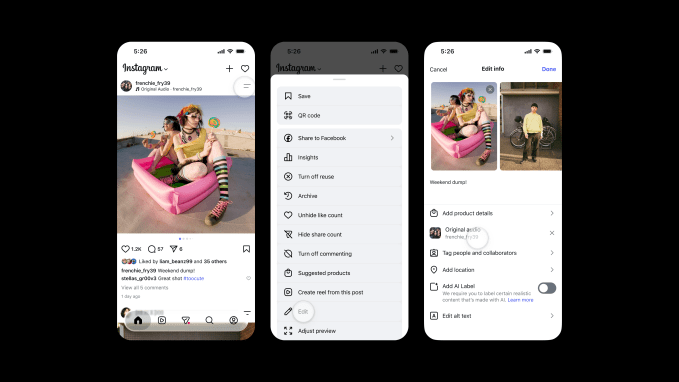
  1. Navigate to the feed post or carousel where you want to change the audio.
  2. Tap the two-line menu (the three-dot or hamburger icon) in the top-right corner of the post.
  3. Scroll down to find Edit.
  4. Inside the edit screen, you’ll see the option to swap out the audio. Tap it and choose a new track from Instagram’s music library.

That’s it. The new audio replaces the old one. The post’s visual content, caption, tags, and location remain untouched. The feature works on both single-image posts and multi-image carousels.

One thing to note: the feature only applies to posts that already have music attached. You can’t add music to a post that was originally published without it — at least not yet.

A rare win after a string of missteps

Instagram has taken plenty of heat lately for features nobody asked for. Last month, the company killed an AI-powered tool that let users modify photos from public Instagram accounts. The company admitted the feature missed the mark and pulled it.

In May, Instagram launched Instants, a feature meant to share real-time moments. It backfired badly. Many users accidentally sent images to their entire Friends list, sparking widespread frustration online.

Replace Audio feels different. It solves a genuine problem without forcing a new behavior on users. No AI drama. No accidental oversharing. Just a practical tool that makes an existing workflow less painful.

It’s also worth remembering that Instagram’s relationship with music has been complicated. Licensing deals with major labels come and go. Some tracks disappear from the library without warning. The ability to swap audio after the fact gives users a safety net when a song gets pulled.

What’s next for Instagram’s audio tools

The Replace Audio feature is rolling out now globally. It’s available on both iOS and Android. There’s no word yet on whether Instagram plans to extend the feature to Reels — the platform’s most music-heavy format — but it seems like a logical next step.

For now, the update is a quiet but welcome improvement. It won’t make headlines the way a new algorithmic change or a TikTok clone would. But for the millions of people who post music-backed content every day, it’s the kind of fix that makes the platform feel a little less frustrating to use.

Sometimes the best features aren’t flashy. They’re just the ones that remove a pointless barrier. Instagram’s Replace Audio tool does exactly that.

Continue Reading
Click to comment

Leave a Reply

Your email address will not be published. Required fields are marked *

Social Media

How to Turn What You Know Into AI Tools People Will Pay For

Published

on

AI tools expertise

Why Your Knowledge Is Worth More Than You Think

You’ve spent years mastering a craft, building frameworks, and solving problems that others find baffling. That know-how is a goldmine — but only if you can package it into something people can buy and use on autopilot.

AI has changed the game. Not in the hype sense, but in a very practical way: it lets you turn your hard-won expertise into a digital tool that works 24/7. No more trading hours for dollars. No more repeating the same advice in endless coaching calls.

Think of it as building a robot that thinks like you — but never gets tired, never forgets a detail, and never charges by the hour.

What Makes an AI Tool Worth Paying For?

Not every piece of advice translates into a sellable AI product. The key is to identify what your audience already pays for — and then automate the delivery.

Here are the telltale signs that your expertise is ripe for productization:

  • You answer the same questions repeatedly. If clients or readers keep asking the same thing, that’s a pattern you can encode into a tool.
  • You use a specific framework or checklist. Step-by-step processes are easy to turn into AI workflows.
  • People pay you for analysis or recommendations. An AI tool can replicate a chunk of that analysis, freeing you for higher-value work.
  • Your advice has clear inputs and outputs. The more structured your expertise, the better AI can handle it.

For example, a marketing consultant who helps clients choose the right ad platform could build an AI tool that asks a few questions about budget, audience, and goals — then spits out a recommendation. Simple, useful, and scalable.

How to Structure Your First AI-Powered Tool

Step 1: Map Your Expertise to a Decision Tree

Start by writing down the questions you ask yourself when solving a problem for a client. What data do you gather? What rules do you apply? What trade-offs do you consider?

That’s your logic. Now turn it into a flowchart or decision tree. You don’t need to be a programmer for this — a simple diagram in a tool like Miro or even pen and paper works fine.

Step 2: Choose the Right AI Platform

You don’t have to build from scratch. Platforms like ChatGPT, Google Bard, and Claude let you create custom GPTs or assistants that follow your instructions. Alternatively, no-code tools like Bubble or Voiceflow can help you build a standalone web app without writing code.

For most experts, a custom GPT is the fastest path to market. You can train it on your frameworks, your tone, and your typical responses — then share a link with clients.

Step 3: Test, Iterate, and Validate

Before you start charging, run the tool with a few trusted clients or colleagues. Ask them: Does this give you the same quality advice I would? What’s missing? What’s confusing?

Refine the prompts and rules until the output feels like a reasonable facsimile of your best thinking. Then, and only then, put a price tag on it.

Pricing Models That Work for AI Tools

You have several options for monetizing your AI tool. The most common and sustainable is a subscription — monthly or annual access to the tool. This creates the recurring revenue you’re after.

  • Tiered subscriptions: Offer a basic version with limited queries and a premium version with unlimited access plus occasional human check-ins.
  • One-time purchase: Works for simpler tools, but limits your upside.
  • Freemium with upsells: Give away a stripped-down version for free; charge for advanced features or deeper analysis.
  • Bundled with services: Include the tool as a bonus for existing consulting clients, then sell it separately to new customers.

Pricing should reflect the value the tool delivers — not the cost to build it. If your AI tool saves a client 10 hours a month, charging $50–100/month is a no-brainer for them.

Marketing Your AI Tool Without Being Sleazy

You don’t need a big launch or a slick ad campaign. Start with your existing audience. Email your list. Post in your LinkedIn feed. Offer a free trial to a handful of people in exchange for honest feedback.

Case studies are powerful: show a before-and-after of someone using your tool versus going it alone. Let the results speak for themselves.

And don’t forget to optimize your landing page for search. Use phrases like AI tools expertise and productize expertise in your headings and copy. That way, people searching for solutions find you organically.

Common Pitfalls to Avoid

Building an AI tool is exciting, but it’s easy to overcomplicate things. Here are the mistakes that trip up most creators:

  • Trying to automate everything. Start with one specific use case. You can always expand later.
  • Ignoring the user experience. If the tool is clunky or confusing, people won’t use it — no matter how smart it is.
  • Underpricing. Your expertise is valuable. Don’t charge less than what it’s worth just because it’s automated.
  • Forgetting to update. AI models change, and your knowledge evolves. Plan to revisit your tool every few months.

The biggest mistake? Waiting until everything is perfect before launching. Ship a version that works, then improve it based on real feedback.

Real-World Examples to Inspire You

Consider a career coach who built an AI resume reviewer. Clients upload their CV, answer a few questions about their target industry, and the tool spits out specific improvement suggestions. The coach charges $29/month for unlimited reviews.

Or a nutritionist who created a meal-plan generator. Users input their dietary restrictions, goals, and food preferences — the AI outputs a week of recipes. That tool sells for $15/month and runs mostly on autopilot.

These aren’t massive tech companies. They’re solo experts who saw an opportunity to package their knowledge into something scalable.

Your Next Move

You don’t need a PhD in AI or a big budget to start. You just need a clear idea of what you know that others are willing to pay for — and the willingness to test a simple version of it.

Pick one problem you solve regularly. Map out the steps. Build a rough prototype using a custom GPT or no-code tool. Share it with a few people. Iterate. Then launch.

The market for AI-powered expertise is wide open. The question isn’t whether you can do it — it’s whether you’ll start before your competitors do.

Continue Reading

Social Media

YouTube Gets Specific: New Rules Target AI Slop, Upsetting Videos, and Fake Personas

Published

on

YouTube AI slop

Three strikes against low-quality AI content

YouTube is drawing harder lines around what kind of AI-generated material qualifies for ad revenue. The platform updated its monetization policies on July 16, breaking down what it calls “inauthentic content” into three distinct categories. Any channel leaning too heavily into these types of videos risks losing access to the YouTube Partner Program (YPP).

The move isn’t a total ban on AI content. Far from it. YouTube’s trust and safety chief Matt Halprin made that clear in a recent Creator Insider video. “AI can actually allow people to make a lot of videos,” he said. “Sometimes those videos are great, and it really enhances creativity.”

The problem, he explained, is when creators use the same tools to churn out lookalike videos with no real narrative or original thought. That’s the stuff YouTube wants out of its revenue-sharing program.

Category one: cookie-cutter content and template traps

The first bucket covers generic, repetitive, or template-based videos. Think material cranked out with AI, CGI, or pre-made templates where each video is barely distinguishable from the last. Halprin specifically called out tutorial channels that simply reproduce information already flooding the platform, offering nothing new.

This is the classic definition of content farming — pumping out volume over value. YouTube’s policy now explicitly states that channels built around this approach won’t be monetized.

Category two: upsetting videos designed to manipulate

The second category targets what YouTube calls “off-putting” content. These are videos deliberately designed to distress or emotionally manipulate viewers for clicks. Halprin gave a concrete example: footage of an animal in distress, followed by a staged rescue.

“We’ve heard from our viewers that that’s not something that they like. They find it off-putting. They don’t want to come back to that channel, or maybe even the platform,” Halprin said.

Importantly, this rule applies regardless of whether the video is AI-generated or shot with a phone. If a channel is dedicated to this kind of material, it’s out of YPP.

Category three: AI personas giving advice on sensitive topics

The third bucket is the most directly aimed at generative AI. YouTube is cracking down on channels that use AI personas — digital stand-ins for real people — to discuss sensitive subjects like finance, legal matters, healthcare, and medical issues.

The logic is straightforward: YouTube doesn’t want to incentivize creators who use fake faces to dispense advice that could harm viewers if it’s wrong or misleading. An AI-generated doctor talking about prescription drugs? That’s exactly the kind of content this policy targets.

Why YouTube is tightening the rules now

This isn’t YouTube’s first rodeo with AI policy. The company announced rules around inauthentic content last year. What changed in July was the level of detail. The new guidelines add nuance, giving creators and moderators clearer benchmarks for what crosses the line.

The stakes are high. YouTube now generates more ad revenue than rival streaming platforms and has overtaken Netflix in average daily views worldwide. That puts it in direct competition with TV networks for premium advertising dollars. Allowing the platform to fill up with AI slop would undermine that position.

“The same technology really enables great stuff, but it also enables stuff that’s kind of content farming, and that’s the stuff that we don’t want to have in YPP,” Halprin said.

For creators, the message is clear: AI tools are welcome, but only if they serve genuine creativity. Mass-producing emotionally manipulative or cookie-cutter videos? That path now leads straight out of the Partner Program.

Continue Reading

Social Media

The TikTok ban on government phones is over — federal employees can download the app again

Published

on

The short version

The Department of Justice has quietly reversed a 2022 law that barred federal employees from having TikTok on their government-issued phones. A new memo obtained by Reuters confirms the ban is off. The reason? A deal that handed control of TikTok’s U.S. operations to a joint venture backed by Oracle, Silver Lake, and MGX has changed the legal picture.

That means anyone working for an executive branch agency can now download the short-form video app — as long as their specific department allows it and normal workplace rules still apply.

What changed — and why the ban fell apart

The original restriction came from a 2022 law that specifically targeted TikTok on federal devices. Lawmakers cited national security concerns tied to the app’s Chinese parent company, ByteDance. For years, government employees couldn’t install or use the app on work phones, period.

But the DOJ now says that law no longer applies. The key shift: a deal that transferred ownership of TikTok’s U.S. operations to a new joint venture. Oracle serves as the security partner for that venture. ByteDance still holds a 19.9% stake, but control has moved. That structural change, according to the DOJ, makes the old ban obsolete.

The memo reportedly states that President Donald Trump has cleared “employees of Executive Branch agencies” to “download TikTok onto their official devices, subject to the agency’s discretion and consistent with all applicable workplace policies.”

This isn’t the first TikTok flip-flop — and it won’t be the last

It’s been a wild couple of years for TikTok in the U.S. The federal employee ban was just one piece. A broader national ban took effect early last year, threatening to shut the app down for every American user. That law actually kicked in — and TikTok went dark for about a day.

Then Trump stepped in. He delayed enforcement repeatedly and pressured service providers to restore access. The app came back online quickly, but the legal limbo never really ended. This new DOJ memo is the latest twist, not the final chapter.

What the memo actually says

The DOJ’s language leaves room for nuance. Agencies still have discretion. That means the Department of Defense could theoretically say no even if the White House says yes. Individual workplace policies also still apply. So don’t expect every federal employee to suddenly start scrolling through TikTok during lunch breaks — at least not without checking with their IT department first.

The memo reportedly emphasizes that the change is “consistent with all applicable workplace policies.” Translation: your boss can still ban it locally.

Who’s affected — and who isn’t

This reversal applies to executive branch employees. That covers most federal agencies, from the State Department to the EPA. But it does not automatically extend to legislative or judicial branch workers. Congress and the courts have their own rules.

Contractors and consultants who work with the government but aren’t direct employees? That’s a gray area. The memo addresses “employees of Executive Branch agencies” specifically. If you work for a company that holds a federal contract, check your own organization’s policy.

The app itself is also still banned on devices used for classified work. The DOJ memo doesn’t touch that. National security restrictions around sensitive information remain in place.

What happens next

For now, the door is open. Federal employees who want TikTok on their work phones can download it — assuming their agency hasn’t opted out. IT departments across the government are likely scrambling to update their policies.

But the larger battle over TikTok’s future in the U.S. is far from settled. The joint venture with Oracle isn’t a permanent fix. Lawsuits are still pending. And Congress could always pass new legislation.

One thing is clear: the old ban is dead. Whether a new one rises depends on how the next few months play out.

Continue Reading

Trending