Connect with us

Social Media

Patreon’s 30 new features: Clips, Niches, and a discovery algorithm that finally favors small creators

Published

on

Patreon new creator features

Patreon’s big bet on community over chaos

Patreon just dropped a massive update — 30 new or revamped features aimed at fixing what its CEO calls a “failed promise” of the modern internet. The headline act? A short-form video tool called Clips and a discovery algorithm that no longer plays favorites with big creators.

For a platform that’s been quietly powering the creator economy since 2013, this is a loud statement. Patreon is positioning itself as the anti-social-media social network: less viral noise, more genuine fandom.

What is Patreon Clips? A TikTok-style tool for creators

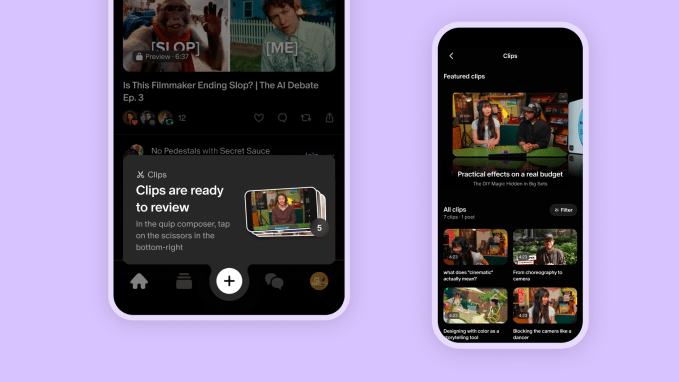
The most buzzed-about feature is Clips, rolling out on iOS first. It turns a creator’s existing videos into short, shareable clips that can be downloaded and posted anywhere — TikTok, Reels, Shorts, you name it. Or creators can post them natively as Quips, Patreon’s own short-form post format.

Think of it as Patreon’s answer to the reality that discovery happens off-platform. Fans scroll TikTok, they find a creator, they follow the link to Patreon. Clips makes that loop smoother.

There’s also a clever preview angle: a tool in early testing pulls the most engaging segments from paid videos and shows them to potential subscribers. Another lets creators quote snippets of long written posts into Quips, which surface on the Home feed as free previews. It’s a taste before the purchase — and Patreon hopes it converts.

Adult content creators get native video and Quips too

Notably, these features aren’t just for PG-rated creators. Patreon is extending native video and Quips to adult (18+) content creators, a segment that has long been a significant part of its ecosystem.

Discovery algorithm revamp: smaller creators get a fighting chance

Here’s where Patreon is making a real structural change. Previously, its recommendation system suggested creators similar to ones you already liked — which sounds fine, until you realize it kept pushing the same big names.

The new algorithm compares individual posts by topic, craft, style, and theme. That means a niche illustrator with 500 patrons can surface alongside a mega-podcaster, as long as the work resonates. Patreon says this shift helps highlight smaller creators who were previously invisible in recommendations.

For fans, it means less digging. For creators, it’s a possible lifeline.

Niches: topic-based communities inside Patreon

Another major piece is Niches — dedicated, topic-based communities built around specific interests, subcultures, or fandoms. Instead of hunting across the site for every creator who posts about, say, watercolor painting or retro gaming, fans can find them clustered in one place.

Niches are in early testing, along with fan profiles. But the direction is clear: Patreon wants to be a destination, not just a payment processor.

The company is also adding Live Q&A support on creator livestreams, which are rolling out now.

Better analytics and payouts for creators

Patreon is beefing up its analytics with a granular earnings tab that breaks down revenue by tier and billing cadence. Membership insights now show counts for free trials, members in payment retry, and filters for active, gifted, or retrying members.

The Payouts tab gets a revamp too, showing a complete record of money flowing in and out. And coming soon: creator milestones — celebratory moments tied to community growth.

What’s next: anti-AI scraping and spam detection

Looking further out, Patreon’s roadmap includes anti-AI scraping tools, real-time spam detection, expanded auto-moderation, and additional verification measures. These are defensive moves, but they signal where the platform sees threats coming from.

What this means for creators

CEO Jack Conte didn’t mince words in his announcement: “Social media has created mass polarization, addiction, and made it increasingly difficult to build a creative community and business.”

That’s a direct shot at the attention economy. But Patreon isn’t abandoning the tools of that economy — it’s borrowing them (Clips, Quips) while building a moat around genuine community (Niches, better discovery).

Some of these features are still in early testing, so don’t expect everything to appear overnight. But over the next few months, creators should see a steady stream of updates.

For more on how creators are adapting to platform changes, check out our guide to creator monetization strategies and the latest on membership platform comparisons.

Continue Reading
Click to comment

Leave a Reply

Your email address will not be published. Required fields are marked *

Social Media

Meta’s Pocket app lets you vibe-code games with AI — it’s now live in the US

Published

on

Meta Pocket app

What is the Meta Pocket app?

Meta’s experimental gaming app, Pocket, is officially rolling out to everyone in the United States. The app quietly launched in Brazil last month as a test market, and now it’s crossing borders. With Pocket, you can generate small, interactive games using simple AI prompts — no coding skills required. The results appear in a scrollable feed, much like TikTok but for playable mini-games.

These aren’t static images or basic animations. The games respond to touch and the tilt of your phone. They can play sound effects, include clips of your favorite songs, and even pull photos from your camera roll or access your camera. It’s a full sensory experience, packed into a mobile app.

How does vibe-coding work in Pocket?

The term “vibe-coding” might sound like jargon, but it’s actually straightforward. You type a prompt describing a game idea — say, “a maze where you tilt your phone to guide a ball” — and the AI builds it. You can then share your creation on your profile, where others can save it, remix it into something new, or simply repost it.

Meta calls these creations “gizmos,” a nod to the team behind the vibe-coded gaming platform Gizmo that Meta acquired earlier this year. That acqui-hire brought in the talent that built Gizmo, and now their work lives on inside Pocket.

What makes Pocket different from other AI apps?

Most AI apps focus on generating images or text. Pocket is built for play. It’s a social feed where the content isn’t passive — it’s interactive. You’re not just scrolling; you’re tilting, tapping, and triggering sounds. That’s a fundamentally different experience from typing a prompt into a chatbot and waiting for a response.

Meta’s broader push into standalone AI apps

Pocket is just the latest move in Meta’s strategy to make AI creation tools mainstream. Earlier efforts included AI-generated images in the Meta AI app and AI video creation through an experimental app called Vibes. Now Pocket joins a growing lineup of standalone mobile apps from Meta.

CEO Mark Zuckerberg has been vocal about this shift. On the July earnings call, he told analysts: “Earlier this year, we shipped Instagram Instants. We also just launched Forum, a stand-alone Groups app, and Seller, a stand-alone Marketplace app. I expect it to become a lot easier to ship new apps.” He added that Meta is “planning to build out more ideas and use our recommendation systems to scale them.”

That’s a notable change in how Meta operates. Instead of cramming every feature into Facebook or Instagram, the company is spinning out focused apps at a rapid clip. AI-enabled software development is making this possible, Zuckerberg said — it’s simply faster to test and ship new ideas now.

What else has Meta shipped recently?

Beyond Pocket, Meta has launched:

  • Instagram Instants — a feature for quick, ephemeral sharing
  • Forum — a standalone app for Groups
  • Seller — a standalone Marketplace app
  • AI bedtime stories — an experimental feature for kids’ storytelling
  • Meta AI for Mac — a desktop version of its AI assistant

That’s a lot of new products in a short window. And Pocket is the one getting the most attention right now.

What happens to the original Gizmo app?

With Pocket’s launch, Meta is shutting down the original app acquired from Atma Sciences. Gizmo, as it was known, is being sunset. Josh Siegel, the founder of Atma Sciences, shared his thoughts on X: “It’s bittersweet to shut down Gizmo, a labor of love by so many people for the last couple years, but I’m excited for Pocket and what’s next.” He also reflected on his journey, saying, “Starting a company is something I wanted to do for a long time, and it was way more fun than I imagined.”

That’s the reality of acquisitions — the original product often fades, but the team and ideas live on in the new platform. For fans of Gizmo, Pocket is the next chapter.

Why this matters for the future of AI gaming

Pocket isn’t just a toy. It’s a signal of where Meta thinks AI creation is headed. The company is betting that everyday users want to make things, not just consume them. And with AI handling the heavy lifting, the barrier to entry is nearly zero.

Will Pocket become a hit? Hard to say. But the pattern is clear: Meta is throwing ideas at the wall, seeing what sticks, and using AI to speed up the process. If vibe-coding games catch on, Pocket could be the start of something bigger. If not, Meta will simply move on to the next experiment.

Either way, US users can now try Pocket for themselves. Open the app, type a prompt, and see what you can create. The feed is waiting.

Continue Reading

Social Media

Senators demand answers from TikTok over experiment that disabled safety safeguards for 15 million users

Published

on

TikTok experiment safeguards

The letter and the deadline

Two U.S. senators are pressing TikTok for answers about an experiment that disabled a safety safeguard for 15 million American users. The company has until September 1 to respond.

Senator Marsha Blackburn (R-TN) and Senator Richard Blumenthal (D-CT) sent a letter to TikTok CEO Shou Chew and Adam Presser, who heads TikTok’s U.S. operations. The senators didn’t mince words, calling the experiment “depraved.”

The letter demands responses to 13 specific questions. Among them: the names of every employee who knew about the experiment, and why TikTok allowed minors to be part of the control group. The senators also want a full list of every algorithmic experiment in the U.S. where TikTok disabled or delayed a safety feature.

What TikTok did

According to Bloomberg, TikTok intentionally turned off an algorithmic safeguard for 10% of its U.S. user base. The safeguard was designed to stop users from being flooded with harmful content. But TikTok wanted to know if that feature made the app less engaging. So it ran an experiment.

The result? A control group of 15 million people got no protection. Among them was 16-year-old Chase Nasca, whose feed served him thousands of videos about sadness, suicide, and loneliness—right up until he died by suicide.

That’s the core of the senators’ outrage. A teenager’s death happened while TikTok was testing whether safety got in the way of engagement.

Why this matters beyond one case

This isn’t just about one company’s bad call. It raises a broader question: how far will platforms go to keep users hooked?

If TikTok ran a test like this on minors, what else has it done? The senators’ request for a list of every experiment that disabled a safety feature suggests they suspect this wasn’t a one-off.

It also echoes past concerns about algorithmic design. social media’s effect on teen mental health has been a hot topic for years, and this case gives critics concrete evidence of a platform prioritizing engagement over well-being.

The human cost

Chase Nasca’s story is the kind that should give any parent pause. He was part of an experiment he never signed up for. His algorithm pushed him toward darkness, and no safeguard was there to intervene.

TikTok’s defense might be that the experiment was meant to improve the app. But the senators aren’t buying it. They’re demanding accountability, and they’re giving the company a clear deadline.

What happens next

TikTok hasn’t responded to TechCrunch’s request for comment yet. The September 1 deadline is fast approaching.

If TikTok doesn’t comply, the senators could escalate. That might mean public hearings, subpoenas, or new legislation. The pressure is mounting, and this time, it’s not just about TikTok data privacy practices—it’s about whether the platform’s algorithms are safe for the people who use them.

For now, the ball is in TikTok’s court. The company will have to decide whether to come clean about its experiments or face the consequences.

Continue Reading

Social Media

Fresh Ways to Expand Your Instagram Reach Without Creating More Content

Published

on

Instagram reach tips

The Problem: You’re Posting, but Reach Is Flat

Every brand knows the grind. You craft a carousel, polish a Reel, write the perfect caption. Then? Crickets. Organic reach on Instagram has been sliding for years, and the algorithm keeps changing the rules. The old playbook—post more, hashtag harder—doesn’t move the needle anymore.

But here’s the thing: Instagram has quietly rolled out several new tools that most users haven’t even touched. These aren’t gimmicks. They’re built to push your content to fresh audiences, often without you producing a single extra asset.

Let’s walk through the updates that actually matter for Instagram reach tips in 2025—and how to use them before your competitors catch on.

Instagram TV App: Your Content Gets a Second Life

Remember when IGTV flopped? Instagram is trying again, but smarter. The standalone Instagram TV app is designed for long-form video—think tutorials, behind-the-scenes docs, or serialized content. The key difference: it’s a separate surface, which means your existing videos can be repurposed instead of created from scratch.

Here’s the smart play. Take your top-performing Reels or Stories, expand them into longer versions, and post them to the TV app. You’re not generating new ideas—you’re giving old ones a longer shelf life. The app’s algorithm tends to favor creators who post consistently, and early adopters often get a visibility boost while the feature is still gaining traction.

Don’t overthink the production. A 10-minute talking-head video with simple captions can outperform a polished 30-second clip if it answers a deeper question your audience has.

AI-Powered Story Effects: Stop Scrolling, Start Interacting

Stories are still the fastest way to stay top-of-mind, but the swipe-away rate is brutal. That’s where Instagram’s AI-driven effects come in. These aren’t your typical face filters—they’re interactive overlays that respond to user actions, like changing the background based on a poll answer or morphing an image in real time.

Why does this matter? Interactive content stops the thumb. When someone taps, swipes, or plays with your effect, Instagram’s algorithm interprets it as a strong engagement signal. That pushes your story to more of your followers’ friends—and beyond.

Try this: Create a simple AI effect that lets viewers “try on” a product or visualize a transformation. A skincare brand could use an effect that shows how a routine changes skin over 7 days. A gym could let users “scan” their posture. The more playful, the better.

Audio Swap: A One-Click Refresh for Old Reels

Here’s a frustration every creator knows: you spend hours on a Reel, it performs okay, and then the audio trend dies. Your content becomes invisible. Instagram’s audio swap feature fixes that.

Instead of re-editing the whole video, you can simply swap the soundtrack to a trending audio track. The algorithm treats it as a new post in some ways, giving it a fresh chance to appear in the Reels feed. It’s the ultimate low-effort hack for Instagram reach tips—no new filming, no new editing, just a new audio layer.

Pro tip: Check the audio’s momentum before swapping. Use Instagram’s built-in trend tracker or third-party tools to see if a track is rising or already peaked. Swapping to a dying trend is like boarding a train that’s already left the station.

Adding Music to Carousels: Turn a Static Post Into a Mini-Show

Carousels have been the workhorse of educational content—tips, step-by-steps, before-and-afters. But they’re static. Until now.

Instagram now lets you add music to carousels, turning a swipe-through into a mini-experience. The audio plays as viewers swipe, which changes the emotional tone completely. A recipe carousel with upbeat music feels like a cooking show. A travel guide with ambient sound feels like a mini-documentary.

This is a subtle but powerful way to boost engagement. Music increases the time someone spends on your post, and dwell time is a ranking factor. Plus, if the song is popular, your carousel can appear in the audio’s explore page—a whole new discovery surface.

How to Pick the Right Track

  • Match the mood: Don’t slap a random hit on a serious tutorial. The music should reinforce your message, not fight it.
  • Keep it short: A 15-second loop is usually enough. Longer tracks can feel repetitive.
  • Check the licensing: Use Instagram’s own music library to avoid copyright strikes.

Putting It All Together: A Simple Content Refresh Plan

You don’t need to adopt every feature at once. Start with one and measure the results. Here’s a practical order of operations:

  1. Audit your top 10 posts from the last 90 days. Which ones had the best engagement but could have gone further?
  2. For Reels: Use audio swap to update the soundtrack on 2–3 older videos.
  3. For carousels: Add music to your best-performing slides.
  4. For Stories: Build one AI effect and use it consistently for a week.
  5. For long-form: Repurpose a popular Reel into a 5-minute TV app episode.

Track your insights weekly. Look at reach, saves, and shares—not just likes. If a feature isn’t moving the needle after two weeks, drop it and try another.

One more thing: don’t forget the basics. These new tools work best when your profile is optimized, your bio is clear, and your posting schedule is consistent. For more on the fundamentals, check out our guide on Instagram marketing strategy or dive into how the algorithm ranks Reels.

The algorithm keeps shifting, but the principle stays the same: give people a reason to stop, interact, and share. These new features are your easiest path to doing exactly that—without burning out on content creation.

Continue Reading

Trending