Social Media
X drops Stripe for US creator payouts, moves everything to X Money
Published
50 minutes agoon

X creator payouts just changed — and not everyone gets a say
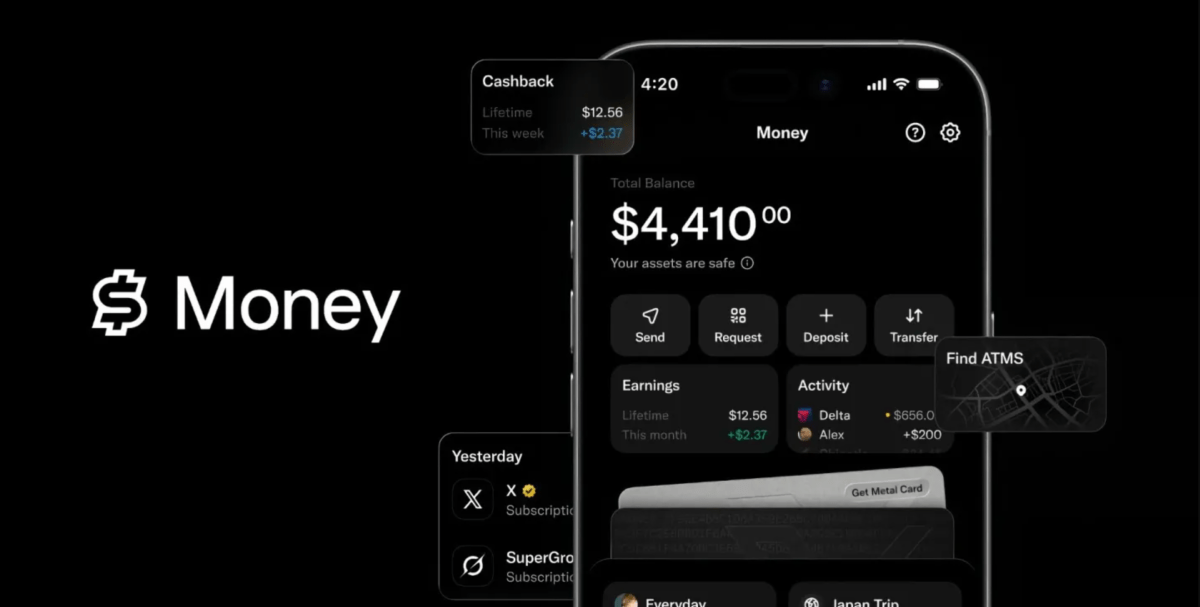
If you make money on X through subscriptions or the platform’s content rewards, your next check isn’t coming from Stripe anymore. As of Wednesday, all U.S. creator payouts are being routed through X Money, the company’s in-app payments service.
The shift was announced in a post from the official @XCreators account, which confirmed that both the Original Content Rewards Program and creator subscriptions now pay out exclusively via X Money for U.S.-based users.
Instant payouts sound great — but there’s a catch
The upside is speed. X says creators get their money the moment it’s sent. No more waiting for a two-week billing cycle to close. No minimum threshold blocking access to your earnings. Previously, X’s own documentation noted payouts ran every two weeks with a $30 minimum.
But here’s the thing: the announcement doesn’t frame X Money as an option. It’s the only way U.S. creators get paid now. If you preferred the old Stripe-powered system, that preference doesn’t matter anymore.
A representative for X confirmed the change is mandatory for U.S. creators. Those outside the U.S. will stay on Stripe for now.
What’s happening to X’s other creator programs?
This payout change lands right as X reshuffles its broader creator economy. On September 7, the platform will retire its Creator Revenue Sharing Program — the one that stopped taking new members last month. Creators are being pushed toward the Original Content Rewards Program instead, which leans harder into original posts rather than engagement-based revenue sharing.
It’s a meaningful pivot. The old program rewarded virality. The new one rewards originality, at least according to X’s framing. Whether that translates into better paydays for creators remains to be seen.
X Money is bigger than creator payouts
X Money is part of Elon Musk’s long-touted “everything app” vision. The service includes a bank card with 3% cash back, instant payments, and free ATM withdrawals. But it’s worth clarifying: X Money is not a bank. Accounts sit with FDIC-insured Cross River Bank.
Here’s what creators should know about the new setup:
- Payouts are instant once sent — no waiting period.
- Direct deposit through X Money could boost your APY. X Premium users get a 6% rate; standard users get 4%.
- Individuals receiving creator payouts will get a 1099-NEC form.
- LLCs must provide W-9 information so X can issue accurate 1099s.
Tax implications and fine print
That tax bit matters. If you’re an individual creator, expect a 1099-NEC from X. If you operate as an LLC, X will collect your organization’s W-9 details to keep the paperwork straight. It’s the kind of administrative detail that’s easy to overlook until tax season rolls around.
The move also means creator payouts count toward X Money’s direct deposit requirements for that better APY rate. So if you were already banking with X Money, your creator earnings just became more valuable.
What creators should do next
If you’re already using X Money, you don’t need to do anything. Your next payout will land there automatically. If you haven’t set up an X Money account yet, you’ll need to open one to keep receiving payments in the U.S.
The bigger question is whether this signals more consolidation to come. X has been steadily folding its creator tools into its payments ecosystem. For those watching Musk’s everything-app ambitions, this is another brick in the wall. For creators, it’s a reminder that platform changes come fast — and you don’t always get to vote.
You may like
Social Media
Stop Accepting Mediocre AI Output: Build Personas and Feedback Loops That Actually Work
Published
19 hours agoon
September 3, 2026
Why Your AI Output Still Sounds Like Everyone Else’s
You’ve noticed it, right? You ask ChatGPT or Claude for a blog post, a strategy doc, or a client report, and what comes back is… fine. Technically correct. Grammatically clean. But utterly forgettable.
The problem isn’t the model. It’s the way you’re prompting it. Most people treat AI like a vending machine: type a request, get a generic result. That’s a waste of the tool’s real power.
The fix? Two techniques that professional AI users swear by: building detailed AI personas and creating structured feedback loops. Together, they can transform your output from bland to genuinely impressive.
What Is an AI Persona and Why It Matters
An AI persona is a detailed role you assign to the model before giving it a task. Instead of saying “Write a marketing report,” you say “You are a senior marketing analyst with 15 years of experience in B2B SaaS, known for concise, data-driven insights.”
That single shift changes everything. The AI doesn’t just generate words — it generates words filtered through a specific lens. It adjusts tone, vocabulary, and structure to match the persona you’ve defined.
Here’s a concrete example. Ask for “a product description” and you’ll get something generic. But ask for “a product description written by a skeptical tech reviewer who’s seen hundreds of similar tools,” and suddenly you get critical thinking, nuance, and specificity.
How to Build a Powerful Persona
Don’t just say “you’re an expert.” That’s too vague. Instead, give the AI a full backstory. Include:
- Role and seniority: “You are a chief financial officer” vs. “You are a junior accountant.”
- Industry context: “You work in healthcare” vs. “You work in e-commerce.”
- Communication style: “You write in short, punchy sentences” or “You prefer formal, academic language.”
- Audience awareness: “You’re writing for C-level executives who hate jargon.”
- A specific point of view: “You believe traditional marketing is dead and say so.”
The more specific you get, the better the output. It’s like giving a method actor a character sheet — the performance becomes believable.
Feedback Loops: The Secret to Consistently Better AI Output
Here’s the thing about AI: it doesn’t remember your preferences unless you tell it. And it doesn’t learn from its mistakes unless you correct them. That’s where feedback loops come in.
A feedback loop is a structured process where you evaluate the AI’s output, identify what’s wrong, and feed that criticism back into the next prompt. Over multiple iterations, the quality compounds.
Think of it like editing a junior writer. You wouldn’t just fire them after one bad draft. You’d point out the issues, explain what you want, and have them try again. AI works the same way.
Build a Simple Feedback Loop in 4 Steps
- Generate a first draft with your persona prompt.
- Critique it honestly. What’s missing? What’s too generic? What’s factually shaky?
- Feed that critique back. Say: “You’re on the right track, but the introduction is weak. Make it more specific. Also, you used the word ‘leveraging’ three times — cut that.”
- Repeat. Usually, two or three rounds are enough to get something great.
This isn’t just a hack — it’s a workflow. And once you internalize it, you’ll stop accepting that first mediocre draft.
How to Use Feedback Loops for Different Deliverables
The technique adapts to whatever you’re producing. Here are a few examples:
For Blog Posts and Articles
Use a persona like “You are a veteran journalist at a major publication who writes for a smart, busy audience.” After the first draft, ask: “Where is this article weakest? Rewrite the middle section with more concrete examples and shorter paragraphs.”
For Client Reports
Create a persona that matches your client’s industry and expectations. Then, in your feedback, push for clarity: “Simplify the executive summary. The client doesn’t care about methodology — they care about results.”
For Social Media Content
Give the AI a brand voice persona. Then iterate on hooks: “Write 10 different opening lines. I’ll pick the best.” That’s a feedback loop in itself — you’re using the AI to generate options, then curating.
Common Mistakes That Sabotage AI Quality
Even with personas and feedback loops, people still mess up. Here’s what to avoid:
- Being too vague: “Make it better” isn’t feedback. Be specific.
- Ignoring context: If the AI doesn’t know your audience, it can’t tailor the output.
- Not iterating: One round of feedback isn’t enough. Expect to go back and forth.
- Forgetting to save good prompts: When you find a persona that works, save it. Build a library of effective prompts.
Another common trap: expecting AI to be perfect on the first try. It won’t be. But with a solid feedback loop, you’ll get to excellent in a fraction of the time it would take to write from scratch.
Putting It All Together: A Simple Workflow
Here’s a practical workflow you can start using today:
- Define the task and the audience.
- Write a detailed persona prompt.
- Generate the first draft.
- Critique it against your standards.
- Feed the critique back and regenerate.
- Repeat until the quality meets your bar.
This isn’t a one-time trick. It’s a habit. And once you start using AI personas and feedback loops consistently, you’ll notice a dramatic improvement in the quality of your content, reports, and deliverables.
For more on getting the most out of AI in your marketing, check out our guides on AI content strategy and prompt engineering for marketers. The tools are only as good as the way you use them.
So next time you’re about to accept a mediocre AI draft, stop. Ask yourself: did I give it a persona? Did I give it feedback? If not, you’re leaving quality on the table.
Social Media
X Money launch draws a wave of password reset attacks — here’s what we know
Published
2 days agoon
September 2, 2026
Password reset emails flood X users after X Money rollout
Attackers are taking aim at X users in the wake of the platform’s new payments service launch. Over the past few days, a wave of users has reported receiving unsolicited password reset emails — the kind that make you wonder if someone is trying to break into your account.
X product engineer Mridul Singhai acknowledged the issue on the platform Tuesday, saying the company is actively investigating. So far, there’s no evidence that any breaches have succeeded.
“Attackers appear to believe that, now that @XMoney is widely available, they can gain unauthorized access to accounts,” Singhai wrote. “We are actively investigating the issue and, so far, have found no evidence of any breaches. We apologize for the multiple emails and appreciate your patience as we work to resolve this.”
What is X Money and why does it matter?
X Money is the social network’s freshly launched payments service, complete with a bank card and other perks. For creators, it’s a potential game-changer — a way to collect payments directly on the platform without bouncing through third-party services. That’s a big step for X’s ambitions to build a full digital economy inside its walls.
But here’s the flip side: money attracts bad actors. Always has, always will. And when a platform suddenly starts handling financial transactions, the criminals take notice.
What exactly is happening to X accounts?
Users are reporting a barrage of password reset emails they never requested. The pattern suggests attackers are using a technique called “mass-triggering” — essentially flooding the password reset form with public usernames to generate emails en masse.
X’s own AI chatbot, Grok, has weighed in on the situation, confirming the attacks are happening while reassuring users that there’s been “no confirmed system breach or mass takeovers.”
The bot also pointed users toward enabling Password Reset Protect, a security feature that adds an extra layer of verification before a password can be changed.
What the attacks mean for your account
Here’s the uncomfortable truth: even if these attempts are unsuccessful, the sheer volume of reset emails suggests attackers are testing the waters. They’re looking for weak points, and they’re betting that X Money’s popularity will make users more vulnerable — or at least more panicked.
- Enable two-factor authentication if you haven’t already. It’s the single most effective step you can take.
- Turn on Password Reset Protect in your security settings. It requires additional verification before a password reset can go through.
- Don’t click links in unexpected emails. If you get a password reset email you didn’t ask for, ignore it — or better yet, report it.
- Use a unique password for X that you don’t use anywhere else.
X’s response: investigation and threats of legal action
X hasn’t posted an official statement to its company accounts yet, and the platform hasn’t responded to press inquiries at the time of writing. But X general counsel James Burnham didn’t mince words in a post of his own.
“The legal and security teams @X will stop at nothing to identify, locate, and hold criminally accountable any person anywhere on or off earth who attempts to victimize our platform’s users,” he wrote.
Strong words, for sure. Whether they’ll translate into actual arrests remains to be seen. But the message is clear: X is treating this as a criminal matter, not just a technical glitch.
How to protect yourself during the X Money launch chaos
If you’re an X user, now is the time to tighten up your security. The attackers are counting on confusion and complacency. Don’t give them the satisfaction.
Head to Settings and privacy, then Security and account access. From there, you can enable two-factor authentication and turn on Password Reset Protect. It takes about two minutes and could save you a world of trouble.
For more on keeping your accounts safe, check out our guide on two-factor authentication best practices and how to spot phishing attempts before they catch you.
The bottom line? X Money is here, and it’s changing how the platform handles payments. But with new features come new risks. Stay alert, enable your protections, and don’t let the panic — or the phishing emails — get the best of you.
Social Media
Your Brand, Your Crowd: Apply Now to Host a Side Event at TechCrunch Disrupt 2026
Published
3 days agoon
September 1, 2026
The Clock Is Ticking on Disrupt 2026 Side Events
TechCrunch Disrupt 2026 is barreling toward San Francisco’s Moscone West from October 13–15. More than 10,000 founders, investors, and tech’s sharpest minds will pack the halls. But the real action? It spills well beyond those three days.
That’s where the Disrupt Side Events program comes in. From October 10–16, you can host your own gathering — a dinner, a workshop, a VC office-hours session — and get it promoted directly to Disrupt’s massive audience. The catch? The application deadline is this Friday, September 4, at midnight PT. Yes, that’s days away.
If you’ve been sitting on an idea for a meetup, now’s the time to move. Here’s everything you need to know.
Why Bother Hosting a Side Event?
Side Events put you in the driver’s seat. Instead of hoping you run into the right people in a crowded expo hall, you create the room where conversations happen. Your brand, your agenda, your crowd.
Here’s what you get:
- Direct access to thousands of the most curious and capable people in tech.
- Real relationships with potential partners, investors, and future collaborators — not just business cards.
- Full control over your narrative. You decide what to showcase and how to frame it.
- Buzz that lingers long after the event ends, thanks to promotion through Disrupt’s official channels.
Approved Side Events are listed on the official calendar and pushed out through Disrupt’s marketing. That’s free exposure to an audience that’s already primed for innovation.
What Kind of Event Can You Host?
Pretty much anything that fits your vision. Past Disrupts have seen industry roundtables, intimate dinners, casual happy hours, deep-dive workshops — you name it. The format is yours to design.
One recommendation: aim for the evenings of October 13–15. There’s less competition for attention, and the post-conference energy is perfect for real conversations. Just make sure your event is open to both Disrupt attendees and the broader public.
What You Need Before Applying
Don’t wing it. The application form asks for specifics, so have these locked down first:
- A venue in the Bay Area — this is strictly in-person, so location matters.
- A title, description, and venue details ready to paste in.
- A quick read of the Side Events Host Guide and the Side Event Host T&Cs so there are no surprises.
If you hit a snag, the Side Events team is just an email away. They’re genuinely helpful.
Who Should Apply?
Venture capitalists looking to spark dialogue. Companies launching something new. Community builders with a point of view. If you have a following, a network, or just a killer idea for bringing people together, this is your shot.
There’s zero cost to apply and zero cost to participate. The organizers prioritize events that add real value for founders, investors, and the startup ecosystem — but beyond that, you know your community best.
So here’s the bottom line: the deadline is September 4 at midnight PT. The application takes minutes. The payoff could define your quarter.
Apply now. Tell them what you want to build, who you want to reach, and what you need logistically. They’ll handle the rest — and you’ll be at the center of the Bay Area’s biggest tech week.

How to Fix Start Menu & Taskbar Not Working in Windows 10 & 11 – Step-by-Step Guide

X drops Stripe for US creator payouts, moves everything to X Money

Forget the Cloud: HUMAIN and Qualcomm Just Built an AI PC That Thinks on Its Own
Trending
CyberSecurity6 months agoLeakBase Data Breach Forum Seized in Major Europol Operation
How To5 months agoThe Truth About Fast Charging Apps for Android: Can They Speed Up Your Battery?
CyberSecurity6 months agoZero-Day Attacks Hit Record High as Enterprise Software Becomes Prime Target
CyberSecurity6 months agoRussian Hackers Target WhatsApp and Signal in Global Espionage Campaign
Social Media6 months agoYouTube Live Streaming API: A Developer’s Guide to Managing Live Broadcasts
Video4 months agoSamsung One UI 8.5 Official Update Is Here: Release Timeline, Eligible Devices & Key Features
Infosecurity6 months agoCybersecurity Communication: Why Fear-Based Messaging Fails and What Works
CyberSecurity6 months agoContextCrush Vulnerability: How a Trusted AI Tool Became an Attack Vector