Connect with us

Social Media

TikTok’s comment sections just got a whole lot more interactive

Published

on

TikTok voice comments

Sound was always the point. Now it’s in the comments too.

For years, TikTok’s comment section was a place to drop a quick thought or a meme. It did the job — but it never felt like part of the show. That’s changing now.

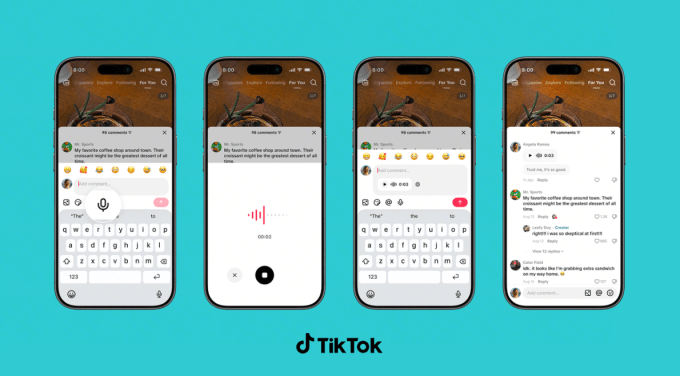
The platform announced a wave of new comment tools on Thursday, and the headline act is TikTok voice comments. Instead of typing, you can record a message up to a minute long and pin it under any video. Tap the microphone icon in the comment box, talk, and post. Anyone who scrolls by can tap to listen.

“Sound and music have shaped TikTok from the very beginning, turning songs into trends and audio clips into jokes shared across the app,” the company wrote in a blog post. “Now, we’re bringing that same energy to the comment section.”

It’s a logical move. TikTok already runs on audio — viral sounds, voiceovers, and those oddly satisfying whisper videos. Extending that into the comments makes the whole feed feel more alive, less like a message board and more like a conversation.

What’s actually new in the comment box

Voice is the big one, but it’s not the only trick TikTok is adding. Here’s the full rundown:

  • Voice comments — record up to 60 seconds of audio under any video. Rolling out globally over the next month, but only to users 18 and older.
  • Comment polls — creators can attach a poll to their own videos, with up to five options and a set voting window. Previously limited to some accounts, now it’s worldwide.
  • Photo carousel comments — you can now drop up to nine images in a single comment, where before it was one at a time. Global rollout over the next month.
  • Live Photo comments — upload a moving image that plays a quick burst of motion before settling into the full photo. Available globally now.

Why TikTok is turning comments into a messaging app

Look at these features side by side and you’ll notice something: they look a lot like the tools you’d find in a chat app. Voice notes, polls, photo sharing — that’s the vocabulary of WhatsApp and iMessage, not your typical social feed.

That’s not an accident. TikTok wants people to stay longer, comment more, and come back to check replies. A voice note feels more personal than a typed reply. A poll invites participation instead of passive scrolling. Photo carousels give commenters a reason to show off, not just speak.

The company is betting that if comments feel like a conversation with friends, users will treat the app less like a broadcast channel and more like a place to hang out.

Moderation: voice comments aren’t a free-for-all

Audio comments raise an obvious question: what stops someone from recording something hateful or harassing? TikTok says it’s on that.

A spokesperson told TechCrunch that voice comments fall under the same Community Guidelines as everything else on the platform. The moderation system combines human reviewers with automated tools, including speech-to-text transcription, to catch and remove policy violations. So yes, they’re listening — or at least, their software is.

Who gets access first

Voice comments aren’t hitting everyone at once. The rollout spans the next month, and it’s restricted to users 18 and up. That age gate is a clear nod to safety concerns — minors are more vulnerable to audio-based harassment or inappropriate content, and moderating voice at scale is harder than filtering text.

Photo carousel comments are also rolling out gradually. Live Photo comments, meanwhile, are already available everywhere.

What creators should do with polls and voice notes

If you’re a creator, these tools are worth experimenting with. Polls are the most obvious win — ask viewers to vote on your next video idea, pick an outfit, or decide what you should cook. The results show up right in the comment section, which turns a passive audience into active participants.

Voice comments, on the other hand, are a chance to add personality. A quick vocal reaction to a comment can feel more genuine than a typed reply. Think of it as a mini-podcast tucked into your comment thread.

For everyday users, the takeaway is simpler: your comments no longer have to be text. You can react with your voice, share a burst of photos, or start a poll of your own — well, if you’re the video’s creator, anyway.

The bigger picture: engagement is the currency

TikTok’s algorithm rewards interaction. More comments, more replies, more time spent — all of it feeds the recommendation engine. By making comments richer and more interactive, TikTok is essentially giving users more reasons to engage, and giving itself more signals to work with.

It’s a smart cycle. The more tools people have to talk, the more they talk. The more they talk, the longer they stay. And the longer they stay, the more ads TikTok can serve. That’s the business model, and it’s working.

So next time you’re scrolling and see a microphone icon in the comment box, don’t be shy. Record something. Start a poll. Drop a Live Photo. The comment section just became a stage of its own.

For more on how to get the most out of your feed, check out our guide to TikTok engagement strategies and the latest on TikTok algorithm updates.

Continue Reading

Social Media

Turn Old LinkedIn Newsletters Into a Discovery Engine (Plus Video Series Tips & Industry News)

Published

on

LinkedIn discovery strategy

Why Your Old LinkedIn Newsletters Are Still Gold

Most marketers treat a newsletter like a one-and-done campaign. You write it, hit publish, and move on. That’s a mistake.

Your past LinkedIn newsletters are packed with insights your audience already engaged with. They’re proven content. So why not turn them into a discovery engine?

Here’s the idea: instead of letting older editions gather digital dust, repurpose them strategically to attract new followers and re-engage lapsed ones. It’s about working smarter, not harder.

How to Repurpose Past Newsletters for Discovery

Start by auditing your last few months of newsletters. Look for themes that performed well — high engagement, thoughtful comments, or topics that sparked conversation.

  • Create a “Best Of” edition: Curate your top insights into a single newsletter and promote it as a starting point for new subscribers.
  • Turn insights into carousel posts: Pull key stats or tips from past newsletters and turn them into a visual carousel for your feed.
  • Link back strategically: In new posts, reference older newsletters as “deep dives” — this sends engaged readers down a rabbit hole of your best content.
  • Update and refresh: If a topic is still relevant, update it with new data and republish. LinkedIn’s algorithm often gives refreshed content a second chance.

This approach turns your newsletter archive into a lead-generation tool. It’s a smart LinkedIn marketing strategy that requires zero new content creation — just smart curation.

How to Structure a Video Series for Marketing

Video is dominating social feeds, but posting random videos won’t cut it. A structured video series builds anticipation and keeps viewers coming back.

Think of it like a TV show. You need a hook, a consistent format, and a reason for people to tune in next week.

Steps to Launch a Winning Video Series

  1. Define your series theme: Pick one narrow topic you can explore deeply. For example, “Instagram Reels tips for local businesses” — not just “social media tips.”
  2. Decide on a format: Will it be a weekly Q&A, a tutorial, or a behind-the-scenes vlog? Consistency in format helps viewers know what to expect.
  3. Plan a season: Map out 4–8 episodes in advance. Each episode should stand alone but also build on the last.
  4. Promote the series: Create a trailer or announcement post. Use a consistent hashtag and posting schedule.
  5. Repurpose episodes: Turn each video into clips for TikTok, YouTube Shorts, or LinkedIn. One episode can feed multiple platforms.

A structured series also helps with audience retention. When viewers know episode 3 is coming next Tuesday, they’re more likely to follow you.

Industry News: Meta and TikTok Updates You Need to Know

The social media landscape never sleeps. Here’s what’s happening at the big platforms.

Meta’s Latest Moves

Meta continues to double down on AI-powered advertising tools. Recent updates suggest a push toward more automated campaign management, which could change how advertisers allocate budgets.

Also notable: Instagram is testing new features that blur the line between Reels and Stories. Keep an eye on your analytics — if engagement shifts, your content strategy may need to adapt.

TikTok’s Expanding Features

TikTok is rolling out more e-commerce integrations, making it easier for creators to tag products directly in videos. This is a big deal for affiliate marketers and small business owners.

Additionally, TikTok’s search functionality is improving, which means optimizing your video captions and descriptions for search is more important than ever. Think of TikTok as a search engine, not just a discovery feed.

Key Takeaways for Your Marketing Strategy

So what should you do with all this? Start by repurposing your best LinkedIn content. It’s low-hanging fruit.

Then, consider launching a video series with a clear structure. It doesn’t have to be perfect — just consistent.

Finally, stay agile with platform changes. Meta and TikTok are constantly evolving, and the marketers who adapt quickly will win.

For more on making the most of your content, check out our guide on repurposing content across platforms or our tips for building a content calendar.

Now get out there and turn your old content into new opportunities.

Continue Reading

Social Media

X drops Stripe for US creator payouts, moves everything to X Money

Published

on

X creator payouts

X creator payouts just changed — and not everyone gets a say

If you make money on X through subscriptions or the platform’s content rewards, your next check isn’t coming from Stripe anymore. As of Wednesday, all U.S. creator payouts are being routed through X Money, the company’s in-app payments service.

The shift was announced in a post from the official @XCreators account, which confirmed that both the Original Content Rewards Program and creator subscriptions now pay out exclusively via X Money for U.S.-based users.

Instant payouts sound great — but there’s a catch

The upside is speed. X says creators get their money the moment it’s sent. No more waiting for a two-week billing cycle to close. No minimum threshold blocking access to your earnings. Previously, X’s own documentation noted payouts ran every two weeks with a $30 minimum.

But here’s the thing: the announcement doesn’t frame X Money as an option. It’s the only way U.S. creators get paid now. If you preferred the old Stripe-powered system, that preference doesn’t matter anymore.

A representative for X confirmed the change is mandatory for U.S. creators. Those outside the U.S. will stay on Stripe for now.

What’s happening to X’s other creator programs?

This payout change lands right as X reshuffles its broader creator economy. On September 7, the platform will retire its Creator Revenue Sharing Program — the one that stopped taking new members last month. Creators are being pushed toward the Original Content Rewards Program instead, which leans harder into original posts rather than engagement-based revenue sharing.

It’s a meaningful pivot. The old program rewarded virality. The new one rewards originality, at least according to X’s framing. Whether that translates into better paydays for creators remains to be seen.

X Money is bigger than creator payouts

X Money is part of Elon Musk’s long-touted “everything app” vision. The service includes a bank card with 3% cash back, instant payments, and free ATM withdrawals. But it’s worth clarifying: X Money is not a bank. Accounts sit with FDIC-insured Cross River Bank.

Here’s what creators should know about the new setup:

  • Payouts are instant once sent — no waiting period.
  • Direct deposit through X Money could boost your APY. X Premium users get a 6% rate; standard users get 4%.
  • Individuals receiving creator payouts will get a 1099-NEC form.
  • LLCs must provide W-9 information so X can issue accurate 1099s.

Tax implications and fine print

That tax bit matters. If you’re an individual creator, expect a 1099-NEC from X. If you operate as an LLC, X will collect your organization’s W-9 details to keep the paperwork straight. It’s the kind of administrative detail that’s easy to overlook until tax season rolls around.

The move also means creator payouts count toward X Money’s direct deposit requirements for that better APY rate. So if you were already banking with X Money, your creator earnings just became more valuable.

What creators should do next

If you’re already using X Money, you don’t need to do anything. Your next payout will land there automatically. If you haven’t set up an X Money account yet, you’ll need to open one to keep receiving payments in the U.S.

The bigger question is whether this signals more consolidation to come. X has been steadily folding its creator tools into its payments ecosystem. For those watching Musk’s everything-app ambitions, this is another brick in the wall. For creators, it’s a reminder that platform changes come fast — and you don’t always get to vote.

Continue Reading

Social Media

Stop Accepting Mediocre AI Output: Build Personas and Feedback Loops That Actually Work

Published

on

AI personas feedback loops

Why Your AI Output Still Sounds Like Everyone Else’s

You’ve noticed it, right? You ask ChatGPT or Claude for a blog post, a strategy doc, or a client report, and what comes back is… fine. Technically correct. Grammatically clean. But utterly forgettable.

The problem isn’t the model. It’s the way you’re prompting it. Most people treat AI like a vending machine: type a request, get a generic result. That’s a waste of the tool’s real power.

The fix? Two techniques that professional AI users swear by: building detailed AI personas and creating structured feedback loops. Together, they can transform your output from bland to genuinely impressive.

What Is an AI Persona and Why It Matters

An AI persona is a detailed role you assign to the model before giving it a task. Instead of saying “Write a marketing report,” you say “You are a senior marketing analyst with 15 years of experience in B2B SaaS, known for concise, data-driven insights.”

That single shift changes everything. The AI doesn’t just generate words — it generates words filtered through a specific lens. It adjusts tone, vocabulary, and structure to match the persona you’ve defined.

Here’s a concrete example. Ask for “a product description” and you’ll get something generic. But ask for “a product description written by a skeptical tech reviewer who’s seen hundreds of similar tools,” and suddenly you get critical thinking, nuance, and specificity.

How to Build a Powerful Persona

Don’t just say “you’re an expert.” That’s too vague. Instead, give the AI a full backstory. Include:

  • Role and seniority: “You are a chief financial officer” vs. “You are a junior accountant.”
  • Industry context: “You work in healthcare” vs. “You work in e-commerce.”
  • Communication style: “You write in short, punchy sentences” or “You prefer formal, academic language.”
  • Audience awareness: “You’re writing for C-level executives who hate jargon.”
  • A specific point of view: “You believe traditional marketing is dead and say so.”

The more specific you get, the better the output. It’s like giving a method actor a character sheet — the performance becomes believable.

Feedback Loops: The Secret to Consistently Better AI Output

Here’s the thing about AI: it doesn’t remember your preferences unless you tell it. And it doesn’t learn from its mistakes unless you correct them. That’s where feedback loops come in.

A feedback loop is a structured process where you evaluate the AI’s output, identify what’s wrong, and feed that criticism back into the next prompt. Over multiple iterations, the quality compounds.

Think of it like editing a junior writer. You wouldn’t just fire them after one bad draft. You’d point out the issues, explain what you want, and have them try again. AI works the same way.

Build a Simple Feedback Loop in 4 Steps

  1. Generate a first draft with your persona prompt.
  2. Critique it honestly. What’s missing? What’s too generic? What’s factually shaky?
  3. Feed that critique back. Say: “You’re on the right track, but the introduction is weak. Make it more specific. Also, you used the word ‘leveraging’ three times — cut that.”
  4. Repeat. Usually, two or three rounds are enough to get something great.

This isn’t just a hack — it’s a workflow. And once you internalize it, you’ll stop accepting that first mediocre draft.

How to Use Feedback Loops for Different Deliverables

The technique adapts to whatever you’re producing. Here are a few examples:

For Blog Posts and Articles

Use a persona like “You are a veteran journalist at a major publication who writes for a smart, busy audience.” After the first draft, ask: “Where is this article weakest? Rewrite the middle section with more concrete examples and shorter paragraphs.”

For Client Reports

Create a persona that matches your client’s industry and expectations. Then, in your feedback, push for clarity: “Simplify the executive summary. The client doesn’t care about methodology — they care about results.”

For Social Media Content

Give the AI a brand voice persona. Then iterate on hooks: “Write 10 different opening lines. I’ll pick the best.” That’s a feedback loop in itself — you’re using the AI to generate options, then curating.

Common Mistakes That Sabotage AI Quality

Even with personas and feedback loops, people still mess up. Here’s what to avoid:

  • Being too vague: “Make it better” isn’t feedback. Be specific.
  • Ignoring context: If the AI doesn’t know your audience, it can’t tailor the output.
  • Not iterating: One round of feedback isn’t enough. Expect to go back and forth.
  • Forgetting to save good prompts: When you find a persona that works, save it. Build a library of effective prompts.

Another common trap: expecting AI to be perfect on the first try. It won’t be. But with a solid feedback loop, you’ll get to excellent in a fraction of the time it would take to write from scratch.

Putting It All Together: A Simple Workflow

Here’s a practical workflow you can start using today:

  1. Define the task and the audience.
  2. Write a detailed persona prompt.
  3. Generate the first draft.
  4. Critique it against your standards.
  5. Feed the critique back and regenerate.
  6. Repeat until the quality meets your bar.

This isn’t a one-time trick. It’s a habit. And once you start using AI personas and feedback loops consistently, you’ll notice a dramatic improvement in the quality of your content, reports, and deliverables.

For more on getting the most out of AI in your marketing, check out our guides on AI content strategy and prompt engineering for marketers. The tools are only as good as the way you use them.

So next time you’re about to accept a mediocre AI draft, stop. Ask yourself: did I give it a persona? Did I give it feedback? If not, you’re leaving quality on the table.

Continue Reading

Trending