Connect with us

How To

Asus NUC 15 Pro Mini PC Lands in India: A Compact Powerhouse for AI and Professionals

Published

on

Asus NUC 15 Pro Mini PC Lands in India: A Compact Powerhouse for AI and Professionals

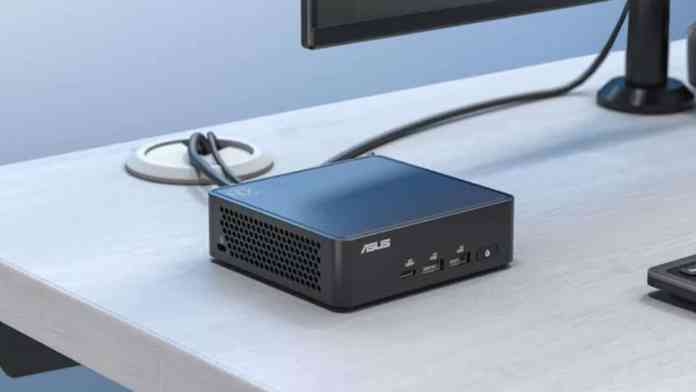
The landscape for compact computing in India has just received a significant upgrade. The Asus NUC 15 Pro Mini PC, a device engineered for serious computational tasks, is now officially available for purchase across the country. This launch marks a pivotal moment for professionals who require desktop-level performance without the physical footprint of a traditional tower.

Pricing and Market Positioning

With an official price tag of ₹1,09,000, the Asus NUC 15 Pro positions itself in the premium segment of the mini PC market. This means it is not a casual purchase, but a targeted investment. Asus is bundling a one-month subscription to Adobe Creative Cloud with the device, directly appealing to its core audience. Consequently, this machine is squarely aimed at AI developers, data scientists, video editors, and other creative professionals who need robust, reliable power in a small form factor.

Unpacking the Core Specifications

At the heart of this compact system lies the latest Intel Core Ultra Series 2 processors. This is not just an incremental update; it represents a leap in integrated AI capabilities. In fact, the system is rated to deliver up to a staggering 99 trillion AI operations per second (TOPS), a figure that underscores its readiness for the AI-driven future. For graphics, it leverages Intel’s integrated graphics alongside an Intel Arc GPU, providing a solid foundation for visual tasks beyond basic display output.

Out of the box, the configuration includes 8GB of DDR5 RAM running at 5600MHz and a 512GB PCIe Gen4 NVMe SSD. However, the true flexibility of the Asus NUC 15 Pro Mini PC lies in its upgradeability. Users can expand the RAM up to 48GB and push storage capacity to a massive 8TB. The system even supports faster DDR5 memory speeds up to 6400MHz, ensuring headroom for future performance demands. It ships with Windows 11 64-bit, providing a modern and secure operating environment.

Design and Durability Considerations

Measuring a mere 117 x 112 x 54 mm and weighing just 357.4 grams, the device’s physical profile is remarkably small. Despite this, it doesn’t compromise on ruggedness. The chassis carries a MIL-STD-810H certification, meaning it has been tested to withstand harsh environmental conditions like shock, vibration, and extreme temperatures—a rare feature for a desktop PC. Internally, a dual heat pipe system manages thermals, while a clever hinged lever design allows for tool-free access to upgrade RAM and storage, a boon for IT departments and tech-savvy users.

Connectivity and Security: Built for the Modern Workspace

Connectivity is a major highlight. The Asus NUC 15 Pro Mini PC is one of the first in its class to feature next-generation Intel Wi-Fi 7, promising peak theoretical speeds up to 46Gbps and the ability to connect up to sixteen devices simultaneously. This is paired with Bluetooth 5.4 for fast, stable peripheral connections. A unique feature, Intel Wi-Fi Proximity Sensing, can automatically lock or wake the PC based on the user’s presence, adding a layer of convenience and security.

Speaking of security, the device integrates Intel vPro technology. This allows for advanced remote management and security features crucial for enterprise deployment. Furthermore, a Firmware TPM 2.0 module provides hardware-based security to protect encryption keys and user credentials from software-based attacks.

Display and Port Versatility

For multi-monitor setups, this mini PC is exceptionally capable. It can drive up to four independent 4K displays simultaneously. The rear I/O includes two HDMI 2.1 ports and two Thunderbolt 4 ports (supporting USB4 and DisplayPort 2.1), offering immense flexibility for high-resolution monitors and high-speed peripherals. Additional ports include USB-C and USB-A on the front, and more USB ports, an RJ45 LAN jack, and the DC power input on the rear. A handy Power Sync feature via HDMI CEC allows users to control the power state of connected Asus monitors directly from the PC.

Who Should Consider the Asus NUC 15 Pro?

Building on its robust feature set, the target user for this device is clear. It is ideal for the professional whose work involves machine learning model development, large dataset analysis, 4K video editing, or complex 3D rendering. Its small size makes it perfect for space-constrained environments like digital signage, kiosks, or sleek office setups. For businesses looking to deploy powerful, manageable, and durable workstations, the Asus NUC 15 Pro Mini PC presents a compelling alternative to bulkier desktops.

In summary, the arrival of the Asus NUC 15 Pro in the Indian market fills a specific niche. It delivers a potent combination of cutting-edge AI silicon, exceptional connectivity, enterprise-grade security, and a surprisingly rugged and upgradeable design—all packed into a chassis smaller than a traditional hardcover book. While the price reflects its premium positioning, for the right user, it represents a powerful and space-efficient solution for the most demanding professional tasks. For more insights on compact computing solutions, explore our guide on the best mini PCs for the home office or read about the latest in Intel Core Ultra processor technology.

Continue Reading
Click to comment

Leave a Reply

Your email address will not be published. Required fields are marked *

How To

The Complete Guide to Liking and Unliking Content on Instagram

Published

on

The Complete Guide to Liking and Unliking Content on Instagram

Navigating the world of social media engagement can sometimes feel like a puzzle. On Instagram, one of the most fundamental ways to interact is by liking content. But what if you change your mind? Understanding how to both like and unlike posts, videos, and Reels is essential for curating your digital footprint and providing genuine feedback to creators.

Why Your Likes Matter on Instagram

Every tap on the heart icon sends a signal. For creators, these likes are a vital metric, offering insight into what resonates with their audience. For you, the user, they help personalize your feed. The algorithm learns from your interactions, showing you more of what you enjoy. This means your likes directly shape your Instagram experience. Conversely, removing a like—or “unliking”—allows you to keep your engagement authentic and your profile activity reflective of your current interests.

How to Like an Instagram Post or Video

The process is designed to be intuitive. First, open the Instagram app and ensure you’re logged into your account. Scroll through your main feed or visit the Explore page to discover new content. When you find a photo or video you appreciate, you have two primary options. You can simply tap the heart icon located directly beneath the post. Alternatively, for a quicker action, double-tap anywhere on the image or video itself. A red heart will appear, confirming your like.

The Double-Tap Shortcut

This gesture has become synonymous with Instagram approval. It’s a fast, seamless way to show appreciation without moving your thumb to a specific button. It works universally across standard posts and videos in your feed.

How to Unlike an Instagram Post or Video

Changing your mind is a normal part of social browsing. Perhaps you liked something by accident, or your opinion shifted. To remove your like, navigate back to the post in question. If you are viewing it in your feed, you will see that the heart icon below it is now filled in and red. Tap this icon once. It will revert to its empty, outlined state, indicating you have successfully unliked the content. Your engagement will be removed from the post’s public count.

Mastering Engagement with Instagram Reels

Instagram Reels have taken center stage as the platform’s short-form video hub. Liking them follows a similar principle but within a dedicated space. To start, tap the Reels icon (it looks like a clapperboard) at the bottom of your Instagram screen. This opens the full-screen, vertical Reels player. As you watch, you can like a Reel by tapping the heart icon on the right side of the screen, next to the comment and share buttons. Just like with posts, you can also double-tap directly on the video playing in the center of your screen for an instant like.

Unliking a Reel You’ve Enjoyed

If you need to retract a like on a Reel, the process is just as straightforward. Find the Reel again—you can look in your “Liked” saved folder or search for the creator’s profile. Once the Reel is playing, look at the heart icon on the right. If it’s red, tap it once. The color will fade, showing you have unliked it. This action helps keep your saved likes collection accurate.

Managing Your Broader Instagram Engagement

Beyond individual actions, it’s wise to periodically review your liked content. You can view all the posts you’ve ever liked by going to your profile, tapping the menu (three lines), and selecting “Your activity.” From there, tap “Interactions” and then “Likes.” This gives you a historical view and an opportunity to manage your past engagements in bulk. For more tips on organizing your profile, check out our guide on Instagram profile optimization.

Furthermore, understanding these mechanics is part of a larger strategy for effective social media use. Consistent, genuine interaction is key. Therefore, don’t underestimate the power of a thoughtful like; it fuels the creator ecosystem. On the other hand, don’t hesitate to unlike content that no longer aligns with your views or interests. This ensures your digital identity remains current.

The Impact of Your Interactions

Each like and unlike is a small data point that influences two things: the creator’s understanding of their audience and Instagram’s algorithm concerning your preferences. This creates a feedback loop where quality content gets promoted, and your feed becomes more tailored. In essence, you are training the app to serve you better. For users looking to grow their own presence, mastering engagement is the first step. Explore our article on increasing Instagram engagement for deeper strategies.

In conclusion, the ability to like and unlike is more than a simple feature—it’s the core of interactive social media. By using these tools intentionally, you enhance your own experience while contributing to the platform’s vibrant community. So go ahead, double-tap with purpose, and curate your digital world with confidence.

Continue Reading

How To

How to Increase Airtel Internet Speed on Your Mobile: A Practical Guide

Published

on

How to Increase Airtel Internet Speed on Your Mobile: A Practical Guide

Is your Airtel mobile data crawling when you need it to sprint? You’re not alone. Many users experience frustrating slowdowns, but the solution often lies in simple adjustments rather than complex fixes. This guide provides clear, actionable steps to help you increase Airtel internet speed and reclaim a smoother online experience on your smartphone.

Why Does My Airtel Internet Speed Fluctuate?

Before diving into solutions, it helps to understand the common culprits. Network congestion during peak hours, your distance from the nearest cell tower, background app activity, and even your device’s settings can throttle your connection. Therefore, optimizing your speed is often a multi-step process.

7 Effective Ways to Boost Your Airtel Data Speed

Let’s explore proven methods that can make a noticeable difference. You don’t need to be a tech expert to follow these steps.

1. Manage Your Device’s Network Settings

First, ensure your phone is set to use the fastest available network. Navigate to your mobile network settings and set the “Preferred network type” to “4G/3G/2G (auto)” or simply “4G” if you’re in a strong coverage area. This prevents your device from unnecessarily clinging to a slower 2G signal.

2. Limit Background Data and Syncing

Consequently, numerous apps sync data in the background—email, social media, cloud storage—consuming bandwidth silently. Go to your device’s data usage settings and restrict background data for non-essential apps. This instantly frees up bandwidth for your active browsing or streaming.

3. Use a Lightweight, Updated Browser

Building on this, your choice of browser matters. While Chrome and Firefox are excellent, ensure they are updated to the latest version for optimal performance. For extremely slow connections, consider browsers with data compression modes or lighter alternatives like UC Browser which can accelerate downloads.

4. The Strategic VPN Approach

Interestingly, a VPN can sometimes increase Airtel internet speed by routing your connection through a less congested server. This is not a guaranteed fix, but it can bypass local network throttling. Try connecting to a different server location within your VPN app and test your speed before and after.

5. Clear Cache and Restart Regularly

Over time, cached data can slow down your device’s network operations. Periodically clear the cache for your browser and key apps. More importantly, a simple restart of your phone can clear temporary glitches and re-establish a fresh connection with the Airtel network, often providing an immediate speed bump.

6. Optimize for Downloading

When downloading large files, use a download manager or a browser with a built-in accelerator. Pause and resume large downloads occasionally; this can sometimes help the server allocate more bandwidth to your task. For more tips on managing your mobile data, see our guide on sharing internet via Bluetooth.

7. Check for Network Updates and Coverage

Finally, ensure your device has the latest carrier settings or firmware updates. Sometimes, moving to a different location—near a window or away from thick walls—can significantly improve signal strength. Use Airtel’s coverage map or app to check the strongest signal areas near you.

What to Do If Your Speed Is Still Slow

If you’ve tried these steps and your connection remains poor, the issue might be external. Contact Airtel customer care to check if there are outages or maintenance in your area. You can also inquire about upgrading your data plan or getting a network booster for your home. For broader device performance issues, our article on lock screen customization explores other optimization avenues.

In summary, increasing your Airtel internet speed is usually within your control. By adjusting settings, managing app behavior, and using the right tools, you can transform a sluggish connection into a responsive one. Start with one or two changes, test your speed, and proceed—you’ll likely see an improvement without any extra cost.

Continue Reading

How To

Realme 14 Pro India Launch Imminent: Key Specs, Camera Details & Model Variants Revealed

Published

on

Realme 14 Pro India Launch Imminent: Key Specs, Camera Details & Model Variants Revealed

The Indian smartphone market is poised for a significant new arrival. According to recent certifications and database leaks, the Realme 14 Pro is gearing up for its official launch in the country. This move signals Realme’s continued commitment to strengthening its position in the competitive mid-range segment.

Official Certification Hints at Realme 14 Pro Launch Timeline

Building on this, the device’s appearance on regulatory platforms provides the first concrete evidence. The Realme 14 Pro, identified by the model number RMX5055 for China, has cleared the 3C certification process. Consequently, its Indian variant, expected to carry the RMX5056 designation, is likely in the final stages of preparation. This certification, while sparse on details, is a reliable indicator that the commercial release is on the horizon.

Camera Capabilities: A Closer Look at the Realme 14 Pro

Therefore, photography enthusiasts have reason to be optimistic. Leaks from the Camera FV-5 database shed light on the imaging hardware. The primary rear sensor is suggested to be a 50MP unit with an f/1.8 aperture, electronic image stabilization (EIS), and a 26.6mm focal length. This combination typically allows for better low-light performance and sharper details. On the front, the selfie camera is listed with a 4MP resolution (likely binned from a 16MP sensor), an f/2.4 aperture, and EIS, promising clear and stable video calls and self-portraits.

Storage Configurations and Color Choices

In addition, the Realme 14 Pro is rumored to cater to diverse user needs with multiple memory options. Reports suggest the phone will be available in three configurations: 8GB RAM with 128GB storage, 8GB RAM with 256GB storage, and a top-tier model with 12GB RAM and 512GB storage. Aesthetically, it is expected to launch in two sophisticated finishes: Pearl White and Suede Grey, offering a blend of elegance and style.

Will a Realme 14 Pro Lite Model Join the Lineup?

On the other hand, the excitement may extend beyond the standard Pro model. Industry whispers point to the potential debut of a Realme 14 Pro Lite. This variant, bearing the model number RMX990, could feature up to 12GB of RAM and 512GB of internal storage. More vibrant color options like Emerald Green, Monet Purple, and Monet Gold are also speculated for the Lite version. However, it remains unclear if this model will launch simultaneously with the Realme 14 Pro or follow at a later date.

Market Positioning and What to Expect

As a result, the Realme 14 Pro series appears strategically positioned to make a strong impact. By offering capable camera specs, generous storage variants, and a potential Lite option, Realme seems to be targeting a wide audience within the value-for-money segment. This launch will be crucial for the brand as it competes with other players in a fiercely contested market. For more insights on competing devices, check our analysis of the upcoming iQOO 15.

This means that prospective buyers should stay tuned for an official announcement regarding the launch event date, final specifications, and Indian pricing. The combination of certification sightings and detailed leaks strongly suggests that the wait for the new Realme 14 Pro in India will soon be over. To understand how such launches affect the broader ecosystem, read about Airtel’s latest 5G innovations.

Continue Reading

Trending