Connect with us

How To

Badoo Online Dating App Review: How to Chat, Meet & Match in 2025

Published

on

Badoo Online Dating App Review: How to Chat, Meet & Match in 2025

Looking for a Badoo online dating app that lets you chat, meet, and match with new people for free? You’ve come to the right place. In this detailed guide, we’ll walk you through everything you need to know about Badoo — from downloading the app to using its live video chat features. Whether you’re searching for a life partner or just a new friend, this free dating app has you covered.

What Is Badoo and How Does It Work?

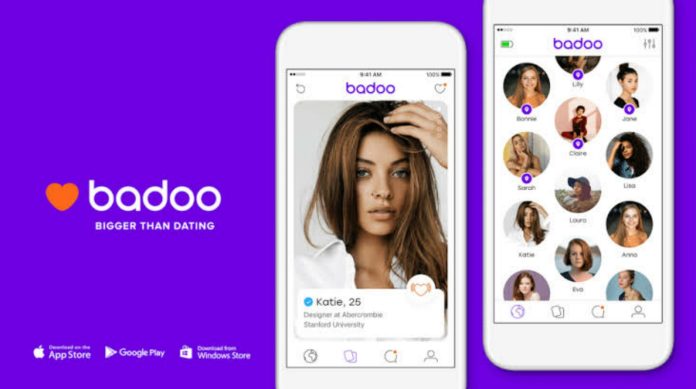
Badoo is one of the most popular social discovery platforms in the world. It’s designed to help you find people nearby or across the globe for casual chats, meaningful connections, or even romance. The app is available on Android, iOS, and Windows, making it accessible to almost everyone.

Unlike traditional dating websites, Badoo online dating app focuses on real-time interaction. You can swipe through profiles, send messages, and even start live video calls without sharing personal contact details. This makes it a safe and convenient option for modern daters.

Key Features of the Badoo Free Dating App

Live Video Chat

One of the standout features is the ability to video chat with matches directly within the app. No need to exchange phone numbers or use third-party tools. This feature helps you verify who you’re talking to and build trust before meeting in person.

Encounters Game

Similar to Tinder’s swipe mechanic, Badoo’s “Encounters” lets you quickly browse profiles and indicate interest. If both people swipe right, it’s a match — and you can start chatting immediately.

People Nearby

This feature shows you profiles of users in your vicinity. It’s perfect for spontaneous meetups or discovering new friends in your area. You can filter by age, distance, and gender to narrow down your options.

Verified Profiles

Badoo takes safety seriously. Users can verify their identity by taking a selfie in a specific pose. Verified profiles earn a blue checkmark, which helps you avoid catfishing and fake accounts.

How to Download and Use Badoo

Getting started with the Badoo download is straightforward. Follow these simple steps:

  1. Open the Google Play Store (for Android) or Apple App Store (for iOS).
  2. Search for “Badoo” and tap Install.
  3. Once installed, open the app and create an account using your phone number, Facebook, or Google.
  4. Set up your profile by adding a few photos and a short bio.
  5. Start swiping, chatting, and video calling immediately.
  6. For a direct link, you can also use the Badoo official app page to download it instantly.

    Is Badoo Really Free?

    Yes, Badoo is a free dating app. You can create a profile, swipe, and send messages without paying a dime. However, there are optional premium subscriptions — like Badoo Premium or Super Powers — that unlock extra features such as seeing who liked you, sending priority messages, and undoing accidental swipes.

    For most users, the free version is more than enough to meet new people and have meaningful conversations.

    Tips for Success on Badoo

    To get the most out of this best dating app 2025, keep these tips in mind:

    • Use high-quality photos: Your main photo should be clear, well-lit, and show your face. Avoid group shots as the first image.
    • Write an interesting bio: A few sentences about your hobbies, career, or what you’re looking for can spark conversations.
    • Be proactive: Don’t wait for others to message you. Send a friendly “Hi” or comment on something from their profile.
    • Stay safe: Never share personal information like your home address or bank details. Stick to in-app messaging until you feel comfortable.

    Alternatives to Badoo

    While Badoo is excellent, you might also want to explore other online dating tips and platforms. For instance, Nova Launcher isn’t a dating app, but it can help you customize your phone. For more app recommendations, check out our screen lock HD wallpaper review.

    Final Thoughts

    In summary, the Badoo online dating app is a solid choice for anyone looking to chat, meet, and match in 2025. Its live video feature, verified profiles, and large user base make it stand out from the competition. Best of all, it’s free to start. So why wait? Download Badoo today and start building new connections.

    If you found this guide helpful, share it with your friends on social media. And don’t forget to check out our other best dating app 2025 reviews for more options.

Continue Reading
Click to comment

Leave a Reply

Your email address will not be published. Required fields are marked *

How To

Fabby Selfie Art Camera App: A Complete Guide to Transforming Your Selfies

Published

on

Fabby Selfie Art Camera App: A Complete Guide to Transforming Your Selfies

Are you tired of taking selfies that lack that professional touch? Many smartphone users struggle with built-in cameras that don’t deliver the quality they desire. Fortunately, the Fabby Selfie Art Camera app offers a practical solution. This powerful tool can elevate your mobile photography, making ordinary selfies look like they were shot with a high-end DSLR. In this comprehensive guide, we will explore everything you need to know about this app, from its standout features to step-by-step usage instructions.

What Makes the Fabby Selfie Art Camera App Special?

The Fabby Selfie Art Camera app is not just another filter app; it’s a versatile photo editing suite designed for creativity and ease of use. Its core appeal lies in its ability to transform the background of your selfies. Instead of settling for a cluttered or dull backdrop, you can replace it with anything from a serene beach scene to a vibrant abstract pattern. This feature alone opens up endless possibilities for artistic expression.

Another standout capability is the background blur effect. By softening the area behind your subject, the app creates a depth-of-field effect that mimics professional portrait photography. This technique helps draw attention to your face, making your selfies look more polished and engaging. The app also includes a variety of color themes and filters, allowing you to adjust the mood and tone of your photos. Whether you prefer warm, golden hues or cool, monochromatic tones, you can find a preset that matches your vision.

Key Features at a Glance

  • Background Replacement: Swap out any background with a library of images or your own photos.
  • Background Blur: Create a professional bokeh effect to highlight your subject.
  • Color Themes & Filters: Apply artistic presets to change the overall look and feel.
  • User-Friendly Interface: Simple controls make editing accessible for beginners.

How to Download the Fabby Selfie Art Camera App

Getting started with the Fabby Selfie Art Camera app is straightforward. The app is available on the Google Play Store for Android devices. Simply open the Play Store on your smartphone, type “Fabby Selfie Art Camera” into the search bar, and you will see the app appear in the results. Tap on the install button, and within moments, the app will be ready to use. For your convenience, you can also use the direct link provided below to jump straight to the download page.

Once installed, the app will request certain permissions, such as access to your camera and photo gallery. These permissions are essential for the app to capture new selfies and edit existing images from your library. Granting these permissions is safe and standard for photo-editing applications.

Step-by-Step Guide: How to Use the App

Using the Fabby Selfie Art Camera app is intuitive, even for those who are not tech-savvy. Follow these simple steps to start creating stunning selfies:

  1. Open the App: After installation, launch the app from your app drawer.
  2. Grant Permissions: Allow the app to access your camera and storage when prompted. This is necessary for taking new photos and editing existing ones.
  3. Take or Select a Photo: You can either take a fresh selfie using the in-app camera or choose an existing photo from your gallery.
  4. Apply Background Effects: Once your photo is loaded, use the toolbar to select the background option. You can blur the background or replace it entirely with a new image.
  5. Adjust Color Themes: Experiment with the various color themes and filters available. Slide through the options to see how each one changes the mood of your photo.
  6. Save and Share: When you are satisfied with the result, tap the save button. The edited photo will be stored in your gallery, ready to be shared on social media or with friends.

This process is quick and efficient, allowing you to produce professional-looking selfies in just a few taps. The app’s interface is designed to minimize clutter, so you can focus on your creativity rather than navigating complex menus.

Why This App Stands Out Among Photo Editors

In a crowded market of photo editing apps, the Fabby Selfie Art Camera app distinguishes itself through its specialization in selfie enhancement. While other apps offer a broad range of editing tools, this app focuses specifically on the elements that matter most for selfies: background control and color grading. This targeted approach makes it incredibly efficient for users who primarily want to improve their portrait photos.

Moreover, the app’s performance is optimized for mobile devices, ensuring that editing is smooth and lag-free. It does not require a high-end smartphone to function well, making it accessible to a wide audience. For those looking to elevate their social media presence or simply capture better memories, this app is a valuable addition to their digital toolkit. You can also explore other useful tools like the Voice Lock app for added smartphone security.

Final Thoughts: Is It Worth Your Time?

To sum up, the Fabby Selfie Art Camera app is a fantastic option for anyone who wants to improve their selfie game without investing in expensive equipment or learning complex software. Its combination of background replacement, blur effects, and color themes provides a complete package for creative mobile photography. The app is easy to download, simple to use, and delivers impressive results that can make your photos stand out.

Building on this, if you enjoy experimenting with different apps, you might also find value in our review of the Transparent Wallpaper app for customizing your home screen. Ultimately, the Fabby Selfie Art Camera app empowers you to take control of your selfies and express your unique style. Give it a try, and you might be surprised at the professional-quality photos you can create with just your phone.

Continue Reading

How To

Black Wallpapers 4K: Transform Your Screen with Stunning Dark Backgrounds – Full App Guide

Published

on

Black Wallpapers 4K: Transform Your Screen with Stunning Dark Backgrounds – Full App Guide

Are you tired of dull, generic wallpapers that make your phone look ordinary? Many users struggle to find high-quality dark backgrounds that truly enhance their device’s display. Fortunately, the Black Wallpapers 4K app offers a solution. This comprehensive review explores how this app can revolutionize your screen with crisp, dark imagery perfect for AMOLED panels.

What Is the Black Wallpapers 4K App?

This application is a dedicated platform for downloading premium black-themed wallpapers in 4K resolution. It caters specifically to users who prefer dark backgrounds for a sleek, modern look. The app is lightweight, easy to use, and regularly updated with fresh content.

Unlike generic wallpaper apps, this one focuses on deep blacks and high contrast. This makes it an excellent choice for AMOLED screens, where true blacks save battery and make colors pop. The app is available for free on the Google Play Store.

Key Features of the Black Wallpapers 4K App

This app stands out due to its curated collection and user-friendly design. Below are the main features that users appreciate.

Diverse Wallpaper Categories

The app includes several categories to suit different tastes. You’ll find 3D abstract designs, animal wallpapers, black bike images, and car wallpapers. This variety ensures there’s something for everyone, whether you prefer minimalist patterns or bold automotive shots.

4K Resolution and AMOLED Optimization

All images are rendered in 4K quality, delivering sharp details and vibrant colors. The black backgrounds are particularly optimized for AMOLED displays. This means deeper blacks, reduced power consumption, and a longer battery life for compatible devices.

User-Friendly Interface

The app is designed with simplicity in mind. Even first-time users can navigate through categories effortlessly. Wallpapers are sorted logically, making it easy to find exactly what you’re looking for without confusion.

Regular Updates and Customization

The collection is updated frequently, so you never run out of options. Additionally, you can save your favorite wallpapers to a personal collection. This allows you to quickly switch between backgrounds without searching again.

How to Download and Use the Black Wallpapers 4K App

Getting started is straightforward. Follow these steps to install and enjoy the app on your Android device.

  1. Open the Google Play Store on your phone. Search for “Black Wallpapers 4K” or use the direct download link provided in the app’s official page.
  2. Install the app and launch it. You may need to grant basic permissions like storage access to save wallpapers.
  3. Browse categories such as abstract, animals, bikes, or cars. Tap any wallpaper to preview it in full screen.
  4. Set or download your chosen image. Use the “Set as Wallpaper” button to apply it directly, or save it to your gallery for later use.

Building on this, the app also allows you to share wallpapers with friends through social media or messaging apps. This makes it a social tool as well.

Why Choose This App for Dark Backgrounds?

There are several reasons why this app is a top pick for dark theme enthusiasts.

Enhanced Visual Appeal

Black wallpapers create a striking contrast against app icons and widgets. This makes your home screen look more organized and visually appealing. The 4K resolution ensures every detail is crisp, even on large screens.

Battery Savings on AMOLED Screens

For devices with AMOLED displays, black pixels are turned off entirely. This means that using black wallpapers can significantly reduce battery drain. The app’s focus on true black backgrounds maximizes this benefit.

Lightweight and Fast Performance

The app is optimized to run smoothly without consuming excessive storage or memory. It loads quickly and doesn’t lag, even on older devices. This ensures a seamless user experience.

Final Verdict: Should You Download It?

In conclusion, the Black Wallpapers 4K app is a solid choice for anyone seeking high-quality dark backgrounds. Its diverse categories, 4K resolution, and AMOLED optimization make it stand out from competitors. The user-friendly interface and regular updates further enhance its value.

However, the app could benefit from more customization options, such as wallpaper scheduling or blur effects. Despite this, it remains a reliable tool for refreshing your phone’s look. For more app recommendations, check out our review of the Rose Wallpaper app or explore Glitter Live Wallpaper for Android.

So, if you’re ready to upgrade your screen with stunning dark aesthetics, download the app today. Your phone will thank you.

Continue Reading

How To

How to Download WhatsApp Status on Mobile Without Any Application: A Simple Guide

Published

on

How to Download WhatsApp Status Without Any App on Your Mobile

Have you ever seen a friend’s WhatsApp status and wished you could save it instantly? Many users encounter this situation daily. They want to keep a memorable photo or video but feel awkward asking the person to resend it. Fortunately, there is a straightforward solution. You can download WhatsApp status without app using only your phone’s built-in file manager. This method works on both Android and iOS devices, though the steps vary slightly. Let’s explore how to save those precious moments without any third-party software.

Why Download WhatsApp Status Without an App?

Third-party apps often pose security risks. They might request unnecessary permissions or contain malware. By using the file manager approach, you keep your data safe. Additionally, this method is faster. You don’t need to install, configure, or update any extra software. It’s a native solution that works offline. As a result, you can save statuses even when you have limited internet connectivity. This technique is especially useful for users who value privacy and simplicity.

Step-by-Step Guide to Save WhatsApp Status Manually

Step 1: Open Your File Manager

First, locate the File Manager app on your phone. Most Android devices have one pre-installed. If you use an iPhone, you can access the Files app. This tool lets you browse all the data stored on your device.

Step 2: Access Phone Storage

Next, tap on “Phone Storage” or “Internal Storage.” This section contains all your folders, including those created by apps like WhatsApp.

Step 3: Find the WhatsApp Folder

Scroll down until you see a folder named “WhatsApp.” If you cannot find it, use the search bar at the top. Type “WhatsApp” and the folder will appear instantly.

Step 4: Enter the Media Directory

Open the WhatsApp folder. Inside, you will find several subfolders. Tap on the one labeled “Media.” This is where WhatsApp stores all shared content.

Step 5: Locate the Statuses Folder

Within the Media folder, look for “Statuses.” This hidden folder automatically saves a temporary copy of every status you view. Tap on it to see all recent statuses from your contacts.

Step 6: Copy or Move the Desired Status

Press and hold the file you want to keep. A menu will appear with options like “Copy” or “Move.” Choose “Copy” to leave the original in place, or “Move” to transfer it permanently.

Step 7: Save to Your Preferred Location

Select the destination folder, such as “Downloads” or “Pictures.” Tap “Copy to Here” or “Move to Here.” The status is now saved on your device. You can access it anytime from the Gallery or File Manager.

Important Tips for a Smooth Download WhatsApp Status Without App Experience

Make sure you view the status before attempting to save it. WhatsApp only stores statuses that have been seen. If you skip a status, it may not appear in the folder. Also, remember that statuses disappear after 24 hours. Therefore, act quickly. This method works for both photos and videos. However, video files might be in a compressed format. To get the original quality, ask the sender to share the file directly. For more WhatsApp tips, check out our guide on sending HD media on WhatsApp.

Alternative Methods: Using Third-Party Apps

If you prefer an automated solution, several apps claim to download WhatsApp status without app hassle. However, these apps often require access to your notifications or storage. Use them with caution. Always check reviews and permissions before installing. A safer alternative is to use a screen recorder for videos or a screenshot for photos. While not as clean, these methods avoid external software risks. For more details, read our article on best WhatsApp status saver apps.

Frequently Asked Questions

Can I download WhatsApp status on iPhone without an app?
Yes. On iPhone, use the Files app. Navigate to WhatsApp > Media > Statuses. However, iOS restricts access to some folders. You might need to use a third-party file manager like Documents by Readdle.

Why can’t I see the Statuses folder?
This folder appears only after you have viewed at least one status. If it’s missing, ask a friend to post a new status, view it, then check again.

Does this method work for WhatsApp Business?
Absolutely. WhatsApp Business stores statuses in the same folder structure. Follow the same steps to save content from business accounts.

Final Thoughts

Learning to download WhatsApp status without app is a valuable skill. It saves time, protects your privacy, and works offline. By following the nine simple steps above, you can keep any status you like. No more awkward requests or missed opportunities. Share this guide with friends who also want to master WhatsApp. For more productivity hacks, explore our social media tips section.

Continue Reading

Trending