Connect with us

Infosecurity

Dark RAT Malware: Inside the Android Remote Access Trojan Targeting Victims Worldwide

Published

on

Dark RAT Malware: Inside the Android Remote Access Trojan Targeting Victims Worldwide

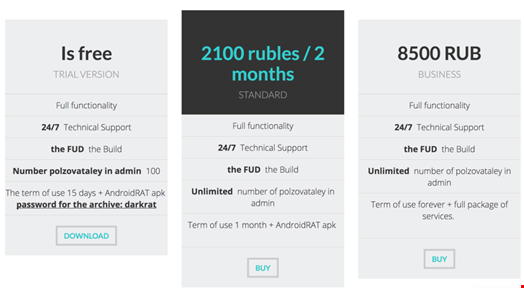
Cybercriminals are constantly evolving their tactics, and the Dark RAT malware is a prime example of how commodity threats remain dangerous. Uncovered by Fujitsu Cyber Threat Intelligence in March 2017, this remote access trojan (RAT) is marketed as a Fully Undetectable (FUD) build, offering attackers a cheap and effective way to steal sensitive data. With a tiered pricing model and even an Android version, Dark RAT highlights the growing convergence of mobile and desktop threats.

What Is Dark RAT Malware and How Does It Work?

Dark RAT is a remote access trojan designed to infiltrate systems and exfiltrate private information. The developer offers it as a FUD build, meaning it can evade many antivirus programs. This makes it especially appealing to low-level cybercriminals—often called “average attackers”—who rely on commodity malware rather than sophisticated exploits.

The malware includes an Android variant, reflecting a broader trend in mobile malware. In 2015, authorities arrested several suspects linked to DroidJack, another Android RAT. More recently, Check Point identified adware on the Google Play Store that infected over 10,000 users. These incidents underscore the rising risk of mobile threats.

Dark RAT Features: Credential Theft and Keylogging

Although Dark RAT is not revolutionary, its features are highly effective for data theft. The trojan can capture browser credentials, log keystrokes, and steal login details from platforms like Steam and Skype. These capabilities allow attackers to compromise accounts and move laterally within networks.

According to metadata in the RAT builder, the developer used an unpaid evaluation copy of Resource Tuner from HeavenTools. This detail suggests the malware was created with limited resources, yet it still poses a serious threat.

Pricing Model: A Three-Tiered Approach

Dark RAT comes with three pricing tiers, including a trial version. Each tier offers varying levels of functionality, such as administrative controls and Android APK generation. This model makes the malware accessible to a wide range of attackers, from hobbyists to more organized groups.

Who Are the Victims of Dark RAT?

Fujitsu’s analysis revealed victims across multiple countries, including Russia, Ukraine, Sweden, the Czech Republic, and Kazakhstan. The geographic spread shows that commodity malware like Dark RAT does not discriminate—it can target anyone with weak security defenses.

This is not an isolated case. In November 2016, Fujitsu reported a similar operation targeting Middle Eastern businesses using KeyBase malware. The pattern is clear: remote access trojans remain a persistent threat, even if they lack the complexity of advanced persistent threats (APTs).

How to Protect Against Android Remote Access Trojans

Organizations cannot afford to ignore threats like Dark RAT malware. While they may not make headlines like APT attacks, they are far more common and can cause significant damage. A robust defense strategy includes three key components:

  • Security education programs: Train employees to recognize phishing emails and suspicious downloads.
  • Threat intelligence systems: Use services like Fujitsu Cyber Threat Intelligence to stay informed about emerging malware.
  • Incident response plans: Prepare for a breach with clear protocols to minimize damage.

Building on this, mobile device management (MDM) solutions can help prevent Android malware infections. Regularly updating software and using reputable app stores also reduces risk. As the threat landscape evolves, complacency is no longer an option.

For more insights, check out our guide on cybersecurity best practices for businesses and learn about mobile threat prevention strategies.

Continue Reading
Click to comment

Leave a Reply

Your email address will not be published. Required fields are marked *

Infosecurity

How to Sell Endpoint Security to Business Leaders: 5 Proven Strategies

Published

on

How to Sell Endpoint Security to Business Leaders: 5 Proven Strategies

Cybersecurity budgets are rising, yet many organizations still underinvest in endpoint security. Business leaders often overlook the risks posed by everyday office devices—printers, laptops, smartphones—that connect to corporate networks. As a result, IT managers face a critical challenge: convincing the C-suite that endpoint security deserves a larger slice of the budget pie.

To succeed, security professionals must move beyond technical jargon and speak the language of business. Here are five practical strategies to help you pitch endpoint security to business leaders effectively.

1. Translate Tech into Business Value

Only a small fraction of CIOs are considered trusted allies by their CEOs, according to industry surveys. Why? Many technologists focus on malware and specific threats instead of operational efficiencies and revenue impact. This disconnect undermines their credibility.

To bridge the gap, reframe the conversation. Instead of talking about zero-day exploits, quantify the benefits of secure endpoints. Explain how investing in HP security printers or managed devices can protect customer data, reduce downtime, and improve ROI. Business leaders care about numbers, not technical details.

By translating risk into financial terms, you position yourself as a strategic advisor—not just a tech gatekeeper.

2. Make the Threat Tangible with Real-World Examples

Abstract risks rarely move executives. You need to make the threat concrete. For instance, highlight that network-connected printers often store sensitive documents on hard drives. A hacker could intercept a confidential contract sent to an unsecured printer, or use the device as a springboard to access other parts of the network.

Use vivid scenarios: “Imagine a competitor stealing your quarterly financial report from a printer’s memory.” Such illustrations resonate more than generic warnings about “cyber threats.”

When you sell endpoint security to business leaders, always pair the problem with a clear, real-world consequence.

3. Prioritize Your Recommendations

Before meeting with the C-suite, understand what matters most to the business. Is it compliance, customer trust, or operational continuity? Align your endpoint security proposals with these priorities.

Stack-rank your recommendations by urgency. For example, if one department handles 70% of all print jobs but uses outdated printers, that’s a high-risk area requiring immediate attention. Present a clear, prioritized list—not a laundry list of every vulnerability.

Executives appreciate brevity and focus. Show them where the biggest risks lie, and why those should be addressed first.

4. Build Cross-Functional Alliances

Security is no longer an IT-only issue. It affects legal, HR, sales, and operations. Build alliances with colleagues from these departments to present a united front.

  • Partner with legal to explain regulatory penalties from a data breach.
  • Work with HR to highlight employee privacy concerns.
  • Team up with sales to emphasize the risk of stolen go-to-market plans.

When multiple leaders voice the same concern, the C-suite takes notice. A joint presentation carries far more weight than a solo pitch.

5. Embrace the Long-Term Journey

Cybersecurity is not a one-time fix; it’s an ongoing process. Similarly, convincing executives to invest in endpoint security requires patience and persistence. Don’t expect to get everything you want in one meeting.

Map out an incremental strategy. Start with the most critical devices—like HP security printers—then expand to other endpoints over time. Frame each investment as a step toward a broader security culture.

By taking the long view, you build trust and credibility. Eventually, the C-suite will see you as a strategic partner, not just a cost center.

For more on building a security-first culture, check out our guide on creating a cybersecurity-aware organization.

Conclusion: Bridge the Gap

Selling endpoint security to business leaders is about communication, not technology. Learn their language, make risks tangible, prioritize your asks, build alliances, and think long-term. With these five strategies, you can turn the C-suite into your strongest ally—and protect your organization from the inside out.

Continue Reading

Infosecurity

Bill 34 Passed: How the New Law Targets US Online Privacy and What You Can Do

Published

on

Bill 34 Passed: How the New Law Targets US Online Privacy and What You Can Do

In a move that has sent shockwaves through the digital world, Bill 34 has officially been passed into law. This legislation directly targets US online privacy, effectively dismantling protections that once kept internet service providers (ISPs) from freely exploiting user data. For millions of Americans, the implications are immediate and profound: your browsing history, search habits, and even incognito activity are now up for sale without your explicit consent.

But what exactly does Bill 34 mean for the average internet user? More importantly, how can you safeguard your digital footprint in this new landscape? This article breaks down the law, its origins, and practical steps to regain control over your personal information.

What Is Bill 34 and How Does It Affect US Online Privacy?

Bill 34, formally known as S.J.Res. 34, is a joint resolution that nullifies the Federal Communications Commission (FCC) privacy rules established in 2016. Those rules, introduced under the Obama administration, required ISPs to obtain explicit permission before collecting or sharing customer data. They were designed to protect US online privacy by treating broadband providers as gatekeepers of sensitive information.

Now, with Bill 34 in effect, ISPs like Comcast, AT&T, and Verizon can monitor, collect, and sell your browsing history, app usage, location data, and more—all without notifying you or seeking approval. As a result, your online behavior becomes a commodity traded to advertisers, marketers, and data brokers.

Why Was Bill 34 Introduced? The Political and Legal Context

Republican lawmakers, led by Senator Jeff Flake, argued that the FCC rules placed an unfair burden on ISPs compared to tech giants like Google, Amazon, and Netflix, which are regulated by the Federal Trade Commission (FTC) rather than the FCC. Flake claimed the resolution would “restore a consumer-friendly approach” by empowering users to make informed choices about their data.

However, critics counter that the law does the opposite. Instead of giving consumers control, it removes the only layer of protection that required ISPs to act as trusted stewards of private information. The bill passed swiftly through both chambers of Congress and was signed by President Trump, despite opposition from Senate Minority Leader Chuck Schumer and privacy advocates.

Key Differences Between ISP and Tech Company Regulations

One central argument in this debate is the regulatory disparity. While Google and Amazon face FTC oversight, ISPs were subject to stricter FCC rules. Bill 34 levels the playing field by eliminating those rules, but at the cost of US online privacy. Without dedicated privacy regulations for ISPs, consumers are left vulnerable to data exploitation that tech companies have long been criticized for.

What the Law Means for Your Data: Real-World Implications

Under Bill 34, ISPs can now track everything you do online, including activity in incognito or private browsing modes. They can build detailed profiles based on your health searches, financial transactions, political views, and even your location at specific times. This data can then be sold to third parties without your knowledge.

For advertisers, this is a goldmine. For consumers, it’s a privacy nightmare. The loss of US online privacy means that sensitive information—such as medical conditions, religious affiliations, or personal relationships—could be exposed or used to target you with manipulative ads.

How to Protect Your US Online Privacy After Bill 34

Despite the setback, you are not powerless. Privacy advocates recommend several steps to shield your data from prying ISPs:

  • Use a VPN: A virtual private network encrypts your internet traffic, making it unreadable to your ISP. This is one of the most effective ways to restore US online privacy. Many reputable VPN services are available, and some offer free tiers.
  • Switch to HTTPS-Only Browsing: Ensure websites you visit use HTTPS encryption. Browser extensions like HTTPS Everywhere can enforce this automatically.
  • Adjust Browser Privacy Settings: Disable third-party cookies, use private browsing modes, and clear your history regularly. While these steps don’t block ISP tracking, they reduce the amount of data collected.
  • Support Privacy Legislation: Advocate for new federal privacy laws that apply equally to all companies, including ISPs. Groups like the Electronic Frontier Foundation (EFF) are actively fighting for stronger protections.

In addition, legal challenges are underway. Companies like Google and advocacy organizations have filed lawsuits against Bill 34, arguing that it violates consumer rights. However, until these cases are resolved, individual action remains your best defense.

Looking Ahead: The Future of US Online Privacy

Bill 34 marks a significant shift in the balance between corporate interests and individual privacy. While it empowers ISPs economically, it undermines the trust that users place in their internet connection. As more people become aware of these risks, demand for privacy tools and stronger regulations is likely to grow.

For now, the onus is on you to take control. By using encryption tools, staying informed, and supporting privacy-focused organizations, you can mitigate the impact of this law. Remember, US online privacy is not a lost cause—it’s a right worth fighting for.

For more tips on securing your digital life, check out our guide on how to choose a VPN and our analysis of internet privacy laws explained.

Continue Reading

Infosecurity

The Domain Name and Its Role in Cyber Forensics: Unmasking Digital Crime

Published

on

The Domain Name and Its Role in Cyber Forensics: Unmasking Digital Crime

When you type a website address into your browser, the Domain Name System (DNS) silently translates it into an IP address. This system, first standardized in 1984, made the internet accessible and fueled e-commerce. However, the same ease of registering a domain name for a few dollars also opens the door to cybercriminals. Understanding the domain name cyber forensics connection is now essential for investigators tracing malicious activity.

Cybercriminals routinely exploit domain names to launch phishing campaigns, deploy botnets, or execute brandjacking. For instance, they register domains that closely mimic legitimate company names—a tactic known as typosquatting. Alternatively, they redirect users to rogue servers that steal credentials. These attacks rely on the central role DNS plays in routing traffic. But here’s the twist: every malicious domain leaves behind digital footprints that forensic experts can follow.

How DNS Data Powers Cyber Forensics Investigations

In a typical cyber forensics investigation, analysts start by examining Whois records. These public databases contain registration details for each domain name and IP address block. Attackers often use fake names and addresses, but they cannot hide all traces. By correlating email addresses, IP identifiers, and registration patterns, investigators can map out entire criminal networks.

Building on this, domain-based threat intelligence involves linking newly registered domains to subsequent malicious activities. For example, a botnet’s infected nodes periodically beacon out to command-and-control domains. Analysts can trace these domains back to a smaller set of IP addresses. This approach helps security teams stay ahead of blacklists and detection systems.

Real-World Case: Uncovering a Casino Data Breach

In May 2016, a UK-based online casino hired Horizon Forensics to investigate a data breach that had cost millions in lost revenue. Attackers had stolen the head of security’s login credentials, accessed the customer database, and sold betting records to a marketing affiliate. That affiliate then sent phishing emails to high rollers, enticing them to switch to rival casinos.

Investigator Dean Olberholzer began by examining the IP and email addresses used in the marketing pitches. Using DNS data, he quickly correlated unique identifiers to recently registered domain names. Although the affiliate used the Moniker privacy service to anonymize registration details, Olberholzer traced email addresses across all domains ever registered—in reverse chronological order. He also cross-referenced data from Google AdSense, AdWords, Analytics, Facebook, and Skype.

This domain-centric approach revealed the affiliate’s true identity and location in Israel. Cash flowed from casinos to bank accounts in Cyprus, Seychelles, and Panama. A kingpin based in Thailand orchestrated the scheme, which had victimized several other casinos, causing an aggregate revenue loss of $500 million.

The Role of DNS in Detecting Phishing and Botnets

Phishing campaigns often rely on spoofed domains to trick employees into revealing credentials. Similarly, botnets use thousands of malicious domains to evade detection. In both cases, attackers set up dozens or hundreds of domains tied to a smaller subset of IP addresses. Forensic analysts can use DNS intelligence to spot these patterns early.

For example, a sudden spike in domain registrations mimicking a company’s name may signal an impending attack. Investigators can then proactively block those domains or monitor them for malicious activity. This proactive approach is far more effective than reacting after a breach.

Building Your Own Threat Intelligence with DNS

Many security teams now adopt a “roll your own” approach to threat intelligence. Instead of relying solely on external feeds, they combine DNS data with internal logs and public sources. This method blends the analyst’s experience with automated tools to create customized, relevant intelligence. Counterintuitively, this can save time because it focuses on the most relevant threats.

To get started, analysts can use tools like Whois Lookup to examine domain registration details. They can also monitor DNS query logs within their own network. By correlating suspicious domains with known attack patterns, they can uncover hidden connections.

Conclusion: Why Domain Name Intelligence Matters

As cybercriminals become more sophisticated, traditional detection methods often fall short. However, the domain name remains a weak link in their operations. Every malicious domain leaves a trail of registration data, IP addresses, and behavioral patterns. By integrating domain name cyber forensics into their workflows, investigators can unmask attackers, disrupt campaigns, and prevent future breaches.

Ultimately, the DNS is not just a technical protocol—it is a powerful forensic tool. Whether you are a security analyst or a business owner, understanding how to leverage domain intelligence can make the difference between a contained incident and a catastrophic loss.

Continue Reading

Trending