Connect with us

Artificial Intelligence

Google Gemini’s New Troubleshooting Mode Could Save You a Trip to Help Manuals

Published

on

Google Gemini’s New Troubleshooting Mode Could Save You a Trip to Help Manuals

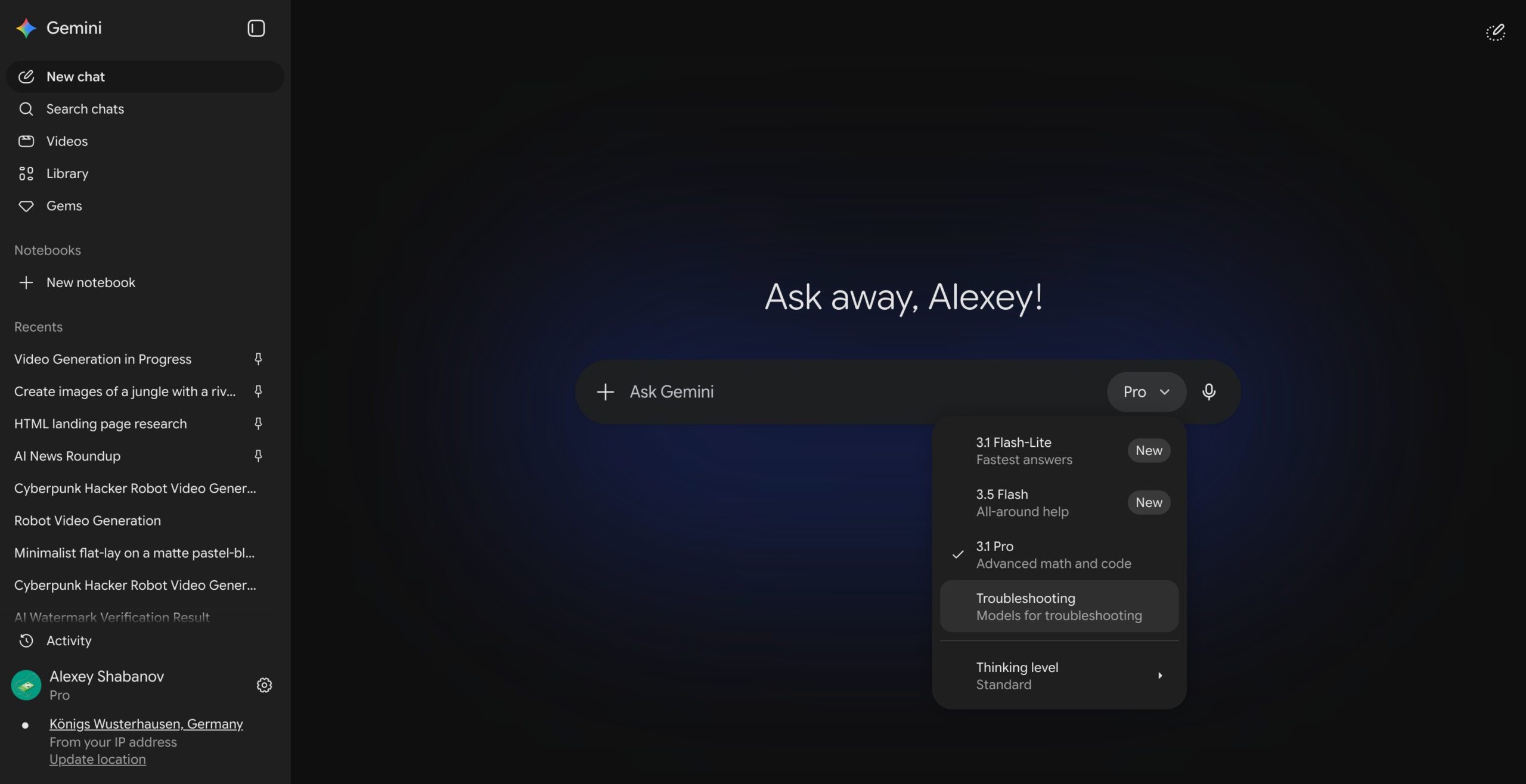
Imagine your car won’t start, and instead of digging through a dusty manual or scrolling endless forums, you tap a button and get a guided, step-by-step diagnostic. That’s exactly what Google’s Gemini troubleshooting mode promises. Recently spotted in the wild by TestingCatalog, this new feature quietly appeared inside the Gemini model picker menu for a handful of users. It sits alongside familiar options like Gemini 3.5 Flash and 3.1 Pro, but its purpose is radically different.

What Does Gemini Troubleshooting Mode Actually Do?

Instead of delivering a dense block of text, the Gemini troubleshooting mode walks you through problems using a combination of written responses and interactive widgets. For example, if you tell Gemini your car won’t start, it might list common culprits—like a dead battery—and then present you with symptom options to tap, such as “clicks or silent.” This helps narrow down the issue far more efficiently than a standard chat query.

According to early reports from TestingCatalog, the mode uses a structured, guided experience. It’s not just about giving you an answer; it’s about leading you through a logical diagnostic process. This could be a game-changer for anyone who has ever struggled with appliance repairs, computer errors, or vehicle issues.

Building on this, the interactive widgets allow you to select symptoms, view possible causes, and receive targeted fixes—all within the Gemini interface. It’s a far cry from the generic responses you’d get in regular chat mode.

How Is This Different from Asking Gemini Normally?

That’s a fair question. The key difference lies in how the mode is tuned under the hood. Redditors who gained early access suggest that Gemini troubleshooting mode operates on a lower temperature setting. In AI terms, this means the model sticks closely to the problem at hand and avoids conversational filler. Its responses are reportedly laser-focused on diagnosis and practical fixes rather than general information.

As a result, you get concise, actionable advice without the fluff. Google hasn’t officially announced the feature, and it remains unclear whether this is a planned rollout or an internal test that leaked. For now, the troubleshooting option appears to be an unintended release—meaning Google likely flipped it on by mistake and could pull it back at any time.

What This Means for Users

If you’re excited about this Gemini troubleshooting mode, you’re not alone. It represents a shift toward more practical, task-oriented AI assistance. However, keep in mind that the feature is still in flux. More details are expected in the coming weeks, especially if Google decides to officially unveil it.

In the meantime, there’s plenty more happening with Gemini. Google recently unveiled Gemini Spark, a 24/7 AI agent that handles background tasks. On the flip side, free users may soon face stricter weekly usage caps. For a deeper dive into how AI assistants are evolving, check out our guide on AI assistant features.

Will Troubleshooting Mode Replace Help Manuals?

Potentially, yes. The Gemini troubleshooting mode is designed to be a one-stop shop for common problems—from tech glitches to household repairs. Instead of flipping through PDFs or watching disjointed YouTube videos, you get a coherent, step-by-step walkthrough. This could save time and reduce frustration, especially for non-tech-savvy users.

Nevertheless, it’s still early days. The feature hasn’t been stress-tested on a wide scale, and its accuracy will depend on the quality of the underlying data. Google’s AI models are powerful, but they’re not infallible. For now, think of it as a helpful starting point rather than a definitive fix.

Curious about other Gemini innovations? Read our analysis of Gemini Spark’s background capabilities.

What’s Next for Gemini’s Troubleshooting Mode?

Given that this appears to be an accidental release, Google’s next steps are anyone’s guess. The company could either embrace the feature and roll it out officially, or quietly remove it. Based on the positive early feedback, an official launch seems likely—but nothing is guaranteed.

To stay updated, keep an eye on the Gemini app’s model picker menu. If you see the troubleshooting option appear, you’ll know you’re among the first to test it. In the meantime, you can explore other Google Gemini tips to get the most out of the assistant.

Ultimately, Gemini troubleshooting mode represents a step toward more intuitive, human-like AI assistance. It’s not just about answering questions; it’s about solving problems. And that’s something we can all get behind.

Continue Reading
Click to comment

Leave a Reply

Your email address will not be published. Required fields are marked *

Artificial Intelligence

You Can Now Send Emails Directly from ChatGPT on the Web — Here’s How It Works

Published

on

You Can Now Send Emails Directly from ChatGPT on the Web — Here’s How It Works

If you’ve ever asked ChatGPT to draft an email, only to copy and paste it into Gmail or Outlook, you’re not alone. That extra step has just become obsolete. OpenAI has quietly rolled out a feature that lets you send emails from ChatGPT directly within the conversation — no more switching tabs or copying text.

This update streamlines the entire workflow. You draft, edit, and send your message without ever leaving the chat interface. It’s a small change, but for anyone who uses ChatGPT for daily correspondence, it could save significant time.

How the ChatGPT Email Feature Works

Writing blocks have been part of ChatGPT since late last year. When you ask the AI to compose an email, it now presents the result in a clean, separate block that mimics a real email editor. You can highlight any line and request changes, accept or reject suggestions one by one, or edit the text directly inside the block.

Building on this, the latest update adds a send button. Once you’re happy with your draft, you can hit send without copying anything elsewhere. The entire process — from drafting to delivery — stays inside the same conversation.

As a result, the workflow feels more seamless. You no longer need to juggle multiple windows or worry about formatting getting lost during copy-paste. For frequent email writers, this is a notable productivity boost.

Is It Safe to Send Emails Through ChatGPT?

Before you start using this feature for all your correspondence, there’s an important caveat. A recent lawsuit filed in California alleges that OpenAI shared user prompts, chat queries, and identifying information with Google and Meta tracking tools without proper consent. The case claims this violated California privacy law and federal wiretap regulations.

This means you might want to think twice before sending sensitive or confidential emails through ChatGPT. While the feature is convenient, privacy concerns remain. OpenAI has not commented directly on the lawsuit, but the allegations highlight potential risks.

On the other hand, for routine, non-sensitive messages, the new email capability could be a practical tool. Just be mindful of what you share.

What Else Is New with ChatGPT?

OpenAI isn’t slowing down on innovation. Beyond the email feature, ChatGPT is becoming more personalized. It now learns from your chat history over time, retaining information to make conversations feel tailored to you. This means the AI can remember your preferences, writing style, and recurring topics.

Additionally, ChatGPT for Excel and Google Sheets has officially moved out of beta and is now available globally. This tool lets you build workbooks, clean data, and write formulas using plain language — no spreadsheet expertise required. It’s designed to make data tasks accessible to everyone, not just analysts.

For more on how AI is reshaping productivity, check out our guide on top AI productivity tools for 2025.

Final Thoughts on Sending Emails from ChatGPT

The ability to send emails from ChatGPT directly on the web is a welcome addition for anyone who values efficiency. It removes friction from the drafting process and keeps everything in one place.

However, the privacy concerns raised by the recent lawsuit cannot be ignored. As with any AI tool, it’s wise to weigh convenience against confidentiality. For everyday, non-sensitive emails, this feature is a game-changer in terms of workflow. For anything sensitive, stick to traditional email clients.

OpenAI continues to push boundaries, and this update is another step toward making AI an integral part of daily tasks. Whether you’re a busy professional or a casual user, the new email capability is worth trying — just keep your privacy settings in check.

Continue Reading

Artificial Intelligence

iOS 27 could force iPhone users to retrain muscle memory with a new notification gesture

Published

on

iOS 27 could force iPhone users to retrain muscle memory with a new notification gesture

Apple is reportedly preparing a major shift in how notifications work on the iPhone with the upcoming iOS 27 notification gesture redesign. According to a report from Bloomberg’s Mark Gurman, internal builds of iOS 27 and iPadOS 27 now show incoming notifications sliding in from the left side of the screen. While this might seem like a minor visual tweak at first glance, it actually signals a much deeper rethinking of navigation gestures — one that could force longtime iPhone users to unlearn years of ingrained muscle memory.

Why the familiar swipe may no longer work as expected

For years, iPhone users have relied on a simple, almost instinctive gesture: swipe down from the center of the screen to pull up notifications. That core interaction is reportedly changing in iOS 27. Under the new system, swiping down from the center would instead open Search or an AI-powered assistant panel. Notifications would move to a separate gesture, requiring users to swipe down from the left side of the display to access Notification Center. Anyone who has ever switched from another smartphone platform knows how deeply these gestures become embedded in daily use. This means that millions of people may need to consciously retrain their thumbs — and their brains — to adapt to the new flow.

How the new gesture compares to current behavior

Currently, a single swipe down from the top left or center reveals your notification shade. In iOS 27, that same motion from the center would launch Apple’s AI assistant or Search. The notification center would only appear when you swipe from the left edge. This is a fundamental shift in interaction design. It mirrors how some Android skins have handled notifications, but for iPhone loyalists, it could feel jarring at first. The visual cue of notifications sliding in from the left side is designed to reinforce the new behavior, but whether users embrace the change remains an open question.

Apple’s AI ambitions may be driving the gesture overhaul

The reported redesign suggests that Apple wants to give Search and AI features a much more prominent role in the iPhone experience. Rather than hiding AI tools behind buttons or menus, the company appears to be assigning them one of the most natural gestures on the phone: the center swipe. This is a strong signal about where Apple sees user interactions heading. By placing AI front and center, Apple is betting that users will eventually prefer a more proactive, intelligent assistant over a simple notification list. However, history shows that even small adjustments to familiar gestures can spark strong reactions. The iOS 27 notification gesture change is not just about where notifications appear — it’s about redefining how people instinctively interact with their devices every day.

What this means for iPad users

iPadOS 27 will likely follow the same logic. On the larger screen, swiping from the left side to access notifications could feel more natural, given the iPad’s wider display. But for iPad users who have grown accustomed to the center swipe, the transition may still require some adjustment. Apple’s decision to unify the gesture across both platforms suggests a long-term vision: one where AI and search are the primary entry points, and notifications are a secondary layer. This could also pave the way for deeper integration with Siri and future AI features.

Will users embrace the change or resist it?

Change is never easy, especially when it involves muscle memory. The iOS 27 notification gesture redesign is a classic example of Apple prioritizing future functionality over current comfort. On one hand, the shift could make the iPhone more intuitive for new users who haven’t yet developed strong habits. On the other hand, longtime iPhone users may find themselves accidentally opening Search instead of notifications for weeks after the update. Apple has a history of making bold interface changes — like removing the home button — that initially frustrate users but eventually become standard. Whether this gesture overhaul follows that pattern or sparks a backlash depends on how well Apple communicates the change and how quickly users adapt.

For more on how iOS updates impact user behavior, check out our guide on iOS gesture changes over the years. And if you’re curious about the broader trend toward AI-first interfaces, read our analysis of Apple’s AI strategy in 2025.

Continue Reading

Artificial Intelligence

ChatGPT’s memory gets a major upgrade: here’s how the new ‘dreaming’ system works

Published

on

ChatGPT’s memory gets a major upgrade: here’s how the new ‘dreaming’ system works

For months, users of ChatGPT have complained about inconsistent recall—details vanishing, outdated preferences lingering, and memories that simply wouldn’t stick. Now, OpenAI is rolling out a significant ChatGPT memory upgrade called “dreaming,” designed to make conversations feel more natural and context-aware. This overhaul addresses one of the platform’s most persistent weaknesses since memory features launched in 2024.

How the dreaming system changes memory management

The original memory system relied on explicit cues—users had to ask ChatGPT to remember something. That approach often let valuable context slip through the cracks. Temporary details, like an upcoming vacation or a dietary preference, had no way to update themselves over time.

OpenAI’s new dreaming system works differently. It synthesises information from your chat history automatically, running in the background without waiting for a manual trigger. This means that if you mentioned a trip to Singapore last month, the system no longer assumes you’re still there. It accounts for the passage of time, refreshing or discarding information as context evolves.

In addition, a new memory summary page gives users a clear overview of what ChatGPT knows about them. You can review stored facts, make corrections, and add details manually. This added transparency helps you steer the AI’s memory more precisely.

Better application of preferences in conversations

The update also improves how ChatGPT applies your preferences during chats. If you’ve noted in past conversations that you’re vegetarian or that you prefer quieter restaurants, the new system is better at pulling that context into new discussions. You no longer have to repeat yourself—a common frustration with earlier versions.

This means that the ChatGPT memory upgrade not only stores more accurate information but also uses it more intelligently during interactions. The result is fewer awkward or irrelevant responses, making the chatbot feel more like a helpful assistant that remembers your habits.

Who gets the update and when

OpenAI is rolling out the dreaming system to ChatGPT Plus and Pro users in the United States starting today. Over the coming weeks, it will expand to additional countries and to the Free and Go tiers. The inclusion of the free tier is particularly notable.

According to OpenAI, recent efficiency improvements reduced the compute required to serve the memory feature by roughly 5x. That made a free-tier rollout practical. The company also increased memory capacity by 2x for Plus and Pro users, allowing them to store more context without performance hits.

This wider availability means that more people can benefit from improved recall, regardless of their subscription level. For those who rely on ChatGPT for daily tasks, this is a welcome change.

Will the dreaming system solve user frustrations?

Memory has been one of the most-requested improvements from ChatGPT users. Complaints about inconsistent recall, stale information, and new memories not saving have surfaced regularly on Reddit and other forums. The dreaming system directly targets these pain points by making memory updates automatic and context-sensitive.

However, whether this ChatGPT memory upgrade resolves those frustrations in practice—rather than in benchmark tests—remains to be seen. Early adopters will likely provide feedback on how well the system handles nuanced changes, such as shifting preferences or evolving life circumstances.

For now, OpenAI is positioning dreaming as a significant leap forward. If it works as advertised, users can expect fewer “I don’t remember that” moments and more fluid, personalised conversations. As the rollout expands, the true test will be how seamlessly the system adapts to real-world usage patterns.

To learn more about optimising your ChatGPT experience, check out our guide on improving AI productivity. For updates on future features, visit the OpenAI blog.

Continue Reading

Trending