Connect with us

How To

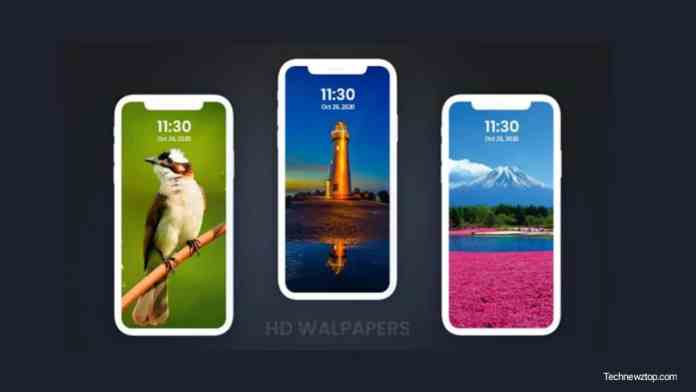
HD Wallpapers Best Backgrounds Android App: A Complete Guide to Personalising Your Phone

Published

on

HD Wallpapers Best Backgrounds Android App: A Complete Guide to Personalising Your Phone

Your phone’s wallpaper is the first thing you see every time you unlock the screen. A dull or blurry background can make even the best device feel uninspired. That’s where the HD Wallpapers Best Backgrounds app steps in. This Android application offers a vast library of crisp, high-resolution images that can transform your phone’s look in seconds. Whether you’re into serene landscapes, vibrant abstract art, or cute animals, this app promises something for everyone.

Many users struggle to find wallpapers that don’t pixelate on modern screens. The HD Wallpapers Best Backgrounds app solves this problem by curating images specifically optimised for mobile displays. In this guide, we’ll walk you through everything you need to know: how to download the app, how to use its features, and why it stands out among the crowd of wallpaper apps on the Google Play Store.

How to Download and Install HD Wallpapers Best Backgrounds

Getting started is straightforward. The app is available directly on the Play Store, so you don’t need to sideload anything or worry about security risks. Simply open the Play Store on your Android device, type “HD Wallpapers Best Backgrounds” in the search bar, and tap the first result. Alternatively, you can use the official download link provided on the developer’s website.

Once the app finishes downloading, tap “Install.” The process usually takes less than a minute, depending on your internet speed. After installation, open the app and grant the necessary permissions — such as access to storage — so you can save wallpapers to your device. That’s it. You’re now ready to explore thousands of stunning backgrounds.

Step-by-Step Guide to Using the App

1. Browse the Collection

Upon opening the app, you’ll see a grid of thumbnails. Swipe through the categories at the top — Nature, Animals, Art, Abstract, and more. Each category contains dozens of images, all displayed in crisp HD previews. Tapping any thumbnail opens a full-screen view where you can examine the details before deciding.

2. Set a Wallpaper

Found one you like? Tap the “Set Wallpaper” button. The app will ask whether you want to apply it to your home screen, lock screen, or both. Choose your preference, and the image is instantly applied. The app also offers a cropping tool so you can adjust the framing to fit your screen perfectly.

3. Save Favourites for Later

Don’t want to decide right away? Use the heart icon to bookmark wallpapers into a dedicated Favourites section. This feature is especially handy if you like to rotate your backgrounds weekly. You can build a personal gallery of top picks without having to search again.

Key Features That Make This App Stand Out

The HD Wallpapers Best Backgrounds app isn’t just another wallpaper repository. It packs several thoughtful features that enhance the user experience. Here are the highlights:

  • High-Quality Images: Every wallpaper is rendered in true HD resolution. No more blurry or stretched images — your screen will look sharp and vibrant.
  • Diverse Categories: From breathtaking sunsets to minimalist patterns, the app organises content into intuitive categories. You can switch moods in seconds.
  • User-Friendly Interface: The layout is clean and uncluttered. Even first-time users can navigate without confusion. Buttons are clearly labelled, and the search function works smoothly.
  • Regular Updates: The developers add new wallpapers every week. This means you’ll never run out of fresh options, keeping your phone feeling new.
  • Favourites Section: Save your most-loved wallpapers in one place. This makes it easy to switch between them whenever you want a change.

Why You Should Try This App

A great wallpaper does more than decorate your screen — it reflects your personality. The HD Wallpapers Best Backgrounds app gives you the freedom to express yourself without spending a dime. Compared to other apps on the market, this one stands out for its image quality and ease of use. Many competing apps bombard you with ads or require subscriptions for HD content. Here, the core experience remains free and ad-light.

Building on this, the app is perfect for people who enjoy changing their backgrounds frequently. Instead of hunting through random websites, you have a curated library at your fingertips. Plus, you can share your favourite finds with friends directly from the app.

If you’re looking to give your phone a fresh look today, download HD Wallpapers Best Backgrounds and start exploring. For more tips on Android personalisation, check out our guide on best live wallpaper apps. And if you’re curious about other utility apps, don’t miss our review of Glitter Live Wallpaper.

Continue Reading
Click to comment

Leave a Reply

Your email address will not be published. Required fields are marked *

How To

CrookCatcher Anti Theft App: Your Ultimate Guide to Smartphone Security

Published

on

CrookCatcher Anti Theft App: Your Ultimate Guide to Smartphone Security

Losing a smartphone can feel like a personal crisis. Not only do you lose a costly device, but also your photos, contacts, and sensitive data. That’s where a reliable security tool like the CrookCatcher anti theft app steps in. This application offers a clever way to catch anyone who tries to unlock your phone without permission. In this guide, we’ll explore how to set it up, its key features, and why it’s a must-have for every Android user.

Many people worry about phone theft, especially in crowded places or while traveling. However, with the right app, you can turn your device into a self-defending gadget. The CrookCatcher anti theft app uses the front camera to snap a photo of anyone who enters an incorrect password. It then sends that image along with GPS location data straight to your email. This means you can identify the thief and track your phone’s whereabouts in real time.

Why Choose CrookCatcher for Phone Theft Protection?

When it comes to phone theft protection, not all apps are created equal. Some require complex setups or drain your battery. CrookCatcher, on the other hand, is lightweight and straightforward. It focuses on one core task: capturing the face of an intruder. This approach gives you concrete evidence, which can be shared with law enforcement.

Moreover, the app works silently in the background. It does not alert the thief that a photo is being taken. As a result, you get a natural, unposed image of the person handling your device. This feature alone makes it a powerful deterrent. Would-be thieves might think twice if they know their face could be recorded and sent to the owner.

In addition, the app’s GPS tracking helps you pinpoint the device’s location. You can see exactly where your phone is on a map. This combination of visual evidence and location data is invaluable for recovery efforts.

How to Set Up the CrookCatcher Anti Theft App

Setting up the CrookCatcher anti theft app is a simple process. Follow these steps to get started:

Step 1: Download and Install

First, open the Google Play Store on your Android device. Search for “CrookCatcher Anti Theft” and tap the install button. You can also use the direct download link provided on the official website. Once installed, open the app and grant the necessary permissions, including camera access and location services.

Step 2: Configure Attempt Limits

Inside the app, you will find an option to set the number of failed attempts before a photo is taken. For example, you can choose 1, 2, or 3 attempts. If you select 2, anyone who enters the wrong password twice will trigger the camera. This setting balances security with convenience, so you don’t get false alerts from your own accidental mistypes.

Step 3: Link Your Email

The app requires a valid email address to send the captured photos and location data. Enter your preferred email and verify it. Every time an intruder attempts to unlock your phone, you will receive an email with the photo and a Google Maps link. This step is crucial for real-time monitoring.

Key Features That Make CrookCatcher Stand Out

Beyond basic anti theft app setup, CrookCatcher offers several standout features. Let’s examine them:

  • Automatic Photo Capture: The front camera activates instantly after a failed attempt. No manual intervention is needed.
  • GPS Location Sharing: Each email includes the exact coordinates of your device. You can see the street address and map view.
  • Low Battery Consumption: The app runs efficiently without slowing down your phone or draining the battery.
  • User-Friendly Interface: The design is clean and intuitive. Even non-tech-savvy users can navigate it easily.

These features combine to create a robust security solution. Whether you’re at home or traveling, your phone remains protected.

Practical Tips for Maximizing Your Smartphone Security

While the CrookCatcher anti theft app is powerful, you can enhance your overall smartphone security tips with a few extra steps:

  • Use a Strong Lock Screen Password: Avoid simple patterns or PINs like 1234. A strong password reduces the chance of a quick unlock.
  • Enable Remote Wipe: Some Android devices allow you to erase data remotely. Activate this feature in your Google account settings.
  • Keep Your Software Updated: Regular updates patch security vulnerabilities. Always install the latest Android version.
  • Back Up Your Data: Use cloud services like Google Drive to store photos and contacts. Even if the phone is lost, your data remains safe.

By combining CrookCatcher with these habits, you create a multi-layered defense against theft.

Real-World Benefits of Using a Mobile Tracking App

A mobile tracking app like CrookCatcher does more than just locate your phone. It gives you peace of mind. Imagine you leave your phone in a taxi or at a café. With the app active, you can check your email to see who picked it up. You can then contact the person or share the photo with the police.

Furthermore, the app serves as a psychological deterrent. Many thieves abandon stolen phones if they realize the owner can identify them. In some cases, the photos have helped reunite owners with their devices within hours. This real-time feedback loop makes CrookCatcher a practical tool for everyday use.

To get the most out of the app, test it with a friend. Have them try to unlock your phone with a wrong password. You will receive the email instantly, confirming that everything works correctly. This simple test builds confidence in the system.

Conclusion: Take Control of Your Phone’s Safety

In a world where smartphones hold our digital lives, protecting them is non-negotiable. The CrookCatcher anti theft app offers an accessible, effective way to deter thieves and recover lost devices. Its automatic photo capture, GPS tracking, and email alerts provide a complete security package. Download the app today, follow the setup guide, and enjoy the peace of mind that comes with knowing your phone is guarded.

For more Android app reviews and security tips, explore our other articles. Share this guide with friends and family to help them stay safe too.

Continue Reading

How To

How to Get Verified on Instagram: The Complete Guide to Earning Your Blue Tick

Published

on

How to Get Verified on Instagram: The Complete Guide to Earning Your Blue Tick

Instagram has become a central hub for creators, businesses, and everyday users. With millions of active accounts, standing out is harder than ever. One way to establish credibility is by becoming verified on Instagram. The coveted blue tick signals authenticity and authority. But how do you actually get it? This guide breaks down everything you need to know.

What Does It Mean to Be Verified on Instagram?

Verification is Instagram’s way of confirming that an account is the genuine presence of a public figure, celebrity, brand, or entity. The blue badge appears next to the account name in search results and on the profile. It helps users distinguish real accounts from impostors.

However, the process isn’t automatic. Instagram reviews each application carefully. Meeting the criteria doesn’t guarantee approval, but understanding the requirements improves your chances significantly.

Key Requirements for Instagram Verification

Before you apply, ensure your account meets Instagram’s baseline standards. The platform looks for several factors when evaluating requests.

Authenticity and Uniqueness

Your account must represent a real person, registered business, or entity. It should be the unique presence of that individual or brand. Instagram doesn’t verify general interest accounts or meme pages.

Completeness and Activity

A complete profile matters. That means having a bio, profile photo, and at least one post. The account should be public and active. Instagram checks whether you’ve been posting regularly and engaging with followers.

Notability and Public Interest

This is often the trickiest part. Instagram looks for accounts that are highly searched for by users. You need to demonstrate that you’re a well-known figure or brand. News articles, Wikipedia pages, or other credible media coverage can help prove notability.

You’ll also need to provide a government-issued ID or official business documents. This step ensures your identity matches the account. Instagram takes data security seriously, so only submit documents through the official verification request form.

How to Apply for Verification on Instagram

The application process is straightforward if you follow the correct steps. Here’s how to submit your request.

Step 1: Navigate to the Verification Request Page

Open the Instagram app on your mobile device. Go to your profile by tapping your profile picture in the bottom right corner. Then, tap the three horizontal lines (menu icon) in the top right corner.

Step 2: Access Account Settings

From the menu, select “Settings and privacy.” Scroll down until you see “Account type and tools.” Tap on “Request verification.” This option is available only for accounts that meet the basic eligibility criteria.

Step 3: Fill Out the Application Form

You’ll be asked to provide your full name and the username of the account you want verified. You must also select your account category: Brand or Business, Public Figure, or Entertainment. Choose the one that best fits your presence.

Step 4: Submit Supporting Documentation

Upload a clear photo of your government-issued ID (driver’s license, passport, or national ID card). For businesses, you can submit official documents like a tax ID or utility bill. Make sure the name on the document matches your account name.

Step 5: Wait for Instagram’s Decision

After submission, Instagram reviews your application. This process can take anywhere from a few days to several weeks. You’ll receive a notification in your activity tab with the result. If approved, the blue badge appears automatically. If rejected, you can reapply after 30 days.

Tips to Improve Your Chances of Getting Verified

Simply applying doesn’t guarantee success. Many accounts get rejected. Here are strategies to strengthen your application.

Build a Strong Online Presence

Focus on growing your account organically. Post high-quality content consistently. Engage with your audience through comments and stories. The more active and authentic your account looks, the better.

Get Featured in News Articles

Media coverage from reputable outlets can significantly boost your notability. Reach out to journalists or PR professionals to share your story. A mention in a major publication like Forbes or BBC adds weight to your application.

Avoid Buying Followers or Engagement

Instagram’s algorithm can detect fake activity. Purchasing followers or bots will hurt your chances. Focus on building a real community instead. Authentic engagement matters more than raw numbers.

Link Your Other Verified Profiles

If you have a verified account on another platform like Twitter or YouTube, include it in your bio. Cross-platform verification can support your case. Instagram may check for consistency across your online identities.

Common Misconceptions About Instagram Verification

Many users think verification is only for celebrities or influencers. While notability helps, it’s not the only factor. Small businesses and local brands have received the blue tick. The key is demonstrating that your account represents something significant and searchable.

Another myth is that you need a certain number of followers. Instagram doesn’t publish a minimum follower count for verification. Instead, they focus on the account’s overall impact and authenticity. A smaller but highly engaged audience can still qualify.

What to Do If Your Verification Request Is Rejected

Rejection isn’t the end. Instagram allows you to reapply after 30 days. Use this time to improve your account. Post more consistently, engage with trending topics, and seek media coverage. Review your application for any errors. Ensure your documents are clear and match your account details.

You can also appeal the decision through Instagram’s help center. Provide additional evidence of your notability. Sometimes a well-documented appeal can reverse the initial outcome.

Final Thoughts on Getting Verified on Instagram

Obtaining the blue tick requires patience and strategy. Focus on building an authentic, notable presence. Follow the application steps carefully. Even if you don’t succeed immediately, each attempt teaches you what to improve.

For more tips on growing your social media presence, check out our guide on how to increase Instagram followers organically. You might also find our article on understanding the Instagram algorithm helpful for boosting engagement.

Continue Reading

How To

Transform Your Screen: Discover the Android App with Over 10,000 Nature HD Wallpapers

Published

on

Transform Your Screen: Discover the Android App with Over 10,000 Nature HD Wallpapers

Are you tired of the same old lock screen or home screen background? Many Android users struggle to find fresh, high-quality wallpapers that truly make their device stand out. Fortunately, a dedicated app now offers an enormous library of nature HD wallpapers—more than 10,000 options—all in one place. This review explores how this app works, what makes it special, and why it might be the perfect solution for your smartphone customization needs.

Whether you are a fan of serene forests, majestic mountains, or tranquil ocean views, this app promises to deliver stunning visuals that breathe life into your screen. Let’s dive into the details.

What Is the 10,000+ Nature HD Wallpaper App?

This Android application is a dedicated gallery of high-definition nature imagery. Instead of searching across multiple websites or dealing with low-resolution images, users can access a curated collection right from their device. The app is designed for simplicity, making it accessible even for those who are not particularly tech-savvy.

Building on this, the primary goal is to provide a hassle-free way to refresh your phone’s appearance. You no longer have to settle for boring stock backgrounds. With thousands of images at your fingertips, you can match your wallpaper to your mood, season, or personal style.

How to Download and Use the Nature HD Wallpaper App

Getting started with this app is straightforward. You do not need any special technical skills. Follow these simple steps to begin exploring the vast collection.

Downloading the App

First, open the Google Play Store on your Android device. Search for the app using its name, or use the direct download link provided by the developer. Once you find it, tap the install button. The download and installation process usually takes only a few moments.

Setting Up and Navigating

After installation, open the app. You will be prompted to grant a few permissions, such as access to your device’s storage or display settings. These permissions are necessary for the app to save your favorite images and set them as your wallpaper.

Once inside, you will see a clean and organized interface. The app categorizes images by themes like mountains, beaches, flowers, and sunsets. You can also use the search bar to find specific types of nature HD wallpapers. Simply browse the thumbnails, tap on an image you like, and choose the option to set it as your home screen, lock screen, or both.

Key Features That Make This App Stand Out

This wallpaper collection app comes packed with features that enhance the user experience. It is not just about having many images; it is about how easily you can use them.

Massive Collection of High-Quality Images

The most obvious advantage is the sheer volume. With over 10,000 nature HD wallpapers, you will never run out of options. Every image is in high definition, ensuring that your screen looks sharp, vibrant, and beautiful. Whether you prefer close-ups of dewdrops or wide-angle shots of canyons, the quality remains consistently high.

User-Friendly Interface and Easy Navigation

The app’s design prioritizes ease of use. Categories and a search function help you find what you need without endless scrolling. The interface is intuitive, meaning you can start using it effectively within seconds of opening it.

Regular Updates for Fresh Content

Furthermore, the app receives regular updates. New wallpapers are added frequently, so your collection never feels stale. This is a significant advantage over static wallpaper packs that offer no new content after the initial download.

Save Favorites and Share with Friends

You can create a personal list of favorite wallpapers. This saves time, as you do not have to search for the same image twice. Additionally, the app includes a share feature. If you find a particularly stunning image, you can send it to friends via messaging apps or social media directly from the app.

Final Verdict: Is This App Worth Your Time?

For anyone looking to personalize their Android device without spending money or dealing with complicated software, this app is an excellent choice. The combination of a vast library, high-definition quality, and simple navigation makes it a top contender in the category of HD nature backgrounds.

Therefore, if you are ready to move beyond generic wallpapers and bring the beauty of the outdoors to your phone, give this app a try. It turns a mundane phone screen into a window to the world’s most breathtaking landscapes.

For more app recommendations and tech tips, check out our guides on other top wallpaper apps and how to customize your phone’s theme.

Continue Reading

Trending