Hide WhatsApp Blue Ticks: A Complete Guide for Android and iPhone
That little blue checkmark. For some, it’s a simple confirmation. For others, it’s a source of anxiety, pressure, and overthinking. The WhatsApp read receipt—the infamous blue tick—has quietly reshaped how we communicate. It tells the sender you’ve seen their message, whether you’re ready to reply or not.
Ever felt that subtle pressure to respond immediately after opening a chat? You’re not alone. Many users seek ways to reclaim a bit of digital privacy and mental space by turning this feature off. The good news is you can disable it, but there are trade-offs and important details to understand first.
Understanding WhatsApp’s Tick System
Before you change any settings, it helps to know what those symbols actually mean. WhatsApp uses a simple visual code to show a message’s journey from your phone to someone else’s screen.
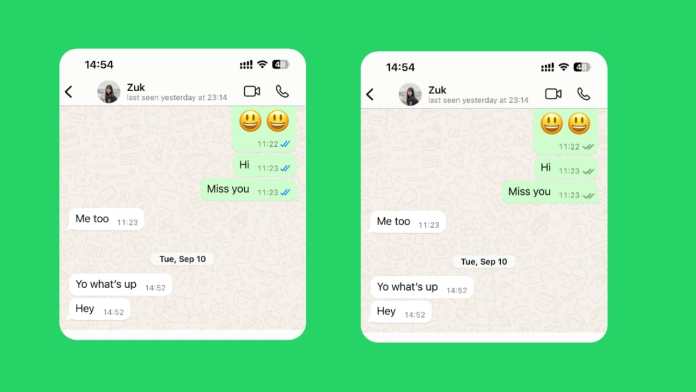
When you hit send, a single grey clock icon appears. This means your message is queued, waiting for a stable internet connection. Once it’s sent from your device, the clock turns into one grey tick. That’s WhatsApp confirming it has your message.
Two grey ticks mean the message has successfully landed on the recipient’s phone. It’s delivered. This doesn’t mean they’ve seen it—just that it’s sitting in their notifications or chat list.
Here’s where the social contract changes. When those two grey ticks turn blue, the app signals that the recipient has opened the chat and seen the message. Technically, WhatsApp only confirms the chat was opened, not that every word was read, but the implication is clear.
This system creates a peculiar modern dilemma. That blue double-check can trigger a cascade of questions: Are they ignoring me? Should I follow up? Why no reply? Disabling read receipts is often about silencing that internal noise.
How to Turn Off Blue Ticks on Android
The process on Android is straightforward. Remember one crucial rule upfront: this is a mutual setting. If you turn off your read receipts, you also won’t see when others read your messages. It’s a two-way street.
Here’s the step-by-step process:
Step 1: Open your WhatsApp application.
Step 2: Tap the three vertical dots in the top-right corner to open the menu.
Step 3: Select “Settings” from the list.
Step 4: Tap on “Privacy.”
Step 5: Scroll down until you find “Read receipts.”
Step 6: Toggle the switch to the OFF position.
The change takes effect immediately. Your sent messages will no longer show blue ticks to the sender, and you’ll lose the ability to see blue ticks on messages you send to others.
Important Android Limitations
This setting has clear boundaries. It applies only to your private, one-on-one chats. Group chats are a different story. WhatsApp maintains transparency in groups, so even with your read receipts off, blue ticks will still appear for messages you read in any group.
Voice messages also play by their own rules. When you listen to a voice note, the microphone icon next to it will turn blue for the sender, indicating playback. This happens regardless of your read receipt setting. WhatsApp treats listening as a separate action you can’t hide.
How to Turn Off Blue Ticks on iPhone
iPhone users follow a nearly identical path, just with a slightly different interface.
Step 1: Launch WhatsApp on your iPhone.
Step 2: Tap the “Settings” tab in the bottom-right corner.
Step 3: Select “Privacy.”
Step 4: Find and tap “Read Receipts.”
Step 5: Toggle the setting off.
That’s it. Your blue ticks are now disabled for individual chats.
Important iPhone Notes
Just like on Android, the grey ticks (single and double) will still show for message delivery. This setting is independent of your “Last Seen” or “Online” status. Those are controlled separately within the same Privacy menu.
The group chat rule is universal. No matter your device—Android, iPhone, or even WhatsApp Web—you cannot disable read receipts in group conversations. The blue ticks will always show there.
The Pros and Cons of Disabling Read Receipts
Is turning off blue ticks the right move for you? Let’s weigh the practical effects.
The Advantages: You gain significant privacy. You can read messages on your own time without the sender knowing you’ve seen them. This reduces the pressure for an instant reply, which is perfect for busy schedules, focused work sessions, or simply avoiding awkward social expectations. It gives you back a sense of control over your attention.
The Disadvantages: The trade-off is total. You lose the ability to see when others read your messages. This can be frustrating if you’re waiting for an important confirmation or reply. For business communication, this lack of transparency can sometimes erode trust, as customers can’t see that you’ve acknowledged their message.
The decision often comes down to your primary use case. Are you managing personal chats where boundaries are helpful? Or are you using WhatsApp for customer support, where visibility builds confidence?
Special Cases: WhatsApp Web, Desktop, and Business
What about other versions of WhatsApp? The rule is simple: the setting on your mobile phone controls everything. If you disable read receipts in the Android or iPhone app, that setting automatically applies to WhatsApp Web and the Desktop app. There’s no separate toggle on those platforms.
For WhatsApp Business users, the option exists in the same Privacy menu. The steps are identical. However, business accounts should consider the impact more carefully.
For many small businesses, the blue tick is a powerful tool. It shows customers their message has been seen, which can be reassuring, especially for complaints or urgent inquiries. Turning it off might leave customers feeling ignored. If your business uses WhatsApp primarily for broadcasting announcements (not two-way support), disabling receipts might be acceptable. For active customer service, keeping them on is usually the better strategy.
Making Your Decision
Disabling WhatsApp’s blue ticks is a personal choice centered on digital wellbeing. It’s a tool for reducing notification anxiety and reclaiming a small piece of conversational privacy.
Just go in with your eyes open. You’re choosing a path of mutual invisibility. You won’t see their reads, and they won’t see yours. Group chats and voice notes remain fully transparent, by WhatsApp’s design.
Think about your communication style. Do you value the unspoken accountability the blue ticks create? Or do you prefer the freedom to process messages without a digital audience? Your answer will guide you to the right setting for your peace of mind.







 CyberSecurity5 months ago
 How To4 months ago
 CyberSecurity5 months ago
 CyberSecurity5 months ago
 Social Media5 months ago
 Infosecurity5 months ago
 CyberSecurity5 months ago
 CyberSecurity5 months ago