Connect with us

Social Media

How to Reserve and Change Your WhatsApp Username: A Step-by-Step Guide

Published

on

WhatsApp username

What Is the WhatsApp Username Feature?

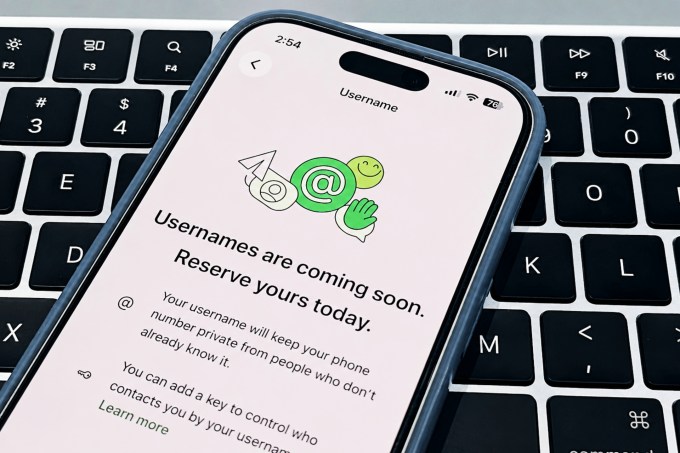
In early June, WhatsApp began rolling out username reservations for its massive user base of 3 billion people. The feature isn’t active yet — you can’t message someone using just a username right now. But you can claim your handle early, so when it goes live later this year, you’re ready.

Why does this matter? Usernames let you share a contact without handing over your phone number. Think about it: you meet someone at a conference, or you’re a small business owner posting on social media. Instead of typing out a 10-digit number that could get scraped by bots, you just say, “Find me on WhatsApp as @YourName.” That’s a big win for privacy.

How to Reserve Your WhatsApp Username

Reserving a username takes about 30 seconds. Here’s the exact path:

  1. Open WhatsApp and go to Settings.
  2. Tap Account, then look under the “Your Account” section for the Username option.
  3. If this is your first time, you’ll see a “Create username” button. Tap it and type your desired handle.
  4. If the name you want is taken, tap Suggest a username. WhatsApp will offer variations that are still available.

One catch: WhatsApp is reserving certain usernames of public figures and major entities. So don’t expect to snag @elonmusk or @nike. If you already have a username on Facebook or Instagram, you can log in through either service and claim the same handle on WhatsApp — a neat cross-platform trick.

How to Change or Delete Your WhatsApp Username

Changed your mind? No problem. Go back to Settings > Account > Username. In the top-right corner, tap the Edit button. You can type a new name or simply delete your username entirely if you decide you don’t want one.

There’s no limit on how many times you can change it — at least not yet. Just remember that once the feature goes live, your contacts will see whatever username you’ve set. So pick something you’re comfortable with.

Extra Privacy: The Username Key

WhatsApp isn’t stopping at just hiding your phone number. They’ve added an optional layer of protection called the username key.

From the username menu, you can restrict who can contact you. The default is Everyone — anyone who knows your username can message you. But you can switch it to People who know my key. Here’s how it works:

  • You share your username and a unique four-digit key.
  • When someone messages you for the first time, they must enter that key.
  • You can save the key or generate a new one at any time.

This is a smart middle ground. You get the convenience of a username without spam. Think of it like a PIN for your inbox.

When Will the Feature Go Live?

WhatsApp says the username feature will become active “in the coming weeks.” For now, they’re only letting people claim names to prevent a land grab later. If you want your handle, grab it now. Waiting until launch day might leave you with @user928374 instead of something clean.

Once it’s live, expect more updates — possibly group chat usernames or the ability to search for people by username. For now, just reserve, relax, and keep an eye on your settings.

Continue Reading
Click to comment

Leave a Reply

Your email address will not be published. Required fields are marked *

Social Media

How to Use Instagram Stories in 2026: A Complete Guide to Posting, Editing, and Saving

Published

on

How to Use Instagram Stories in 2026: A Complete Guide to Posting, Editing, and Saving

Instagram Stories have become a cornerstone of daily social media interaction. With over 500 million daily active users, this feature allows you to share moments that disappear after 24 hours—unless you save them as Instagram Highlights. This Instagram Stories guide for 2026 covers everything from basic posting to advanced AI tools, helping you create engaging content that stands out.

Getting Started with Instagram Stories

First, open the Instagram app and tap your profile picture at the top left of the feed. Alternatively, swipe right from anywhere in the main feed to access the camera. You can also tap the plus icon and select “Story.”

Once the camera is open, you have several options: take a photo by tapping the shutter button, record a video by holding it, or upload existing media from your gallery by swiping up. In 2026, Instagram introduced improved low-light mode and enhanced stabilization for videos, making even spontaneous clips look polished.

Essential Features for Your Instagram Stories

Add Music, Text, and Stickers

After capturing or uploading content, tap the sticker icon (square smiley face) at the top. Here you can add music tracks from Instagram’s library, which now includes trending songs and sound effects. You can also overlay text in various fonts, resize it, and change colors using the color palette.

Stickers have evolved significantly. The “Add Yours” sticker encourages followers to share their own stories, while the poll, question, and quiz stickers boost engagement. For businesses, the product sticker links directly to your shop, making shopping seamless.

Use AI Tools for Creative Effects

Instagram’s AI tools in 2026 are a game-changer for storytelling. The “AI Background” feature lets you generate custom backgrounds based on text prompts—for example, type “sunset beach” and the app creates a realistic scene. The “AI Avatar” option transforms your selfie into a cartoon or artistic style.

Additionally, the “Auto-Caption” tool automatically generates captions for your videos, improving accessibility. To access these, tap the magic wand icon after capturing your content. These features save time and spark creativity, especially for users who aren’t professional designers.

How to Save Instagram Stories to Highlights

Stories disappear after 24 hours, but you can preserve them permanently in Highlights. After posting a story, tap the “Highlight” button at the bottom right. Choose an existing highlight or create a new one by naming it (e.g., “Travel,” “Food,” “Behind the Scenes”).

To manage highlights, go to your profile and tap the highlight circle under your bio. You can add or remove stories, rearrange the order, or change the cover image. This is ideal for curating evergreen content that new followers can explore.

Pro Tips for Engaging Instagram Stories

Post Consistently and Interact

Posting daily stories keeps your audience engaged. Use the countdown sticker for events, the quiz sticker to test knowledge, and the question sticker to gather feedback. Respond to replies in your inbox—this builds community and boosts your post visibility.

Analyze Your Performance

Instagram provides story insights for business and creator accounts. Check metrics like reach, impressions, exits, and replies. Identify which stickers or content types get the most engagement. For example, if polls drive high interaction, incorporate them more often.

Leverage Trending Audio and Effects

Music trends change rapidly. Browse the “Trending” section in the music library to find popular tracks. Using trending sounds can increase your story’s discoverability through Instagram’s algorithm. Similarly, try new AR effects from the effect gallery—they often get featured on the Explore page.

Common Mistakes to Avoid

One frequent error is overloading stories with too many stickers or text, which clutters the visual. Keep it clean: one or two interactive elements per story is sufficient. Another mistake is neglecting to save important stories to Highlights, causing them to vanish forever.

Also, avoid posting low-resolution images or shaky videos. Instagram compresses media, so start with high-quality files. Finally, don’t ignore analytics—use them to refine your strategy.

Conclusion

Mastering Instagram Stories in 2026 is about combining creativity with smart use of features. From AI backgrounds to interactive stickers, the platform offers endless ways to connect with your audience. Start by posting one story daily, experiment with different tools, and save your best content to Highlights. For more tips, check out our guide on Instagram Reels Tips and Social Media Strategy. Happy storytelling!

Continue Reading

Social Media

Instagram for TV Gets Bigger: New Ways to Watch Together on Samsung Screens

Published

on

Instagram for TV Gets Bigger: New Ways to Watch Together on Samsung Screens

Instagram is taking its social experience beyond the smartphone. The company has launched Instagram for TV on Samsung smart TVs in the United States, bringing a suite of features designed for shared, big-screen viewing. This move aims to transform how users engage with content, making it a more communal activity.

What Does Instagram for TV Offer?

The new TV app introduces several key features that prioritize group watching. Users can now access dedicated Instagram channels, which curate content around specific themes or creators. This makes it easier to discover and enjoy content without endless scrolling.

Furthermore, the app supports casting Reels and Stories directly to the TV. This means you can start watching on your phone and seamlessly continue on the big screen. It’s a natural evolution for a platform that thrives on visual storytelling.

Horizontal Video and Big-Screen Optimization

One of the most significant updates is the support for horizontal video. Instagram has long been associated with vertical content, but the TV experience demands a different orientation. This change allows videos to fill the screen properly, creating a more immersive viewing experience.

Building on this, the interface has been redesigned for remote control navigation. Menus are simpler, and content is organized into rows for easy browsing. This ensures that the app feels native to the TV, not just a phone screen blown up.

How to Access Instagram for TV on Samsung

If you own a Samsung smart TV (2020 models or newer) in the US, you can download the Instagram app from the Samsung App Store. Once installed, log in with your existing account. The app syncs your feed, so you can pick up where you left off on your phone.

For a better experience, consider using your phone as a remote for typing and searching. This hybrid approach combines the convenience of mobile with the visual impact of TV. Learn more about optimizing your Instagram TV setup.

Why Instagram Is Expanding to TV

This expansion reflects a broader trend: social media platforms are seeking to capture living room attention. As streaming services dominate, Instagram wants to be part of that ecosystem. By offering watch together features, it encourages shared moments, much like watching a show with friends.

However, this is not just about replication. Instagram is adapting its core strengths—short-form video and visual discovery—to a new context. The channels feature, for instance, acts like a TV station for specific interests, from cooking to travel.

In addition, the move could boost engagement. When users watch content on a big screen, they are more likely to stay longer and interact differently. This could lead to new advertising opportunities and deeper community building.

What This Means for Creators and Viewers

For creators, Instagram for TV offers a new canvas. Content designed for horizontal viewing can reach audiences in a more cinematic way. Viewers, meanwhile, get a richer experience, especially for group settings like parties or family time.

Nevertheless, there are challenges. The app is currently limited to Samsung TVs in the US, with no word on global rollout or other brands. Additionally, not all Instagram features are available—shopping and DMs are absent for now.

To stay updated, check our guide on Instagram TV updates and availability. As the platform evolves, expect more integrations with smart home devices.

In conclusion, Instagram for TV is a strategic step toward making social media a living room staple. By focusing on shared viewing, horizontal video, and curated channels, it offers a fresh way to connect with content and each other. Whether you’re a casual scroller or a dedicated creator, this expansion opens new possibilities for watching together.

Continue Reading

Social Media

Instagram Plus: A New Subscription to Unlock Exclusive Features and Deeper Connections

Published

on

Instagram Plus: A New Subscription to Unlock Exclusive Features and Deeper Connections

Instagram has officially unveiled a new subscription tier called Instagram Plus, designed to give users more control over their experience. This paid plan introduces exclusive tools for self-expression, deeper interactions with friends, and personalized customization options. But what exactly does this mean for the average user? Let’s break it down.

What Is Instagram Plus and How Does It Work?

Instagram Plus is a premium subscription that unlocks a set of features not available in the free version. It aims to enhance how you express yourself, connect with your inner circle, and tailor your app to your preferences. Instagram Plus is currently rolling out to select markets, with a broader launch expected soon. Users can subscribe monthly or annually, depending on their region.

This move aligns with Meta’s broader strategy to diversify revenue streams through subscriptions, similar to what we’ve seen with Facebook and its premium offerings. However, Instagram is positioning this as a way to enrich the user experience rather than just removing ads.

Exclusive Features of Instagram Plus

Enhanced Self-Expression Tools

One of the standout aspects of Instagram Plus is the expanded creative toolkit. Subscribers gain access to exclusive filters, augmented reality (AR) effects, and advanced editing capabilities within Stories and Reels. This means you can craft more unique and polished content without relying on third-party apps. Additionally, a new “Focus Mode” for Stories lets you highlight specific elements with professional-grade blur effects.

Deeper Connections with Friends

Instagram Plus also introduces features to strengthen bonds with your closest friends. A new “Close Friends Plus” tier allows you to create multiple private groups with shared content, such as collaborative playlists or exclusive photo albums. You can also see when friends are actively engaging with your posts in real-time, fostering more immediate interactions. This builds on the existing Instagram ecosystem but adds a layer of exclusivity.

Customization and Control

Customization is a major selling point. With Instagram Plus, you can change the app icon, choose from different color themes, and even rearrange the navigation bar. This level of personalization extends to the feed: subscribers can prioritize posts from specific friends or mute suggested content for longer periods. In addition, a new “Smart Archive” feature automatically organizes your past posts into curated collections based on themes or dates.

How Instagram Plus Compares to Other Social Subscriptions

Instagram is not the first platform to introduce a paid tier. Twitter (now X) offers X Premium, while Snapchat has Snapchat+. However, Instagram Plus differentiates itself by focusing on creative expression and social intimacy rather than just verification or ad-free browsing. For instance, while X Premium emphasizes blue checkmarks and longer posts, Instagram Plus prioritizes visual tools and community features.

This means that if you’re a content creator or someone who values deep connections, Instagram Plus might offer more tangible benefits. On the other hand, casual users may find the free version sufficient for their needs.

Should You Subscribe to Instagram Plus?

Deciding whether to subscribe depends on your usage habits. If you frequently create Stories, engage with close friends through DMs, or want more control over your interface, Instagram Plus could be a worthwhile investment. However, for those who primarily scroll through the feed and post occasionally, the free features may already meet your needs.

Ultimately, Instagram Plus represents a shift toward a more personalized and premium social media experience. As the platform continues to evolve, we can expect even more exclusive features to roll out. For now, it’s an intriguing option for power users looking to get more out of their Instagram journey.

To stay updated on the latest developments, check out our guide on how to maximize Instagram Plus features and explore how Instagram Plus compares to Snapchat+.

Continue Reading

Trending