How to Use Do Not Disturb on Android to Stop Unwanted Notifications – Complete Guide
Is your phone buzzing at the worst possible moments? Whether you are in a meeting, studying, or trying to sleep, constant alerts can ruin your focus. Fortunately, Android Do Not Disturb offers a powerful solution. This built-in feature silences unwanted notifications while letting important calls and reminders through. In this guide, you will learn everything about setting up, customizing, and troubleshooting this essential tool.
Understanding Android Do Not Disturb
Do Not Disturb (DND) is a native Android feature that controls sounds, vibrations, and visual alerts. Unlike simply turning down the volume, DND gives you granular control over what breaks your silence. You can allow specific contacts, apps, or even repeat callers to bypass the block.
This flexibility makes DND ideal for various scenarios. Professionals use it during meetings to avoid distractions. Students rely on it while studying for exams. Travelers appreciate fewer alerts during long journeys. Even at night, DND ensures peaceful sleep without missing urgent calls.
DND vs Silent Mode: What Is the Difference?
Many users confuse these two settings. Silent mode simply mutes all sounds, but notifications still appear on the screen. Every alert remains visible, which can still distract you.
DND works smarter. It can completely hide notifications, silence vibrations, and block visual interruptions. More importantly, you decide which alerts are important enough to show. This extra control makes DND far more effective for maintaining focus.
How to Enable Do Not Disturb on Android
Activating DND is straightforward. Android offers multiple methods, so you can choose what works best for you.
Using Quick Settings
The fastest way is through Quick Settings. Swipe down from the top of your screen once or twice to see all tiles. Look for the Do Not Disturb icon — it looks like a circle with a line through it. Tap it once to enable DND immediately. Tap again to turn it off.
This method is perfect for quick, temporary silence. You can also long-press the tile to jump directly into settings for deeper customization.
Through the Settings App
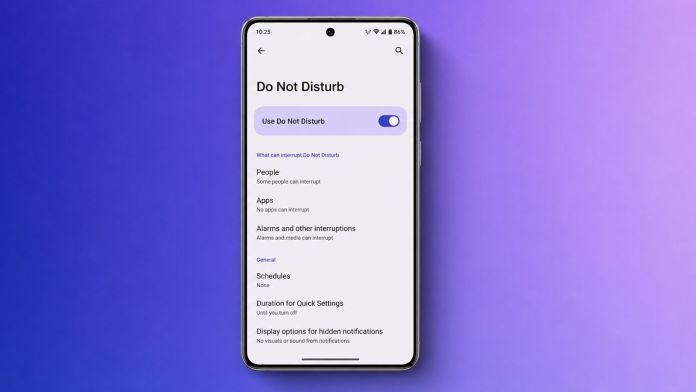
For full control, navigate to Settings > Sound & vibration > Do Not Disturb. Here, you will find a “Turn on now” button. This path also gives you access to all customization options in one place.
On Samsung devices, the menu might be labeled “Modes and Routines” within Settings. On Google Pixel phones, it follows the standard Android layout. Despite minor differences, the core functionality remains identical across brands.
Customizing DND to Stop Unwanted Notifications Effectively
Default settings work, but customization unlocks DND’s true potential. Tailor the feature to your lifestyle for maximum benefit.
Managing Calls and Messages
Open DND settings and tap “People.” Here, you can decide who can reach you. Options include allowing all contacts, only favorites, specific people, or blocking everyone. For messages, similar rules apply. This ensures that urgent communication from family or colleagues still gets through.
Android also includes a “Repeat callers” option. If someone calls twice within 15 minutes, the second call bypasses DND. This is a lifesaver during emergencies. To disable it, simply toggle the switch off in the calls section.
Adding App Exceptions
Not every app should be silenced. Messaging apps like WhatsApp, work tools like Slack, or calendar reminders might need priority access. Tap “Apps” in DND settings and select which apps can still send notifications. This way, you stop unwanted notifications from games or social media while staying connected to what matters.
Controlling Alarms and Media
Alarms typically override DND, so you will never oversleep. Media sounds can also be allowed if you want to listen to music or podcasts uninterrupted. Check the “Alarms & other interruptions” section to fine-tune these settings.
Creating Automatic DND Schedules
Manual activation is useful, but automation is where DND shines. Set it and forget it.
Time-Based Schedules
Go to Schedules within DND settings and tap “Add more” then “Time.” Name your schedule (e.g., “Sleep”), choose active days, and set start and end times. Your phone will automatically enter DND during those hours. This is perfect for bedtime or daily work hours.
Event-Based Scheduling
Android can sync with your Google Calendar. When a meeting is scheduled, DND activates automatically. In Schedules, tap “Event” and enable the feature. Select which calendars to monitor. This ensures you never get distracted during important appointments.
Samsung Modes and Routines
Samsung users have an extra layer of control. Open “Modes and Routines” and create custom modes like Sleep, Work, or Driving. Each mode can trigger DND along with other actions like changing wallpaper or opening specific apps. This creates a truly personalized experience.
Troubleshooting Common DND Issues
Sometimes DND behaves unexpectedly. Here are quick fixes for common problems.
- Restart your phone: This refreshes system settings and resolves most temporary glitches.
- Review exceptions: Double-check that allowed contacts or apps aren’t causing unwanted notifications.
- Update software: Install the latest Android update to fix known bugs.
- Use Safe Mode: Boot into safe mode to see if a third-party app is interfering with DND.
- Reset app preferences: Go to Settings > System > Reset Options > Reset app preferences. This restores default settings without deleting data.
Frequently Asked Questions
Will alarms still sound during DND?
Yes, alarms remain active by default. You can disable them manually in DND settings if needed.
Can DND be turned on automatically?
Absolutely. Use time-based or event-based schedules to automate activation.
Does DND block all notifications?
Only those you choose to block. Exceptions for calls, messages, and apps can be set.
Final Thoughts
Mastering Android Do Not Disturb transforms how you interact with your phone. By stopping unwanted notifications, you reclaim focus, improve productivity, and enjoy better sleep. Take a few minutes to customize the settings today. Your future self will thank you.
For more tips, check out our guide on hiding WhatsApp blue ticks or learn about lock screen widgets for Android.







 CyberSecurity5 months ago
 How To4 months ago
 CyberSecurity5 months ago
 CyberSecurity5 months ago
 Social Media5 months ago
 Infosecurity5 months ago
 CyberSecurity5 months ago
 Video3 months ago