Connect with us

How To

I audited my Windows laptop on hotel Wi-Fi and was shocked by what it exposed

Published

on

hotel Wi-Fi audit

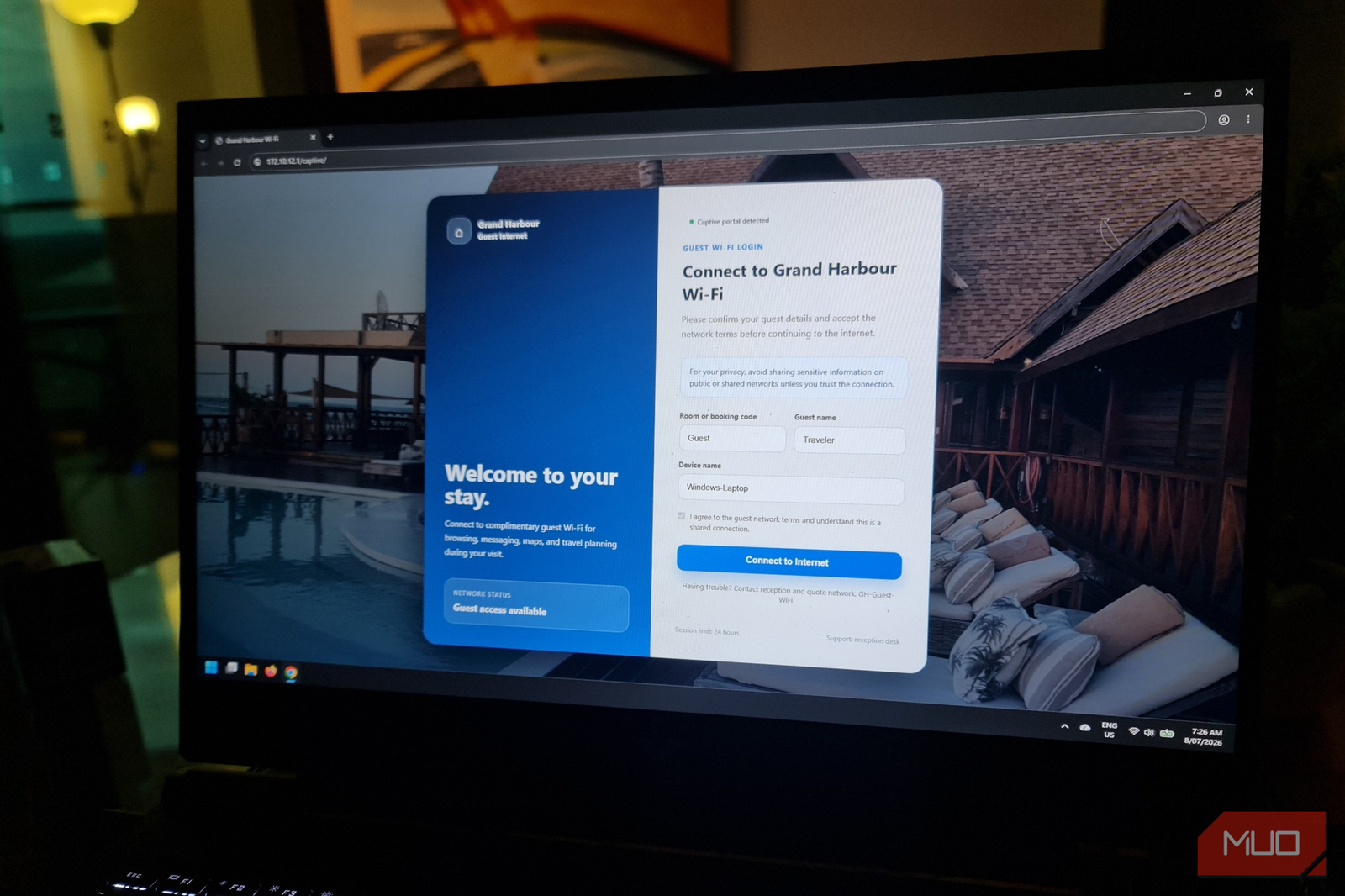
I ran a security audit on my Windows laptop using hotel Wi-Fi. The results were alarming.

I’ve spent over 15 years working in enterprise IT. I know the risks of public networks. But even I wasn’t prepared for what my own Windows laptop security audit revealed when I connected to hotel Wi-Fi during a recent work trip.

Using a handful of free and built-in tools, I scanned my machine’s network activity, checked for open ports, and monitored data flows. Within minutes, I found apps sending unencrypted data, a DNS leak exposing my browsing history, and several services broadcasting my device name and OS version to anyone on the same network.

This isn’t scaremongering. It’s a real snapshot of what happens when an average Windows laptop meets an untrusted Wi-Fi hotspot. Here’s exactly what I found — and how you can protect yourself.

The tools I used for this hotel Wi-Fi audit

You don’t need expensive software to run a basic network audit. I used only free, widely available tools:

  • Wireshark — to capture and inspect network packets in real time.
  • Nmap — to scan for open ports on my own machine and nearby devices.
  • Windows Resource Monitor — to see which processes were making network connections.
  • DNSLeakTest.com — to check whether my DNS queries were leaking outside my VPN tunnel.

Each tool revealed a different layer of exposure. Together, they painted a troubling picture.

What the audit uncovered: plain text data, open ports, and DNS leaks

Apps sending data in plain text

Wireshark immediately flagged several applications transmitting data without encryption. My email client, for instance, was still using unencrypted SMTP for outgoing mail. A weather widget was pulling forecasts over HTTP, not HTTPS. Even a system update check sent my Windows version and device name in plain text.

On a hotel network, anyone with Wireshark and a bit of know-how can read that data. It’s not just embarrassing — it’s a credential theft risk.

Open ports I didn’t know about

Nmap found three open ports on my laptop: 135 (RPC), 139 (NetBIOS), and 445 (SMB). These are classic Windows networking ports, often left open by default. On a trusted home network, they’re useful for file sharing. On hotel Wi-Fi, they’re an open invitation.

An attacker on the same subnet could potentially exploit SMB vulnerabilities or enumerate user accounts through NetBIOS. I hadn’t disabled these services because I never thought about them.

DNS leak despite using a VPN

I was running a VPN during the test — or so I thought. The DNS leak test showed that some queries were still hitting my ISP’s DNS servers, not the VPN’s. That means my browsing history was visible to the hotel network and my internet provider, even with a VPN active.

Why? Because Windows has a feature called Smart Multi-Homed Name Resolution. It sends DNS queries over all available network interfaces by default. If your VPN doesn’t explicitly block this, leaks happen.

Why hotel Wi-Fi is uniquely dangerous for Windows laptops

Hotel networks are shared, often poorly segmented, and rarely monitored. Unlike a coffee shop, you’re connected for hours — sometimes overnight. That gives attackers plenty of time to scan, probe, and exploit.

Many hotels still use WPA2 encryption, which is vulnerable to KRACK attacks. Even WPA3 isn’t a silver bullet if the network’s guest portal is insecure. And because hotels often place all guests on the same flat subnet, your laptop is directly reachable from the room next door.

Combine that with default Windows settings that prioritize convenience over security, and you have a recipe for data exposure.

How to secure your Windows laptop on public Wi-Fi

After this audit, I made several changes. You should too, especially if you travel frequently.

  • Use a firewall to block all inbound connections. Windows Defender Firewall can block unsolicited traffic. Make sure the profile is set to “Public” when you connect to hotel Wi-Fi. This automatically disables file sharing and device discovery.
  • Disable SMB, NetBIOS, and RPC on public networks. Go to Control Panel > Network and Sharing Center > Advanced sharing settings and turn off network discovery and file and printer sharing. Then disable the SMB 1.0/CIFS feature in Windows Features.
  • Force all apps to use encrypted connections. Check your email client’s settings for SSL/TLS. Use a browser with HTTPS-only mode enabled (Firefox and Chrome both support it).
  • Fix DNS leaks. Configure your VPN to use its own DNS servers and disable Smart Multi-Homed Name Resolution. Most quality VPNs have a kill switch that blocks all traffic if the VPN drops.
  • Run a quick scan before connecting. Use Nmap to scan your own machine for open ports. If you see any you don’t recognize, investigate.

Final thoughts: don’t trust hotel Wi-Fi — audit it

I walked into that hotel room thinking I knew the risks. I walked out with a much longer to-do list. The truth is, most Windows laptops are configured for convenience, not security. And hotel Wi-Fi is one of the most hostile environments your machine will ever encounter.

A 10-minute audit can reveal exposures you never knew existed. Take it from someone who just ran one: ignorance isn’t bliss. It’s a data breach waiting to happen.

For more on staying safe, check out our guide to public Wi-Fi security tips and how to set up a VPN for travel.

Continue Reading
Click to comment

Leave a Reply

Your email address will not be published. Required fields are marked *

Social Media

EU says Meta’s Facebook and Instagram are designed to addict users — and fines are coming

Published

on

Meta addictive features

Brussels takes aim at infinite scroll, autoplay, and the algorithm

The European Commission has formally told Meta that its social networks — Facebook and Instagram — are built to hook users, not just connect them. On Friday, regulators announced preliminary findings that Meta’s platforms violate the bloc’s Digital Services Act (DSA) by deploying design tricks that drive compulsive use.

The commission specifically calls out infinite scroll, autoplay videos, push notifications, and hyper-personalized recommendation algorithms. These features, the EU argues, push the brain into “autopilot mode” and fuel an urge to keep swiping. The result? Unhealthy habits and compulsive behavior, especially among minors and vulnerable adults.

This isn’t a slap on the wrist. If the findings are confirmed after Meta’s formal response, the company faces a fine of up to 6% of its global annual turnover. For a business that reported over $134 billion in revenue last year, that’s potentially billions of dollars.

Why the EU says Meta’s design is dangerous

The commission’s investigation zeroes in on how Meta’s interface exploits psychological vulnerabilities. “Evidence also shows that Meta’s current mitigation measures failed to effectively tackle the risks stemming from its addictive design,” the commission wrote in its announcement.

Take screen-time tools. Instagram and Facebook offer them, and they’re even activated by default for teens. But the EU says these tools are too easy to dismiss. They don’t meaningfully reduce usage. A teenager can tap past a break reminder in seconds and keep scrolling through Reels until 2 a.m.

The commission also accuses Meta of ignoring data about how much time minors spend on the platforms at night — and how features like Stories and Reels specifically encourage overuse. The DSA requires platforms to assess and mitigate systemic risks to users’ well-being. Meta, the EU says, failed to do that adequately.

What Meta must change — or else

The commission isn’t just complaining. It’s demanding specific fixes:

  • Disable autoplay and infinite scroll by default. Users could still turn them on, but the default experience would stop feeding content endlessly.
  • Introduce effective screen-time breaks that can’t be easily dismissed.
  • Overhaul recommendation algorithms so they’re less driven by engagement metrics and more focused on user safety.

These changes would fundamentally alter how Facebook and Instagram work. Infinite scroll and autoplay are core to the platforms’ stickiness. So is the algorithm that surfaces content based on what keeps you watching, not what’s good for you.

Meta now has a chance to review the evidence and submit a formal defense. The findings aren’t final. But the clock is ticking.

This isn’t Meta’s first EU showdown — and it won’t be the last

Friday’s announcement is the second time this year the commission has found Meta in breach of its laws. In April, regulators said Meta failed to prevent children under 13 from using Facebook and Instagram — a direct violation of the DSA’s child safety provisions.

Meanwhile, Meta is fighting similar battles on the other side of the Atlantic. In a court filing on Monday, the company revealed that four U.S. states are seeking $1.4 trillion in penalties. The states allege Meta designed its platforms to addict young users and misled the public about safety risks.

The EU’s action adds another layer of regulatory pressure. Meta has not yet responded to requests for comment on the commission’s latest findings.

What the DSA means for Big Tech — and for users

The Digital Services Act, which took full effect in February 2024, is Europe’s most ambitious attempt to rein in platform power. It requires large platforms like Facebook and Instagram to systematically assess and mitigate risks — from illegal content to addictive design.

This case is a test of whether the DSA can actually force change. The commission’s focus on design features, not just content moderation, signals a broader shift. Regulators are looking under the hood at how platforms are built, not just what users post.

For users, the potential changes could mean a less frictionless experience. No more endless scroll. No more videos that start playing automatically. But also, possibly, less time lost to apps designed to capture attention.

Meta still has room to argue its case. But the message from Brussels is clear: the era of designing for maximum engagement at any cost is ending.

Continue Reading

How To

Galaxy phones have a one-handed mode that actually works—it’s just buried where nobody looks

Published

on

The feature you didn’t know your Galaxy phone already had

You’ve probably fumbled with your Samsung Galaxy phone while holding a coffee cup or a grocery bag. The screen is huge, your thumb can’t reach the top corner, and you end up dropping something. There’s a fix built into the phone—but Samsung buried it so deep that most users never find it.

Galaxy one-handed mode isn’t new. It’s been around for years, quietly sitting in the Accessibility menu. But unlike the half-baked “reachability” gestures on other phones, Samsung’s version actually works. You just have to know where to look.

Where Samsung hid one-handed mode

Open Settings on any recent Galaxy phone (S21, S22, S23, S24, or the new S25 series). Scroll down to Accessibility, then tap Interaction and Dexterity. Buried at the bottom of that submenu, you’ll find One-handed mode.

It’s a long path for something that should be a quick toggle. Samsung One UI settings have grown more cluttered with every Android update, and this feature got lost in the shuffle. Once you find it, though, you can turn it on with a single switch.

Two ways to trigger it

After enabling one-handed mode, you can choose your trigger method. The default is Gesture: swipe down diagonally from either bottom corner of the screen. The second option is a double-tap the Home button (if you’re using the old three-button navigation).

I recommend the gesture. It’s faster and doesn’t interfere with normal swipes. Once triggered, the entire screen shrinks to about 60% of its original size, shifted toward whichever thumb you used. The top half of the display becomes reachable. Tap anywhere outside the shrunken area to restore full screen.

Why this beats Apple’s Reachability

Apple’s iPhone Reachability feature pulls the top half of the screen down—but it only works on the bottom half of the display. You still have to stretch your thumb for notifications or buttons near the middle. Samsung’s approach is different: it shrinks the entire UI into a compact window that you can reposition.

That matters when you’re trying to tap a small link at the very top of a webpage. With Reachability, that link moves to the middle of the screen. With Galaxy one-handed mode, it moves to the bottom third. Your thumb doesn’t have to travel as far.

It’s a small difference, but after a week of using it, you’ll wonder how you managed without it.

Good Lock makes it even better

Samsung’s Good Lock app (available in the Galaxy Store) offers a module called One Hand Operation+. This is the pro version of the built-in mode. It lets you assign custom gestures to the left and right edges of the screen—swipe and hold, swipe diagonally, or swipe in a specific pattern.

With One Hand Operation+, you can trigger one-handed mode with a single swipe from the edge, without going through the Accessibility menu at all. You can also adjust the size of the shrunk window, the timeout duration, and whether the keyboard shrinks too.

It’s free, it’s official, and it transforms the feature from “hidden gem” to “daily driver.” Samsung Good Lock customization is worth exploring if you want to fine-tune your phone’s behavior.

One-handed mode on older Galaxy phones

If you’re using a Galaxy S20 or older, the feature works slightly differently. On One UI 2.x and earlier, one-handed mode is in Settings > Advanced Features instead of Accessibility. The trigger gesture is the same, but the visual effect is a bit clunkier—the screen shrinks but leaves a black border around it.

On newer phones (One UI 5.0 and later), the transition is smoother, and the shrunk window blends into the background. The feature also works in landscape mode, which is handy for one-thumb typing while holding the phone sideways.

Check your software version in Settings > About Phone > Software Information. If you’re on One UI 4.0 or newer, you have the modern version.

Bottom line: turn it on now

Galaxy one-handed mode isn’t a gimmick. It’s a genuinely useful tool that Samsung forgot to promote. The company stuffed it into a submenu of a submenu, and most users never see it. That’s a shame, because it solves a real problem: big phones are hard to use with one hand.

Go into your settings right now. Enable it. Spend five minutes practicing the gesture. You’ll save yourself countless stretches and drops over the life of your phone.

And if you want more control, grab Good Lock from the Galaxy Store. The One Hand Operation+ module turns a good feature into a great one. Your thumbs will thank you.

Continue Reading

How To

Ford issues massive Mustang recall, but the reason why is bizarre

Published

on

Ford Mustang recall

Ford recalls nearly 90,000 Mustangs over a seat belt glitch that sounds like a prank

It’s not every day that a recall makes you do a double-take. But Ford’s latest move — pulling almost 90,000 Ford Mustangs off the road — has owners scratching their heads. The problem? A seat belt buckle that might not actually buckle.

According to documents filed with the National Highway Traffic Safety Administration (NHTSA), certain 2024 through 2026 Mustang coupes and convertibles were built with a front seat belt buckle that can fail to latch. Even when you think you’re clicked in, the buckle might not be fully engaged. That means in a crash, the belt could come undone. It’s the kind of defect that sounds almost too strange to be real — until you read the fine print.

Ford says the issue traces back to a manufacturing hiccup at a supplier plant. A specific batch of buckle assemblies didn’t meet specs. The result? A buckle that feels like it’s locked but isn’t. Drivers might not notice anything wrong until it’s too late.

Which Mustangs are affected and what Ford is doing about it

The recall covers 89,513 Mustangs in the United States, plus another 9,000 or so in Canada and Mexico. That’s a big chunk of the pony car’s recent production. Affected models were built between December 2023 and April 2026 at Ford’s Flat Rock Assembly Plant in Michigan.

Ford’s fix is straightforward: dealers will replace both front seat belt buckle assemblies — driver and passenger — free of charge. Owners don’t need to do anything except wait for a letter. Notifications are expected to hit mailboxes starting August 18, 2026. If you’re impatient or worried, you can check your car’s VIN on the NHTSA recall website right now.

A bizarre defect with real consequences

This isn’t a software glitch or a loose bolt. It’s a buckle that fails at its only job: keeping you strapped in. Ford’s own investigation found that the buckle’s internal locking mechanism can be misaligned. Push the latch plate in, and it might click — but not lock. The spring-loaded catch simply doesn’t engage.

Imagine driving down the highway, hit the brakes hard, and your seat belt suddenly goes slack. That’s the nightmare scenario Ford is trying to prevent. While the company says it’s not aware of any accidents or injuries linked to the defect, the potential is obvious. A seat belt that unbuckles on impact is no seat belt at all.

For context, seat belt recalls are rare but not unheard of. What makes this one stand out is the sheer weirdness of the failure. Usually, recalls involve parts that break or wear out. This one involves a part that was never right from the start.

What Mustang owners should do right now

If you own a 2024, 2025, or 2026 Ford Mustang, here’s the short version:

  • Check your VIN on Ford’s recall portal or the NHTSA site.
  • If your car is included, schedule an appointment with a Ford dealer. The fix takes about an hour.
  • In the meantime, test your seat belt. Buckle up, then give the belt a sharp tug. If it releases, drive carefully to the dealer.

Ford says parts are available now, so there shouldn’t be a long wait. And because this is a safety recall, the repair is free — no questions asked.

Why this recall matters beyond Mustang owners

This isn’t just a headache for Mustang fans. It’s a reminder that even the most fundamental safety systems can have hidden flaws. Seat belts have been mandatory in U.S. cars since 1968. They’re simple, proven, and usually bulletproof. But when a supplier cuts a corner or a QC check misses a bad batch, the result can be a recall that sounds like a bad joke.

Ford has been here before. The automaker issued a similar recall in 2023 covering certain Ford Bronco Sport and Escape models for seat belt buckles that could fail to latch. That recall affected about 34,000 vehicles. This Mustang recall is nearly three times larger.

For now, the advice is simple: check your VIN, test your buckle, and get it fixed. It’s a bizarre problem with a straightforward solution. And if you hear a click that doesn’t feel right, trust your gut — and your seat belt.

Continue Reading

Trending