Connect with us

Artificial Intelligence

I tried to parody the most absurd AI products, but the tech industry beat me to it

Published

on

absurd AI products

My attempt at satire

I wanted to invent an AI product so silly that no founder could turn it into a seed round.

It had to solve a problem nobody had, collect far more data than the problem deserved, and turn normal behavior into an insight that sounded vaguely disappointed in its owner. Somewhere around the third feature, it would ask for a subscription.

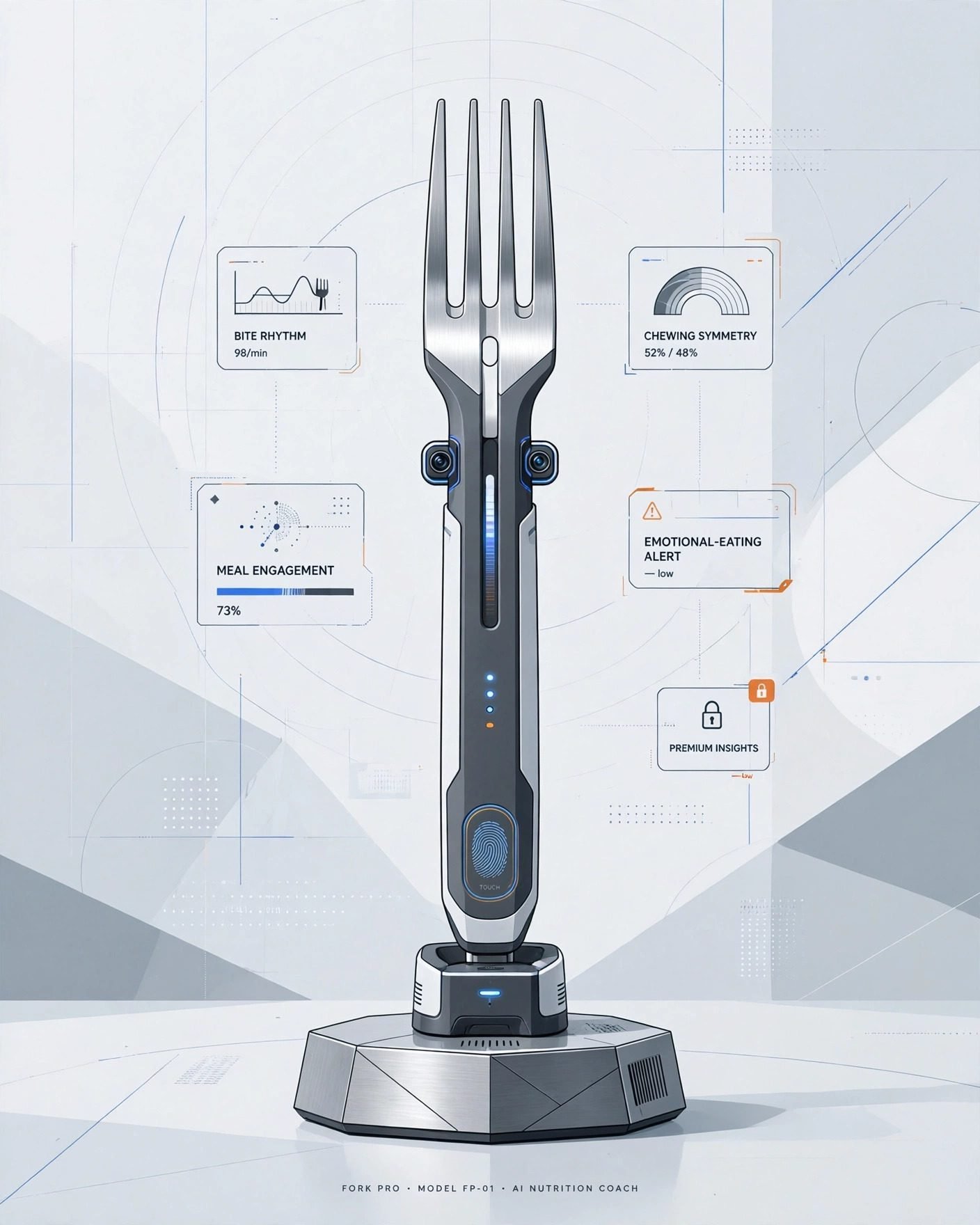
I started with an AI fork. It measures chewing speed, bite symmetry, and something called meal engagement. When it detects emotional eating, it vibrates gently. Premium users can ask the fork why they’re like this.

The silliest ideas I could think of kept coming. An AI pillow that listens to your sleep talking and turns it into a morning executive summary. Slippers that map every defeated lap around the kitchen. An AI shower that lowers the temperature whenever your outlook becomes insufficiently entrepreneurial.

Then came the coffee mug that links each refill to the meeting that caused it, and a chair that tracks posture, procrastination, and low-authority sitting before sending a weekly performance summary to your manager.

My final product: a toilet-paper holder that studies roll velocity, generates household digestive trends, and requires account creation before it’ll dispense the final sheet.

That one felt safely beyond anything a real company would build.

None of those products are real. At least, they weren’t when I wrote them down.

The judgmental fork already has relatives. The Epitome e1 is an AI toothbrush fitted with more than 100 sensors. It maps teeth into 100,000 pixels, detects contamination, and generates detailed oral-health insights.

I went looking for an object that could monitor my mouth and found that the industry had already arrived there.

The imaginary pillow also has competition from companion devices built to listen, remember, interpret moods, and respond emotionally. Razer’s Project Ava watches its owner through a camera, sees what’s happening on a computer screen, and offers advice through a holographic character. Loona promises conversation, games, home monitoring, and companionship through ChatGPT.

The surveillance products get harder to parody around pets

PETKIT’s Purobot Max Pro 2 uses an AI camera, facial recognition, weight sensors, and separate profiles for multiple cats. It records bathroom visits, photographs stool and urine clumps, listens for distressed yowling, and sends health alerts through an app.

That information could help an owner catch a medical problem early. It also means one of the most technically advanced cameras in a modern household may spend its life documenting cat poop.

My imaginary mug monitored one corner of the day. Razer’s Project Motoko wants the full picture. The concept headphones place two 4K cameras near the wearer’s face while microphones capture voices and surrounding audio. An AI assistant can interpret whatever the wearer sees, translate signs, identify objects, suggest recipes, and offer workout guidance. Apparently, headphones that listen to everything still lacked context, so somebody gave them eyes.

Even kitchen appliances have joined the production crew. LG has shown ovens and microwaves with internal cameras that recognize food, monitor cooking, and create recap videos. Dinner can now be observed repackaged as content before anyone’s decided whether it tastes good.

My fictional products were supposed to become gradually less believable. Reality kept refusing to cooperate.

The eight-step plan for putting AI in anything

After comparing the fake products with the real ones, I think I’ve reverse-engineered the process.

  • Find an object that already works without an account.
  • Add cameras, microphones, or enough sensors to monitor a regional airport.
  • Rename all that surveillance as personalization.
  • Turn an ordinary habit into a score.
  • Generate advice.
  • Put the history, interpretation, or useful setting behind Premium.
  • ???
  • PROFIT

The finished product doesn’t necessarily complete the task. It watches you complete the task, grades the attempt, and sends a notification explaining where you could improve.

Companies keep mistaking the ability to observe something for the ability to help with it.

Congratulations, your toothbrush is now your manager

A useful appliance reduces effort. A middle manager measures effort.

A lot of these AI gadgets behave like the second one. The toothbrush reviews your technique while you do the actual cleaning. The mirror studies your face and recommends improvements while you get yourself ready. The headphones play music, watch the world, interpret it, and decide what information deserves your attention.

Some of that information may be useful. A litter box that notices a sick cat has identified something worth knowing. An oven that keeps dinner from burning has actually completed a useful job. The problem begins when every mundane activity produces a score, trend, summary, alert, recommendation, or warning about personal growth.

I already know I drink too much coffee during bad meetings. I don’t need the mug building a case file.

I bought an object and received a relationship

Adding AI can also turn a finished product into an ongoing administrative commitment.

The object needs an account. The account needs permissions, and the app wants notifications. The firmware needs an update. The camera misunderstands what it saw, so the owner has to correct it. The cloud service produces a report that has to be opened, interpreted, dismissed, or upgraded.

A toothbrush once asked for toothpaste. The intelligent version may want your email address, Wi-Fi password, date of birth, and consent to a privacy policy nobody has ever read voluntarily.

That relationship also depends on the company staying interested. When the intelligence lives on a server, the manufacturer controls how long the feature survives, which insights remain available, and whether tomorrow’s most useful setting becomes part of a paid plan.

That’s a lot of uncertainty to attach to an object whose previous version already worked.

I still think the toilet-paper holder is too absurd to become real. Unfortunately, I’ve now described the features, identified the business model, and published the idea online.

Continue Reading
Click to comment

Leave a Reply

Your email address will not be published. Required fields are marked *

Artificial Intelligence

Guardoc Health processes one million clinical documents daily using Amazon Nova models

Published

on

Guardoc Health Amazon Nova

The scale of the documentation challenge

Guardoc Health says it now processes more than one million clinical documents every single day using Amazon Nova models through Amazon Bedrock. The company builds documentation software specifically for long-term care providers — nursing homes, skilled nursing facilities, and similar settings where paperwork volume is enormous and the margin for error is razor-thin.

The stakes are brutally concrete. Get a diagnosis code wrong, and Medicare claims get denied under the Patient-Driven Payment Model. Audit fines pile up. Worse, a missed condition can alter a patient’s entire treatment trajectory. AI in healthcare documentation is not some abstract efficiency play; it’s a risk management problem where the cost of failure is measured in both dollars and patient outcomes.

Guardoc’s published figures suggest they’re tilting the odds in the right direction. A 46 percent reduction in documentation errors. A 70 percent drop in audit fines. More than $400,000 in annual ROI for a single facility. The company hasn’t disclosed the baseline period or methodology behind those numbers, but the direction of travel is clear.

Why clinical documents break most AI pipelines

Clinical documents arrive in formats that would make most document processing systems cry. Multi-page PDFs with handwritten physician annotations layered over printed text. Prior authorization forms where a single checkbox state determines a coverage decision — but that checkbox might have a handwritten note next to it that overrides everything. Medication lists that show up as clean tables in one chart and free text buried inside a doctor’s note in the next. Patient intake forms mixing typed fields, rubber stamps, and handwriting on the same page.

Research published in BMJ Quality and Safety estimates that around 12 million US outpatients are affected by diagnostic error each year, with information-handling failures cited as a contributing factor. At Guardoc’s volume — one million documents daily — even a one percent error rate in condition detection would generate thousands of incorrect records every day. Each one carries its own patient safety or compliance consequence.

In one quarterly deployment covering two facilities and 200 patients, Guardoc says its system drove 847 documentation corrections, flagged 86 issues tied to PDPM reimbursement accuracy, and was associated with a 74 percent reduction in hospital transfers per 100 admissions. A separate case study across seven facilities and 1,618 residents identified 10,612 issues.

A retrieval pipeline built around cost as much as accuracy

Guardoc’s architecture is a multi-stage retrieval augmented generation (RAG) pipeline designed with a clear cost-tiering logic: cheap components handle the high-volume grunt work, and expensive multimodal reasoning only fires when it’s actually needed.

It starts with Amazon Textract, which extracts text and structural metadata from each incoming page. Guardoc treats this as the lowest per-page cost point in the pipeline. That output gets chunked along clinical boundaries — so a medication list or a diagnosis section stays intact rather than getting split by arbitrary character count.

Each chunk is embedded using Amazon Titan Text Embeddings V2 and stored in Amazon DynamoDB, partitioned by patient so retrieval never crosses patient boundaries. A custom pre-filter narrows the candidate set by document type and recency before a k-nearest neighbour search retrieves the chunks most relevant to a given classification query. At this stage, only page references are returned — keeping data transfer light.

Nova 2 Lite and Nova Pro handle the heavy lifting

Amazon Nova 2 Lite runs a text-based pass to remove obvious non-matches. Only the pages that survive every prior filter reach Amazon Nova Pro, which receives the raw PDF bytes and reasons over layout, handwriting, signatures, and stamps to produce the final classification. This is where the computationally intensive multimodal reasoning happens — and only for the subset of documents that actually need it.

Two document types account for most of what earlier pipeline versions missed, according to Guardoc. The first is physician attestation fields on prior authorization forms, where a handwritten note can override a printed checkbox. The second is patient-reported symptom sections, where handwriting often carries information that doesn’t appear anywhere else in the record.

Medication extraction presents a related problem. Drug names, dosages, routes, and frequencies show up in structured tables, in prose buried inside physician notes, in handwritten additions to printed lists, and in scans that have been faxed through multiple hands. Guardoc’s hybrid pipeline runs Amazon Textract first for clean printed tables, then passes both the original PDF and the Textract output to Amazon Nova Pro to resolve wrapped table columns, handwritten additions, and non-standard formats that OCR alone can’t parse correctly.

What this means for long-term care

“With the Nova family, we’re making it easier for healthcare organisations to detect high-risk cases earlier and act before issues become costly,” said Assaf Amiaz, Director of Product at Guardoc Health. “By automating workflows that once required manual oversight, the Nova family helps teams reduce compliance gaps, prevent errors, and focus more of their time on improving patient outcomes.”

The real takeaway here is that AI clinical documentation processing isn’t about replacing human judgment — it’s about catching the things humans miss when they’re buried under paper. A single nurse or coder might process hundreds of documents per shift. The error rate that seems small per document becomes massive at scale. Guardoc’s approach, with its cost-aware RAG pipeline and multimodal reasoning on the hard cases, is a template for how to deploy AI in regulated healthcare settings without blowing the budget on unnecessary compute.

The question now is whether other vendors follow the same playbook — or whether they’ll keep throwing expensive models at every document, regardless of whether the problem actually warrants it.

Continue Reading

Artificial Intelligence

This $9 NFC key forces you to physically unlock your most addictive apps — no willpower required

Published

on

Autonomous Key

The problem with screen-time apps

Most screen-time tools rely on a fragile thing: your willpower. They ping you with reminders, let you set timers, or throw up a soft block you can dismiss with a single tap. For anyone who’s ever told themselves “just five more minutes” on Instagram or TikTok, you know how easily those notifications get ignored. The system depends on you wanting to stop — and when you don’t, it’s useless.

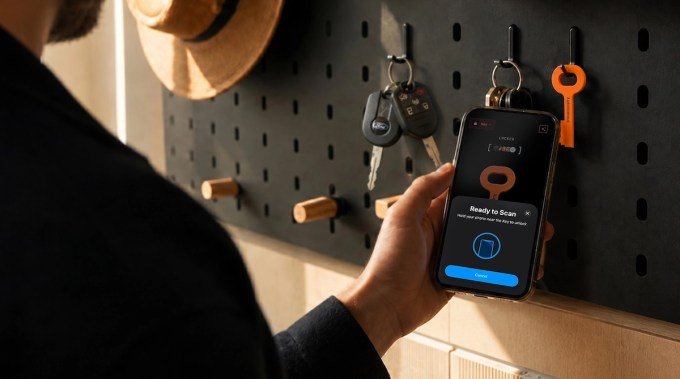
Enter the Autonomous Key. It’s a tiny NFC key, about three inches long, that takes a radically different approach. Instead of a software toggle, it requires a physical scan. Want to open Twitter again? You have to walk to wherever you left the key, tap it to your phone, and only then do you get access. That extra step — the act of getting up — turns a mindless impulse into a deliberate choice.

How the Autonomous Key works

The concept is simple. You pair the NFC key with a companion app, then designate which apps you want to lock. Once locked, those apps are inaccessible until you tap the key against your phone’s NFC reader. Each unlock session lasts up to 60 minutes, after which the apps automatically lock again. Leave the key in another room, at the office, or even at the gym, and suddenly opening TikTok requires a conscious effort — not just a reflexive thumb tap.

At $9, the Autonomous Key is significantly cheaper than its main competitors. Brick costs $59, Blok runs $29, and Unpluq is $26.50. Brick does offer extras like Sleep Mode and in-app purchase blocking, but for the core functionality — physically blocking apps — the Autonomous Key delivers at a fraction of the price.

Compatibility and setup

The key works with Android 8.0 or later and iOS 15 or later. Setup takes a couple of minutes: download the app, tap the key to pair, then select which apps to lock. It comes in five colors: pink, orange, blue, gray, and brown. One key can be paired with multiple phones, which makes it practical for families or people with both a work and personal device.

AI-powered insights with attitude

The companion app doesn’t just lock apps — it tracks your behavior. It logs how often you unlock each app, how long you keep them accessible, and the times of day you’re most likely to reach for them. Then it summarizes those patterns with an AI personality that the company describes as “deliberately sassy.”

For example, if you repeatedly unlock an app immediately after locking it, the AI might say something like, “Clearly the key wasn’t far enough away. Try putting it in another room.” It’s a small touch, but it adds a layer of accountability that a simple timer doesn’t provide. And unlike many app blockers, there are no subscriptions or premium tiers. You pay $9 once, and that’s it.

Real-world testing: one annoying flaw

During testing, the core idea held up. When the key was in the kitchen and I was on the couch, the friction of getting up was enough to stop me from mindlessly opening Instagram. But there’s a catch: the NFC scan occasionally took multiple attempts to register. It’s not a dealbreaker, but it’s frustrating when you’re trying to unlock a messaging app to reply to a text. For that reason, the Autonomous Key is probably best for locking time-sink apps like social media and games — not essential tools like email or WhatsApp.

There’s also the question of what happens if you lose the key. If your apps are currently locked, the workaround is to uninstall and reinstall the companion app. If they’re already unlocked, you can simply remove the key from your account. The company says it’s developing a backup unlock method that will arrive in a future update.

Is the Autonomous Key worth $9?

For the price of a fast-food meal, you get a tool that introduces genuine friction into your scrolling habits. It won’t work for everyone — if you’re the type who keeps your keys on the same table as your phone, the effect is minimal. But if you’re willing to stash the key somewhere inconvenient, it’s a clever way to outsmart your own impulses.

The Autonomous Key is currently in beta, following a Kickstarter campaign, and began shipping earlier this month. If you’ve tried every screen-time app and still find yourself doomscrolling at midnight, this $9 piece of plastic might be the simplest fix yet.

Continue Reading

Artificial Intelligence

OpenAI just took the handcuffs off your ChatGPT Work and Codex usage limits, at least for now

Published

on

ChatGPT Work usage limit

OpenAI drops the 5-hour ceiling — for now

If you’ve ever been deep in a coding session or drafting a long report in ChatGPT Work, only to hit a sudden wall with a ChatGPT Work usage limit warning, you know the frustration. OpenAI just pulled that wall down, at least temporarily.

The company announced it is removing the five-hour usage restriction on OpenAI ChatGPT Work and Codex for all Plus, Business, and Pro subscribers. The move is not permanent — the word temporarily is doing heavy lifting here — but for now, users get an unrestricted run.

This is the kind of change that makes a real difference when you’re in flow. No more watching the clock or rationing queries. Just work.

GPT 5.6 Sol gets smarter about resource use

The second piece of news is about efficiency. OpenAI is rolling out backend improvements to GPT 5.6 Sol that make the model consume less usage for the same output. In plain English: your allowance stretches further.

Tibo, a Member of Technical Staff at OpenAI, posted on X that the exact impact is still being quantified. “The exact impact is still being quantified and will be shared later,” he wrote. So we don’t yet know whether this is a modest trim or a significant leap. But the direction is clear — OpenAI wants users to get more done per unit of compute.

For anyone who works with long documents, complex code, or iterative prompts, this efficiency gain compounds over a session. Less overhead, more output.

Usage counter reset: a fresh start today

The third update is immediate and tangible. OpenAI is resetting the usage counter within the hour of the announcement. If you had already burned through your daily allowance, your counter now starts from zero.

Stack that with the lifted cap and the efficiency improvements, and you are looking at the most generous version of ChatGPT Work and Codex we have seen in a while. The catch, as always, is that we don’t know how long this window stays open.

What this means for Plus, Business, and Pro users

  • Plus plan: Normally subject to the 5-hour limit. Now temporarily uncapped.
  • Business plan: Same treatment — no usage ceiling for now.
  • Pro plan: Already had higher limits, but this removes any remaining cap entirely.

If you are on a free tier, these changes do not apply. The announcement specifically covers paid plans.

Why this matters for heavy users

For power users — developers using OpenAI Codex, writers drafting in ChatGPT Work, analysts running repeated queries — the 5-hour limit was a real bottleneck. A single long debugging session or a complex research task could easily eat up the allowance. The temporary removal means you can now push through without interruption.

It also signals something about OpenAI’s current capacity and strategy. The company has been releasing updates at a brisk pace: just days ago it launched the GPT 5.6 Sol, Terra, and Luna models to the public. Easing usage limits suggests either improved infrastructure or a deliberate effort to keep users engaged during a competitive period.

Either way, the window is open. Use it while it lasts.

What to watch next

The big question is how long “temporarily” lasts. OpenAI has not given a timeline. It could be days, weeks, or until the next major model release. Users should not assume permanence.

Also worth watching: when OpenAI shares the quantified efficiency gains for GPT 5.6 Sol. That data will tell us whether the improvements are incremental or substantial. For now, the combination of a reset counter, no cap, and better efficiency makes this the best time to push ChatGPT Work and Codex hard.

If you have been holding back on a big project, this is your moment. Just don’t get too comfortable — the handcuffs are off, but they are still on the table.

Continue Reading

Trending