Connect with us

Artificial Intelligence

iOS 27 Could Finally Fix the Shortcuts App Nightmare with AI-Powered Natural Language Creation

Published

on

iOS 27 Could Finally Fix the Shortcuts App Nightmare with AI-Powered Natural Language Creation

For years, the Shortcuts app on the iPhone has been a double-edged sword. On one hand, it offers incredible power to automate repetitive tasks, saving users hours of manual work. However, the actual process of building a shortcut has often felt like navigating a labyrinth of confusing menus and obscure commands. Many users have given up in frustration.

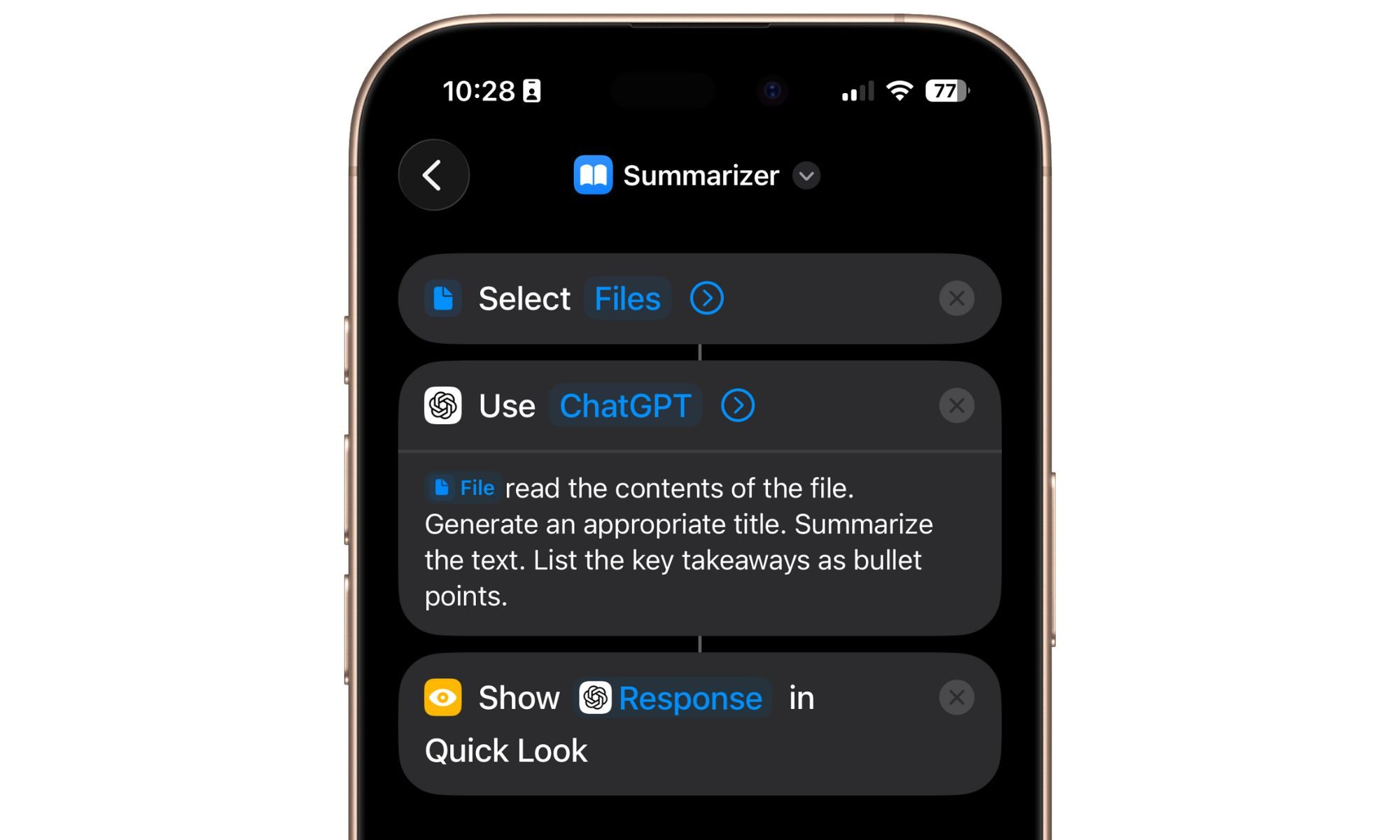
But that might finally change. According to a recent report from Bloomberg, Apple is planning a major overhaul for the Shortcuts app in iOS 27. The key feature? Users will be able to describe the automation they want in natural language, and the system’s AI will build it automatically. This could be the moment the Shortcuts app becomes truly accessible.

What the iOS 27 Shortcuts AI Update Will Do

The Bloomberg report states that the version currently in testing allows users to create shortcuts simply by describing what they want. Instead of manually dragging and dropping actions, you might say, “Every morning at 7 AM, turn on my smart lights, check the weather, and send me a summary.” The AI then interprets your request, builds the shortcut, and installs it on your device.

This represents a fundamental shift. Currently, the Shortcuts app is a maze of functions, calls, and app integrations. Many pre-installed Apple apps work smoothly, but third-party app support often feels like an afterthought. Building a complex multi-step automation that interfaces with, say, Spotify or Twitter can be a test of patience.

However, with natural language input, the barrier to entry drops significantly. You no longer need to understand the app’s arcane logic. You just need to know what you want the automation to do.

Why This Matters for iPhone Users

The Shortcuts app has always been a powerful tool, but its complexity has limited its audience. Power users and developers have long embraced it, but the average iPhone owner often avoids it. The iOS 27 Shortcuts AI update could change that by making automation accessible to everyone.

This is not just about convenience; it’s about productivity. Automations can streamline daily routines, from managing your calendar to controlling your smart home. By removing the friction of manual setup, Apple is essentially democratizing automation.

Moreover, this update could help Apple compete more effectively with other AI-driven platforms. Rivals like Anthropic with Claude AI and OpenAI with ChatGPT already allow users to create complex workflows through natural language. Apple is catching up, but it’s a welcome move.

Not Revolutionary, but Necessary

Let’s be clear: this is not a revolutionary concept. As mentioned, other AI chatbots already offer similar functionality. For example, you can use natural language to create custom GPTs for ChatGPT or build complex skills for Google’s Gemini AI. Apple is essentially borrowing inspiration from these rivals.

However, the integration within the Apple ecosystem is what makes this exciting. The Shortcuts app already has deep hooks into iOS, iPadOS, and macOS. By adding AI-driven natural language creation, Apple is making a powerful tool far more intuitive.

Building on this, the update could also address another pain point: the limitations with third-party apps. Currently, creating a shortcut that interacts with apps outside Apple’s walled garden is notoriously difficult. The new AI system might be able to handle these integrations more gracefully, as it can understand the context and available actions.

When Will iOS 27 Launch?

Apple has not officially confirmed the iOS 27 release date. Based on historical patterns, a beta version could arrive at the Worldwide Developers Conference (WWDC) in June 2027, with a public release following in September. The Bloomberg report suggests the feature is already in testing, so it seems likely to make the cut.

In the meantime, you can explore the current Shortcuts app capabilities and learn some basic automations. But if you’ve been frustrated by its complexity, take heart: help is on the way.

Final Thoughts

The Shortcuts app has long been one of the most frustrating yet powerful parts of the iPhone experience. With iOS 27 Shortcuts AI, Apple is finally addressing the core complaint: it’s too hard to use. By letting users describe automations in natural language, the company is making a bold bet that simplicity will win over complexity.

As a result, you can expect a surge in adoption. More people will create custom automations, and the Shortcuts gallery will likely become richer with user-generated content. This is a win for everyone—except perhaps the app’s steep learning curve, which is finally being flattened.

For more on how automations can improve your workflow, check out our guide on top iPhone automations. And if you’re curious about the broader future of Apple’s AI strategy, read our analysis on Apple’s AI roadmap.

Continue Reading
Click to comment

Leave a Reply

Your email address will not be published. Required fields are marked *

Artificial Intelligence

Maybe Ditch Gemini and ChatGPT for Your AI Images: Why Ideogram Deserves a Closer Look

Published

on

Maybe Ditch Gemini and ChatGPT for Your AI Images: Why Ideogram Deserves a Closer Look

When you think of AI image generators, names like Gemini and ChatGPT probably come to mind first. But there is a growing contender that focuses on what many creators actually need: clean, readable typography and practical design outputs. Enter Ideogram AI, a tool built specifically for visual work that must be production-ready from the start.

Its standout feature is handling text in images. While other generators often produce garbled or nonsensical copy, Ideogram excels at creating readable text inside posters, banners, social media posts, and video thumbnails. A single misspelled word can ruin an otherwise perfect graphic, and Ideogram tackles that problem head-on.

What Makes Ideogram AI Different?

Ideogram puts text placement and format choices directly into the workflow from the beginning. For creators working on layout-heavy assets, this can significantly reduce the repair loop that usually follows a flawed AI image result.

Practical Controls for Real Projects

The service offers users four image options per request, adding a useful layer of selection before any editing begins. Its automatic prompt refinement expands a rough idea, while public galleries make it easy to study existing images and build from other starting points. Users can also choose from various style options, dimensions, and remixing features. Paid editing through Canvas provides further flexibility.

These features help turn a vague request into something closer to a publishable asset. Whether you need a newsletter illustration, a social post, or a promotional banner, Ideogram streamlines the process.

How Does Ideogram Compare to Gemini and ChatGPT?

Gemini and ChatGPT still have strengths that Ideogram does not erase. Gemini is versatile across logos, infographics, slide designs, portraits, and abstract visuals. ChatGPT excels at diagrams and image edits guided through conversation. However, Ideogram wins a more specific fight.

It fits jobs where creator assets often fail over small details—especially copy in the design, reusable styles, flexible aspect ratios, and fast revision. For public-facing graphics, these details can outweigh brand familiarity.

Consider using other AI image tools for different needs, but when typography matters most, Ideogram is worth testing.

Limitations to Keep in Mind

Ideogram is not a clean win for everyone. The free plan includes restricted daily generations, slower rendering, public image creation, and lower-quality JPEG downloads. Paid plans add more images, faster output, extra dimensions, negative prompts, and Canvas editing.

For users who need high-resolution, private, or rapid-fire image generation, the free tier may feel limiting. However, the paid options are reasonably priced for professionals who rely on consistent output.

When Should You Choose Ideogram?

The smartest approach is to treat Ideogram as a specialist. Flux, Adobe Firefly, Gemini, and ChatGPT all have their own strengths, but Ideogram deserves a test run when the job depends on readable design copy and repeatable formats.

Start with the free version, but do not judge it from one request. Its true value shows up after a few iterations, style changes, and format tests. As AI image generation evolves, having a tool that prioritizes typography and practical design could make all the difference for your projects.

Continue Reading

Artificial Intelligence

Google Gemini’s New ‘Thinking Level’ Lets You Dial Up the Brainpower — Here’s How It Works

Published

on

Google Gemini’s New ‘Thinking Level’ Lets You Dial Up the Brainpower — Here’s How It Works

With Google I/O 2026 just around the corner, fresh leaks about Google Gemini keep surfacing. The latest finding reveals that Google is testing a new Google Gemini Thinking Level option inside the app. This feature aims to give users more control over how much reasoning the AI applies before delivering an answer.

According to a report from 9to5Google, some users now see a “Thinking Level” toggle within Gemini’s existing model picker. Currently, the picker offers choices like Fast, Thinking, Pro, or Google AI Plus. The new option adds a layer of nuance to that selection.

How the Thinking Level Feature Works

Instead of simply picking a model, you can now adjust how deeply that model reasons through a task. The report indicates that the Thinking Level option appears when you select Fast (Gemini 3 Flash) or Gemini 3.1 Pro with thinking enabled. For now, the rollout seems extremely limited — only a small group of testers can see it.

This approach mirrors what Google AI Studio already offers: Low, Medium, and High reasoning levels. Bringing that flexibility into the regular Gemini app feels like the next logical step. As AI companies compete on how “thoughtful” or agentic their assistants feel, giving users this kind of control becomes increasingly important.

Why Adjusting Reasoning Power Matters

Not every request needs maximum reasoning power. Sometimes you just want a quick answer without waiting several extra seconds while the model overanalyzes your grocery list as if it were preparing a PhD thesis. Giving users control over the balance between speed and deeper reasoning could make Gemini feel much more flexible day to day.

For instance, when you ask for a simple fact or a quick calculation, a low reasoning level saves time. But when you need a detailed analysis or a creative solution, cranking up the thinking level delivers richer responses. This kind of granular control could set Gemini apart from competitors like ChatGPT or Claude.

Expanding Gemini’s Ecosystem

Alongside the thinking level, Google appears to be expanding Gemini’s growing ecosystem of third-party app integrations. Right now, Gemini already works with apps like GitHub, OpenStax, Spotify, and WhatsApp. However, support documentation hints that integrations for Canva, Instacart, and OpenTable are also on the way.

None of these integrations appears to be live yet, but the timing makes sense. Google I/O is usually where the company shows off Gemini becoming less of a chatbot and more of a proper digital assistant that can actually do things across apps and services. If you’re interested in how these integrations work, check out our guide on using Gemini with popular apps.

What This Means for Users

At this point, Gemini’s evolution feels less about smarter answers alone and more about turning the app into something that quietly handles parts of your digital life in the background — ideally without making everything feel unnecessarily complicated. The Google Gemini Thinking Level feature is a clear step in that direction.

Building on this, users can expect more control over AI behavior in the coming months. As the feature rolls out more widely, we’ll likely see additional reasoning levels and perhaps even custom presets. For now, it’s a promising glimpse into how Google plans to differentiate Gemini in a crowded market.

If you want to stay updated on the latest Gemini features, be sure to check our Gemini updates page.

Continue Reading

Artificial Intelligence

The Hidden Danger of AI: How Instant Answers Could Make Us Think Less

Published

on

The Hidden Danger of AI: How Instant Answers Could Make Us Think Less

Artificial intelligence has transformed how we access information. With a simple query, chatbots deliver polished responses in seconds. But this convenience comes with a serious cost. Experts from the Royal Observatory Greenwich warn that over-reliance on AI for instant answers may erode our AI critical thinking skills, curiosity, and ability to verify sources. The very tool designed to make us smarter could, paradoxically, make us intellectually lazier.

The Shortcut That Skips Learning

Chatbots excel at providing quick summaries. They help users test ideas, explore new angles, and move faster through research. However, a finished response often cuts off the messy process that makes learning stick. When information arrives without struggle—without the need to question, cross-check, or dig deeper—it rarely transforms into genuine understanding. Paddy Rodgers, director of Royal Museums Greenwich, emphasizes that scientific discovery depends on patient habits: asking better questions, weighing evidence, and following leads that don’t look useful at first. Instant answers bypass these habits entirely.

Astronomy’s own history underscores this point. Early observers spent years gathering vast records about the heavens. Later generations found uses for that data that the original researchers could never have predicted. A machine optimized for efficiency might have skipped those detours because they lacked immediate value. In other words, the detours themselves were essential to progress.

When Intelligence Becomes a Utility

Sam Altman, CEO of OpenAI, has described a future where AI intelligence is sold like electricity or water—metered and priced by usage. His framing is a business model, but it also sharpens a cultural worry. If reasoning becomes something we buy on demand, it starts to feel like a service call rather than a skill to practice. The danger grows when a polished answer is treated as verified knowledge, especially when users cannot see what the system skipped, flattened, or failed to check.

This shift could lead to a decline in critical thinking skills across society. When people stop questioning the information they receive, they become more vulnerable to misinformation and less capable of independent judgment. The convenience of AI could inadvertently weaken the very cognitive muscles we need to navigate a complex world.

How to Use AI Without Losing Your Edge

So, what should you do? The better habit is to make AI work against your own certainty. Ask it to challenge an idea, expose missing evidence, or test a conclusion before you accept the response as finished. This turns the Royal Observatory’s warning into a practical rule: use AI to widen the search, not end it.

Check what it leaves out. Trace claims back to original sources. Keep the final act of judgment in human hands. For example, if you’re researching a health topic, use AI to gather initial perspectives, but then verify those claims with peer-reviewed studies or medical professionals. Similarly, when writing an article, let AI suggest angles but rely on your own analysis for the final draft. Developing healthy AI habits can help you maintain mental sharpness while still benefiting from automation.

Building on this, consider setting specific rules for your AI use. Never accept the first answer as final. Always ask follow-up questions that probe for weaknesses. Use AI to identify gaps in your knowledge rather than fill them prematurely. These strategies ensure that AI and curiosity coexist, rather than one replacing the other.

The Bigger Picture: Preserving Human Judgment

The concern raised by the Royal Observatory is not anti-technology. It is a call for mindfulness. As AI becomes more embedded in daily life, the risk of AI cognitive decline grows—not because the technology is flawed, but because we may forget how to think without it. The most valuable tool is not the one that gives you answers but the one that helps you ask better questions.

In the end, the responsibility lies with us. We must choose to remain curious, skeptical, and engaged. The final act of judgment—the decision to accept, reject, or investigate further—must stay in human hands. That is the only way to ensure that intelligence remains a skill we practice, not a service we consume.

For more on maintaining cognitive resilience in the digital age, check out our guide on how to boost critical thinking and digital mindfulness strategies.

Continue Reading

Trending