Connect with us

Artificial Intelligence

Google Gemini May Introduce Weekly Limits for Free Users: Here’s What It Means

Published

on

Google Gemini May Introduce Weekly Limits for Free Users: Here’s What It Means

Right now, almost every major AI chatbot follows the same playbook: hook people with a surprisingly capable free tier, then gently nudge them toward a subscription once they start relying on it too much. And honestly, for most users, the free versions are already good enough. You can ask questions, generate images, summarize documents, and even brainstorm ideas without constantly hitting a paywall. That is why a newly spotted change inside Google’s Gemini app feels particularly interesting.

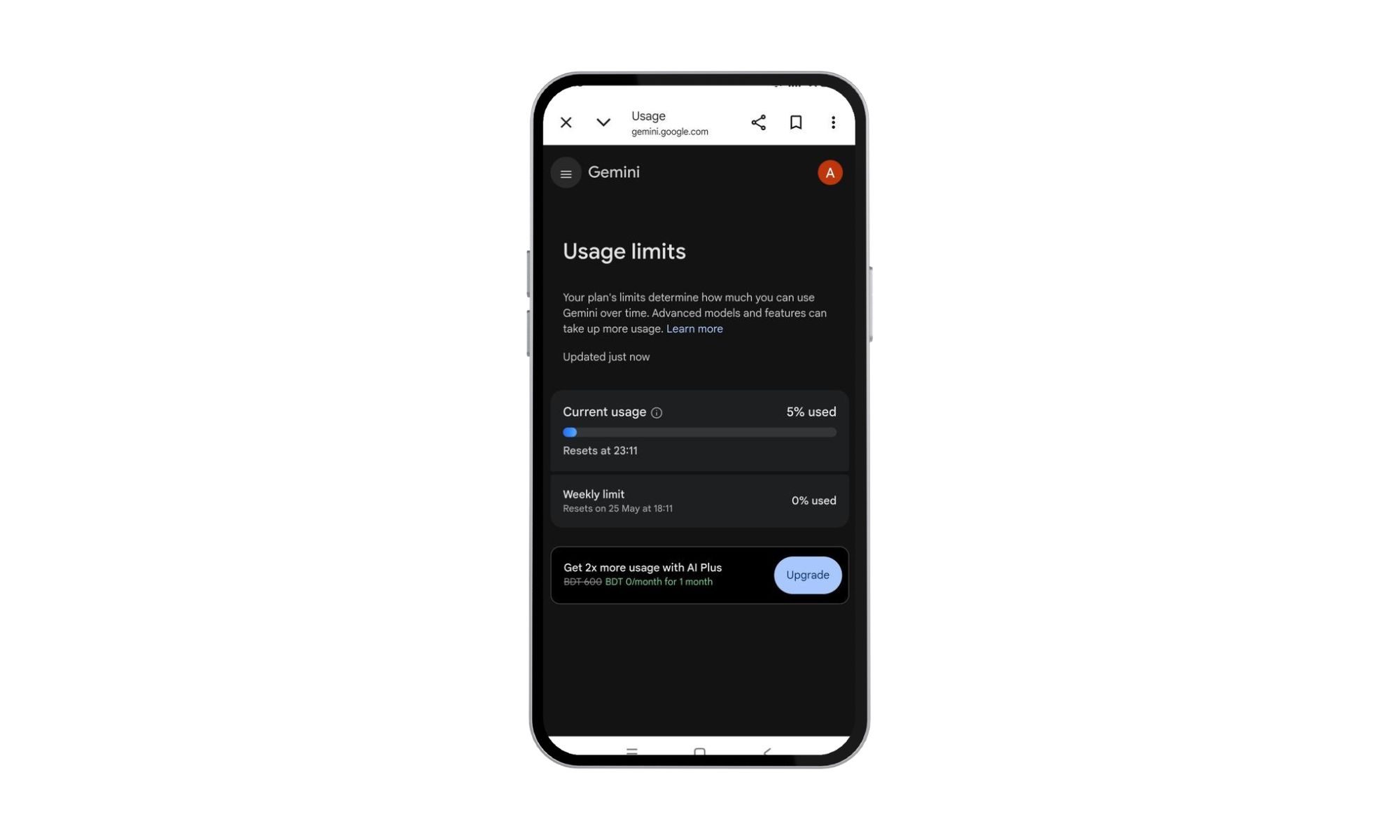
A user on X has shared a screenshot suggesting Google may be testing stricter usage tracking and possible Gemini weekly limits. The screenshot shows a new section that explains, “Plan limits determine how much you can use Gemini over time.” This means Google could be preparing a more aggressive system that measures how frequently free users interact with Gemini, especially when using heavier AI models.

What the Screenshot Reveals About Gemini Usage Caps

The screenshot also includes a usage bar that tracks how much of the quota has already been consumed. In this particular case, the user had reportedly used around 5% of the available allowance, with the limit resetting later in the day. While that may not sound alarming yet, it does point toward Gemini becoming far more structured about how much free access people actually get.

This development aligns with a broader industry trend. Many AI providers, including ChatGPT and Claude, have already introduced usage caps for their free tiers. However, Google has historically offered more generous limits, making this potential shift particularly noteworthy. The question remains: will Gemini weekly limits become a permanent feature, or is this just a test?

Why AI Companies Are Moving Toward Usage Limits

Running large AI models is absurdly expensive. Every prompt, generated image, or long conversation costs money in computing power, and tech companies have spent the last few years conditioning users to expect near-unlimited AI for free. That honeymoon phase was never going to last forever. Google, like practically every other AI company right now, ultimately wants people to pay for premium access. The challenge is figuring out how hard it can push before users simply move elsewhere. Because, unlike traditional software lock-ins, AI tools are painfully easy to abandon. If Gemini suddenly feels restrictive, people can switch to ChatGPT, Claude, or another free alternative within minutes.

This economic reality is driving many platforms to experiment with different models. For instance, compare AI chatbot features to see how different services balance free access with premium subscriptions. Google’s approach with Gemini may ultimately mirror what competitors have already done, but the timing and execution will matter greatly.

What This Means for Free Users

That said, it is important not to overreact just yet. At the moment, this appears to be limited to a single user report, and Google has not officially announced weekly caps for Gemini’s free tier. There is always the possibility that this is part of a small-scale test or an experimental rollout that never expands further. Still, Google has a long history of quietly testing features with limited audiences before rolling them out more broadly. So even if this is only visible to a handful of users today, it would not be surprising to see stricter Gemini limits slowly appear for more people over the coming months. The bigger question is whether users will tolerate it once it happens. Because people have gotten very comfortable treating AI chatbots like infinite digital assistants. The moment those assistants start saying, “You’ve hit your limit for the week,” the relationship between users and AI platforms could start to feel very different.

Building on this, free users may need to reconsider their habits. If you rely heavily on Gemini for daily tasks, it might be wise to explore alternatives or consider a subscription. For example, Gemini vs ChatGPT: which is better for you offers insights into how these platforms compare in terms of features and pricing. Ultimately, the era of completely unrestricted free AI access may be drawing to a close.

How to Prepare for Potential Gemini Limits

So, what can you do if Google enforces Gemini weekly limits? First, monitor your usage patterns. Keep an eye on any new notifications or settings within the Gemini app that might indicate a quota system. Second, consider upgrading to a premium plan if you find the free tier too restrictive. Google’s subscription options often include higher usage caps and access to advanced features. Finally, diversify your AI toolkit. Having multiple chatbot options ensures you’re not locked into a single platform that might suddenly impose limits.

In conclusion, while the news about Gemini weekly limits is still unconfirmed, it reflects a broader shift in the AI industry. Companies are seeking sustainable business models, and usage caps are a natural part of that evolution. For now, stay informed and adaptable, because the landscape of free AI is changing—fast.

Continue Reading
Click to comment

Leave a Reply

Your email address will not be published. Required fields are marked *

Artificial Intelligence

Google I/O 2026: What to Expect from Gemini, Android 17, and the AI Revolution

Published

on

Google I/O 2026: What to Expect from Gemini, Android 17, and the AI Revolution

Google is gearing up for its annual developer conference, Google I/O 2026, and this year’s event promises to be a defining moment for the company. Scheduled to kick off on May 19 at the Shoreline Amphitheatre in Mountain View, California, the conference will feature a keynote led by CEO Sundar Pichai. As always, the event will be livestreamed globally via Google’s official I/O website and YouTube channels.

While past editions have catered primarily to developers, Google I/O 2026 is expected to deliver announcements that directly impact everyday users. From Android phones to Search, Chrome, Workspace, and smart devices, the spotlight will be on artificial intelligence and its growing role across Google’s ecosystem.

Gemini AI Takes Center Stage

The biggest theme at Google I/O 2026 is undoubtedly Gemini AI. Over the past year, Google has steadily integrated Gemini into products like Gmail, Search, Android, and Workspace. However, this year’s event may reveal just how deeply the company plans to embed AI into its entire suite of services.

One of the most anticipated updates is the next evolution of Gemini Intelligence within Android 17. According to reports, Android is shifting from a traditional operating system to a context-aware AI platform. This new system could automate tasks, generate widgets, handle voice interactions, and proactively assist users across multiple apps.

In addition, Google is rumored to unveil “Gemini Omni,” an advanced AI model focused on video generation and editing. If confirmed, this would position Google as a direct competitor to OpenAI’s Sora and Adobe’s generative AI tools.

Beyond smartphones, AI may also reshape Google’s laptop ambitions. Multiple reports suggest that Google could formally introduce “Googlebook,” an AI-first laptop platform designed to eventually replace Chromebooks. These devices are expected to blend elements of Android and ChromeOS while integrating Gemini AI deeply into the user experience.

Android 17 and XR: New Frontiers

Android 17 is poised to receive a host of upgrades focusing on personalization, multitasking, and AI-powered features. Leaks and previews hint at redesigned widgets, enhanced voice input, new digital wellbeing tools, and updates to Android Auto. This release could mark a significant leap forward for the world’s most popular mobile operating system.

Google may also showcase progress on Android XR, its augmented and mixed reality platform. With Meta, Apple, and Samsung all investing heavily in smart glasses and wearable AI devices, Google’s strategy in this space is under intense scrutiny. The company previously teased Android XR hardware, and Google I/O 2026 could provide a clearer picture of its long-term vision.

Why This Year’s Event Matters

Google I/O 2026 arrives at a critical juncture for the tech giant. The AI race has accelerated dramatically over the past two years, with OpenAI, Microsoft, Apple, and Meta all vying to shape how consumers interact with AI systems.

For Google, this event is about more than just announcing new software features. It is an opportunity to demonstrate that Gemini can serve as the foundation of Google’s future products, rather than simply an optional assistant layered onto existing services.

At the same time, the company faces growing scrutiny over AI-generated search summaries, misinformation risks, and the broader impact AI may have on publishers and the web ecosystem. Addressing these concerns will be crucial for maintaining user trust.

What’s Next for Google

Google I/O 2026 begins on May 19, with announcements expected across Android, Gemini AI, XR devices, Search, Workspace, and possibly new hardware categories. If leaks and reports are accurate, this year’s conference could mark Google’s biggest shift yet toward an AI-first ecosystem.

To stay updated on the latest developments, check out our live blog for real-time coverage. For more on Android’s evolution, read our Android 17 preview. And if you’re curious about Google’s AI strategy, explore our deep dive into Gemini.

Continue Reading

Artificial Intelligence

iOS 27 Could Finally Fix the Shortcuts App Nightmare with AI-Powered Natural Language Creation

Published

on

iOS 27 Could Finally Fix the Shortcuts App Nightmare with AI-Powered Natural Language Creation

For years, the Shortcuts app on the iPhone has been a double-edged sword. On one hand, it offers incredible power to automate repetitive tasks, saving users hours of manual work. However, the actual process of building a shortcut has often felt like navigating a labyrinth of confusing menus and obscure commands. Many users have given up in frustration.

But that might finally change. According to a recent report from Bloomberg, Apple is planning a major overhaul for the Shortcuts app in iOS 27. The key feature? Users will be able to describe the automation they want in natural language, and the system’s AI will build it automatically. This could be the moment the Shortcuts app becomes truly accessible.

What the iOS 27 Shortcuts AI Update Will Do

The Bloomberg report states that the version currently in testing allows users to create shortcuts simply by describing what they want. Instead of manually dragging and dropping actions, you might say, “Every morning at 7 AM, turn on my smart lights, check the weather, and send me a summary.” The AI then interprets your request, builds the shortcut, and installs it on your device.

This represents a fundamental shift. Currently, the Shortcuts app is a maze of functions, calls, and app integrations. Many pre-installed Apple apps work smoothly, but third-party app support often feels like an afterthought. Building a complex multi-step automation that interfaces with, say, Spotify or Twitter can be a test of patience.

However, with natural language input, the barrier to entry drops significantly. You no longer need to understand the app’s arcane logic. You just need to know what you want the automation to do.

Why This Matters for iPhone Users

The Shortcuts app has always been a powerful tool, but its complexity has limited its audience. Power users and developers have long embraced it, but the average iPhone owner often avoids it. The iOS 27 Shortcuts AI update could change that by making automation accessible to everyone.

This is not just about convenience; it’s about productivity. Automations can streamline daily routines, from managing your calendar to controlling your smart home. By removing the friction of manual setup, Apple is essentially democratizing automation.

Moreover, this update could help Apple compete more effectively with other AI-driven platforms. Rivals like Anthropic with Claude AI and OpenAI with ChatGPT already allow users to create complex workflows through natural language. Apple is catching up, but it’s a welcome move.

Not Revolutionary, but Necessary

Let’s be clear: this is not a revolutionary concept. As mentioned, other AI chatbots already offer similar functionality. For example, you can use natural language to create custom GPTs for ChatGPT or build complex skills for Google’s Gemini AI. Apple is essentially borrowing inspiration from these rivals.

However, the integration within the Apple ecosystem is what makes this exciting. The Shortcuts app already has deep hooks into iOS, iPadOS, and macOS. By adding AI-driven natural language creation, Apple is making a powerful tool far more intuitive.

Building on this, the update could also address another pain point: the limitations with third-party apps. Currently, creating a shortcut that interacts with apps outside Apple’s walled garden is notoriously difficult. The new AI system might be able to handle these integrations more gracefully, as it can understand the context and available actions.

When Will iOS 27 Launch?

Apple has not officially confirmed the iOS 27 release date. Based on historical patterns, a beta version could arrive at the Worldwide Developers Conference (WWDC) in June 2027, with a public release following in September. The Bloomberg report suggests the feature is already in testing, so it seems likely to make the cut.

In the meantime, you can explore the current Shortcuts app capabilities and learn some basic automations. But if you’ve been frustrated by its complexity, take heart: help is on the way.

Final Thoughts

The Shortcuts app has long been one of the most frustrating yet powerful parts of the iPhone experience. With iOS 27 Shortcuts AI, Apple is finally addressing the core complaint: it’s too hard to use. By letting users describe automations in natural language, the company is making a bold bet that simplicity will win over complexity.

As a result, you can expect a surge in adoption. More people will create custom automations, and the Shortcuts gallery will likely become richer with user-generated content. This is a win for everyone—except perhaps the app’s steep learning curve, which is finally being flattened.

For more on how automations can improve your workflow, check out our guide on top iPhone automations. And if you’re curious about the broader future of Apple’s AI strategy, read our analysis on Apple’s AI roadmap.

Continue Reading

Artificial Intelligence

Maybe Ditch Gemini and ChatGPT for Your AI Images: Why Ideogram Deserves a Closer Look

Published

on

Maybe Ditch Gemini and ChatGPT for Your AI Images: Why Ideogram Deserves a Closer Look

When you think of AI image generators, names like Gemini and ChatGPT probably come to mind first. But there is a growing contender that focuses on what many creators actually need: clean, readable typography and practical design outputs. Enter Ideogram AI, a tool built specifically for visual work that must be production-ready from the start.

Its standout feature is handling text in images. While other generators often produce garbled or nonsensical copy, Ideogram excels at creating readable text inside posters, banners, social media posts, and video thumbnails. A single misspelled word can ruin an otherwise perfect graphic, and Ideogram tackles that problem head-on.

What Makes Ideogram AI Different?

Ideogram puts text placement and format choices directly into the workflow from the beginning. For creators working on layout-heavy assets, this can significantly reduce the repair loop that usually follows a flawed AI image result.

Practical Controls for Real Projects

The service offers users four image options per request, adding a useful layer of selection before any editing begins. Its automatic prompt refinement expands a rough idea, while public galleries make it easy to study existing images and build from other starting points. Users can also choose from various style options, dimensions, and remixing features. Paid editing through Canvas provides further flexibility.

These features help turn a vague request into something closer to a publishable asset. Whether you need a newsletter illustration, a social post, or a promotional banner, Ideogram streamlines the process.

How Does Ideogram Compare to Gemini and ChatGPT?

Gemini and ChatGPT still have strengths that Ideogram does not erase. Gemini is versatile across logos, infographics, slide designs, portraits, and abstract visuals. ChatGPT excels at diagrams and image edits guided through conversation. However, Ideogram wins a more specific fight.

It fits jobs where creator assets often fail over small details—especially copy in the design, reusable styles, flexible aspect ratios, and fast revision. For public-facing graphics, these details can outweigh brand familiarity.

Consider using other AI image tools for different needs, but when typography matters most, Ideogram is worth testing.

Limitations to Keep in Mind

Ideogram is not a clean win for everyone. The free plan includes restricted daily generations, slower rendering, public image creation, and lower-quality JPEG downloads. Paid plans add more images, faster output, extra dimensions, negative prompts, and Canvas editing.

For users who need high-resolution, private, or rapid-fire image generation, the free tier may feel limiting. However, the paid options are reasonably priced for professionals who rely on consistent output.

When Should You Choose Ideogram?

The smartest approach is to treat Ideogram as a specialist. Flux, Adobe Firefly, Gemini, and ChatGPT all have their own strengths, but Ideogram deserves a test run when the job depends on readable design copy and repeatable formats.

Start with the free version, but do not judge it from one request. Its true value shows up after a few iterations, style changes, and format tests. As AI image generation evolves, having a tool that prioritizes typography and practical design could make all the difference for your projects.

Continue Reading

Trending