Connect with us

How To

Stop Wasting Filament: 6 Slicer Settings That Slash Costs on Every Print

Published

on

save filament

The Real Cost of 3D Printing Isn’t the Printer

You saved up, bought the machine, and set it up. Feels good. But here’s the truth nobody tells beginners: the printer is the cheap part. The real money drain? Filament. Spool after spool, it adds up fast — especially when you’re cranking out desk organizers and trinkets that use way more plastic than they need to.

The solution isn’t buying cheaper filament. It’s smarter slicing. By tweaking just six settings in your slicer, you can save filament on nearly every print without sacrificing quality. Let’s get into it.

1. Reduce Infill Density — You Don’t Need 20%

Most slicers default to 20% infill. That’s overkill for 90% of prints. A phone stand, a pencil holder, a decorative vase — none of them need that much internal structure.

Drop infill to 10% or even 5% for non-functional parts. For purely decorative items, try 0% with 2-3 wall layers. The print will be hollow but still strong enough to sit on a shelf. This single change can save filament by 15-30% per print.

Need strength? Use lightning infill in Cura. It builds support only where needed, leaving the rest hollow. Same strength, far less plastic.

2. Optimize Wall Line Count

Three walls is the sweet spot for most prints. Four or five? That’s just extra plastic melting into the void. Unless you’re printing something that takes real abuse — like a tool handle or a bracket — stick to two or three wall lines.

Here’s a quick rule: for prints under 50mm tall, two walls are plenty. For taller or wider objects, three walls give you durability without waste. Each extra wall layer adds about 0.4mm of thickness and a surprising amount of filament usage over a full build plate.

3. Enable Adaptive Layer Height

Flat, featureless sections don’t need 0.1mm layers. Curved or detailed areas do. Adaptive layer height adjusts the layer thickness dynamically — fine layers on complex geometry, thicker layers on straight walls.

In Ultimaker Cura, it’s called “Adaptive Layers.” In PrusaSlicer, it’s “Variable Layer Height.” Enable it, set a maximum variation of 0.12mm to 0.28mm, and watch print time drop by 20-40% while using noticeably less filament. The quality stays high where it matters.

4. Use a Wider Nozzle — And Adjust Line Width

This one isn’t a slicer setting per se, but it changes how you slice. Swap your standard 0.4mm nozzle for a 0.6mm or 0.8mm one. Then set your line width to match the nozzle diameter.

A wider nozzle extrudes more plastic per pass, which means fewer passes to cover the same area. You’ll print faster and use less filament because the walls are thicker and stronger with fewer perimeter loops. For functional parts where surface finish doesn’t matter, a 0.8mm nozzle can save filament by up to 25% compared to a 0.4mm nozzle with the same wall count.

5. Turn Off Supports — Or Use Tree Supports

Supports are filament thieves. They print, then get thrown away. The best way to save? Avoid them entirely. Orient your model so overhangs face upward or use chamfers and fillets in your design.

When supports are unavoidable, switch to tree supports (Cura) or organic supports (PrusaSlicer). These branch-like structures use far less material than traditional grid supports. In my tests, tree supports used 40% less filament on a model with a 45-degree overhang. They also peel off cleaner, reducing post-processing waste.

Set support overhang angle to 60 degrees instead of the default 45. You’ll get fewer supports overall, and most printers can handle a 60-degree overhang without drooping.

6. Lower the Top Layers — And Use Ironing

Default top layer counts are often 4 or 5. That’s a lot of solid plastic on the top surface. Drop it to 3 for most prints. Combined with ironing (which flattens the top layer without adding extra filament), you get a smooth finish without the waste.

In Cura, enable “Ironing” and set flow to 10%. It re-melts the top surface and levels it, eliminating the need for extra top layers. Test it on a small cube first — ironing can add time, but it doesn’t add filament beyond a tiny amount.

Bonus: Print Multiple Objects at Once — But Use a Brim

Printing several small objects in one go saves time, but it can waste filament if you use a full brim on each. Instead, use a skirt (one perimeter around the entire group) or a brim only on the first object. This trick alone shaves grams off every multi-part print.

Combine all six settings, and you’ll easily cut filament usage by 30-50% across your projects. That’s real money back in your pocket — money you can spend on more filament, or maybe even a second printer.

Start with one setting change today. Your wallet will thank you.

Continue Reading
Click to comment

Leave a Reply

Your email address will not be published. Required fields are marked *

How To

3 brilliant new Netflix movies to get you through the week (July 6-12)

Published

on

new Netflix movies

What’s new on Netflix this week?

July is here, and Netflix isn’t exactly making it easy for U.S. subscribers to choose. The platform has dropped a solid lineup of movies for the month — including a fresh Enola Holmes sequel and a massive July 1st catalog dump stuffed with more classics than any reasonable person has evenings for.

If you spent the holiday weekend away from your screen, you might have missed that Enola Holmes 2 is now streaming. It’s the kind of breezy, clever mystery that makes for a perfect weeknight watch. But that’s just one of three titles worth your time this week.

Below, we’ve picked the three best new Netflix movies streaming between July 6 and July 12. No filler. No deep cuts that require a film degree. Just solid entertainment.

1. Enola Holmes 2 — The sequel that improves on the original

Millie Bobby Brown returns as the teenage detective in Enola Holmes 2, a follow-up that actually outdoes its predecessor. The first film was a charming introduction; this one tightens the mystery, sharpens the humor, and gives Brown more room to flex her comic timing.

The plot picks up with Enola opening her own detective agency — only to find that no one takes a young woman seriously. Her first case? A missing matchgirl from a factory. Naturally, it leads her into a conspiracy that connects to her famous brother, Sherlock (Henry Cavill), and the broader social unrest of Victorian London.

Director Harry Bradbeer keeps things moving at a clip, and the production design is lush without being fussy. It’s a family-friendly adventure that doesn’t talk down to its audience. If you liked the first one, you’ll love this. If you haven’t seen the first one, start there — it’s still on Netflix.

2. The Guilty — Jake Gyllenhaal’s one-room thriller

Sometimes all you need is one actor, one room, and one phone call. The Guilty (2021) is a remake of the Danish film Den skyldige, and it’s a masterclass in tension. Jake Gyllenhaal plays Joe Baylor, a demoted LAPD officer working the emergency dispatch desk on the night before his court hearing.

He gets a call from a woman who claims she’s been kidnapped. The catch? She can’t speak freely — her abductor is in the car with her. Over the next 90 minutes, Joe tries to save her while wrestling with his own demons. The entire film takes place in that call center, and it’s gripping.

Director Antoine Fuqua (Training Day) knows how to wring suspense from a limited space, and Gyllenhaal delivers a performance that’s all voice and micro-expressions. It’s a lean, mean thriller — perfect for a quiet Tuesday night.

3. The Woman King — Epic historical action with Viola Davis

If you want something with more spectacle, The Woman King (2022) is the pick. Viola Davis leads as General Nanisca, the commander of the all-female Agojie warrior unit in the Kingdom of Dahomey (present-day Benin). The film dramatizes their resistance against the slave trade and European colonizers in the 1820s.

Yes, it’s a historical epic with battle sequences and political intrigue. But what makes it work is the emotional core: Nanisca’s mentorship of a young recruit, Nawi (Thuso Mbedu), and the cost of leadership in a violent world. Director Gina Prince-Bythewood balances action and character work with rare skill.

The fight choreography is brutal and balletic. Davis is, predictably, phenomenal. And the film doesn’t shy away from the moral complexities of Dahomey’s own involvement in the slave trade — it’s a smarter blockbuster than most.

How to choose what to watch

Three strong options, but they serve very different moods. Here’s a quick cheat sheet:

  • Enola Holmes 2: Light, clever, family-friendly. Best for a weekend afternoon with kids or a low-stakes evening.
  • The Guilty: Tight, tense, minimalist. Watch it alone or with someone who likes thrillers. No distractions.
  • The Woman King: Epic, violent, emotionally rich. Save it for a night when you can give it your full attention.

All three are streaming now through July 12. If you’re looking for more options, Netflix’s July 1st dump added dozens of older titles — from 1990s comedies to classic action films. But these three are the standouts of the week.

For more streaming recommendations, check out our guide to the best new shows on Netflix this month or our roundup of underrated Netflix originals you might have missed.

Continue Reading

Social Media

‘Slow-cial’ app Roost forces you to slow down to the speed of a carrier pigeon

Published

on

Roost slow-cial app

What is Roost? A messaging app built on bird flight times

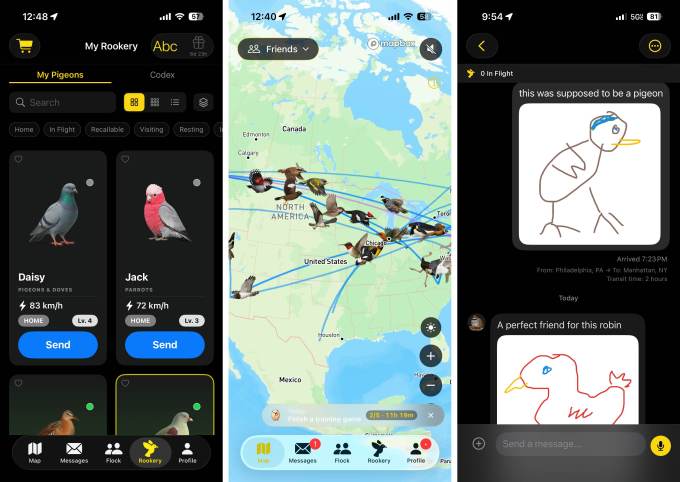
Somewhere above the Great Plains right now, a virtual woodpecker is flapping its way toward Alaska, carrying a message from me to an anonymous pen pal. Meanwhile, a zebra finch named Tucker is winging into Manhattan to deliver my terrible Cool S doodle to a friend. These messages take hours — sometimes days — to arrive, depending on how far the bird has to fly. That’s the whole point.

Roost, the so-called “slow-cial” app, is making carrier pigeons cool again. At a moment when people are exhausted by apps that demand constant attention, Roost deliberately adds friction. Founder Logan Mendelsohn, a senior product manager in trust and safety at Ticketmaster, told TechCrunch: “Everything on a phone is instantaneous these days — every single thing you do, it’s like you’re always getting some notification or something. Roost is kind of a break from the instant. It’s resonating with people in a way where they don’t feel pressure all the time to have to do something.”

The app lets you choose four birds for your rookery. Each bird moves at its real-life speed: a falcon delivers fast; a hummingbird, not so much. If you really want to drag things out, you can send snails or turtles instead. Messages travel in literal bird time. It’s weird. It’s charming. And it’s catching on.

From side project to viral sensation — 300,000 users in weeks

Mendelsohn started building Roost as a fun project for himself and his friends. They loved it so much they pushed him to put it on the App Store. For a while, it had a tiny, devoted following. Then a mother posted on Threads about how her daughter was chatting with friends in Elizabethan English on an app where messages move at the speed of actual birds.

Within three days, Roost went from 10,000 users to 100,000. Now, about five weeks later, it’s approaching 300,000. “The people are what really make this platform,” Mendelsohn said. “What people kept talking about is how wholesome it is, how whimsical it is, and how much this really helps them put more intention into what they’re saying. There’s a lot less pressure when you know the message isn’t going to someone immediately.”

Privacy built in, not bolted on

Mendelsohn works in trust and safety by day. He knows any social platform — even a whimsical bird app — can be abused. So Roost shares only a user’s city with friends by default. There’s a manual “close friends” feature that lets you share your precise location with specific people if you choose. “I personally think that for any new platform that connects people, trust and safety should be the first thing they think about,” Mendelsohn said. “When you’re able to start at zero with that lens, you can build it into the platform instead of doing it later.”

Privacy concerns also shaped the “Pen Pals” feature, which lets you exchange messages with anonymous users in your age group. During onboarding, the app explicitly warns you not to share personal details or contact info. Roost deliberately doesn’t support photo sharing yet — Mendelsohn wants to build more sophisticated content moderation tools first. That kind of caution is rare in the fast-ship world of consumer apps.

Mini games and bird collecting — the slow life has layers

Roost isn’t just about waiting for messages. There are mini games. There’s bird collecting. The whole experience is designed to be playful and unhurried. It’s a reminder that not every app needs to optimize for engagement at all costs. Sometimes you just want to send a doodle on a virtual sparrow and wait a few hours for a reply.

The AI art controversy — and how Mendelsohn handled it

Roost’s rapid growth brought an unexpected backlash. When users learned Mendelsohn had used AI-generated art for the bird images, they were furious. “On the AI art side, I completely understood the feedback,” he said. “I won’t lie, it was daunting to see the reaction online. But I don’t think it’s productive to dig your heels in when your community is vocal about something they care for. At the same time, I also knew I couldn’t flip a switch overnight. Replacing the art in an app this size takes time, planning, and money.”

Mendelsohn runs Roost in his spare time, with no outside funding. Revenue comes from in-app purchases like extra birds. To address the complaints, he’s now running a contest for artists to contribute original art. That’s quieted things for now, but the situation highlights a real tension in the consumer app space: many users boycott AI art out of respect for human creators, but a solo founder with limited resources can’t always afford to commission custom illustrations from day one. “As a solo founder, I don’t think I could build and maintain something at this scale without AI-assisted development,” Mendelsohn said. “But every product decision and direction for Roost still comes from me and the community.”

Why Roost matters in a world of instant everything

Roost is part of a small but growing wave of apps that reject the dopamine-loop model. It’s a “slow-cial” app in the truest sense — it forces you to wait, to think, to be intentional. In an era of push notifications and infinite scroll, that’s almost radical. It’s also a reminder that the people flocking to Roost are often the same ones who are tired of the tech industry’s relentless pace. They want something slower. Something more human. Even if it means waiting for a virtual bird to cross a continent.

Continue Reading

Social Media

Building Agentic Workflows with Manus: Stop Copy-Pasting and Let AI Do the Heavy Lifting

Published

on

agentic workflows with Manus

Why Your Current AI Workflow Is Probably Broken

If you’ve ever found yourself copying text from ChatGPT, pasting it into a document, then manually feeding that output into another tool — you’re not alone. That tedious loop is the reality for most knowledge workers today. You’re using AI, sure, but you’re still the human middleman.

There’s a better way. It’s called an agentic workflow, and the tool that’s making it accessible to non-developers is Manus. Instead of you orchestrating every step, you tell Manus what you want done, and it hands off the subtasks to specialized AI agents. No more copy-paste. No more babysitting.

In this guide, you’ll learn how to set up your first agentic workflow with Manus — and finally let the machines do the grunt work.

What Is an Agentic Workflow, Really?

An agentic workflow is a sequence of automated steps where an AI agent decides which tool or sub-agent to call next based on the task. Think of it like a project manager who doesn’t just assign work but also checks back, adjusts, and hands off results to the next specialist.

With Manus, you define the overall goal — say, “Research competitors, summarize their pricing, and draft an email to the sales team” — and the platform breaks it down. It might call a web-scraping agent first, then a summarization model, then a writing agent. You just review the final output.

This is fundamentally different from a chatbot that gives you a single answer. It’s a system that acts on your behalf across multiple domains.

Getting Started with Manus: What You Need

Before you dive in, make sure you have:

  • An active Manus account (free tier available with limited credits)
  • Access to at least one external tool API (e.g., SerpAPI for web search, or a database connector)
  • A clear, single-sentence goal for your first workflow

Manus works best when you start small. Don’t try to automate your entire marketing funnel on day one. Pick one repetitive task — like pulling daily news mentions for your brand — and build from there.

Step-by-Step: Building Your First Agentic Workflow with Manus

1. Define the Trigger and the End Result

Every workflow starts with a trigger. It could be a scheduled time, a webhook from a CRM, or a manual launch. Then define the output: a Slack message, a Google Doc, an email. Be specific. “Send me a daily briefing” is vague. “Send a Slack message every weekday at 8 AM with three news articles about my competitor” is actionable.

Inside Manus, you create a new workflow and name it. Then you add the trigger node.

2. Chain Your Tools Together

Manus uses a visual node editor. You drag and drop blocks representing different agents or API calls. For example:

  • Node 1: Search the web for “competitor news” using SerpAPI
  • Node 2: Pass the top 5 results to an AI summarizer
  • Node 3: Format the summary into a Slack message

The magic is in the handoff. Manus automatically passes the output of Node 1 into Node 2. You don’t write any glue code. Just connect the nodes.

3. Set Conditions and Fallbacks

Real-world workflows fail. A search API might return no results. An AI summarizer might timeout. Manus lets you add conditional branches: “If no results found, send me a notification instead of a summary.” This prevents your workflow from breaking silently.

You can also set retry logic. If an agent fails, Manus can retry twice before escalating to you.

4. Test and Iterate

Run your workflow in test mode. Manus shows you the output of each node in real time. This is where you catch mistakes. Maybe the summarizer is too verbose. Maybe the Slack message format is ugly. Tweak the prompts in each node until the output feels right.

Once it’s solid, schedule it or connect it to your live tools.

Real-World Use Cases for Agentic Workflows with Manus

Here are three practical applications you can build today:

Automated Competitor Monitoring

Set a daily search for mentions of your top three competitors. Manus scrapes the results, has an AI agent rank them by relevance, and posts the top five to a shared Slack channel. Your team wakes up to intelligence, not noise.

Lead Qualification from Inbound Forms

When a new lead fills out a form on your site, a webhook triggers a Manus workflow. The platform enriches the lead data using a public API, scores it with a custom AI model, and if the score is high, emails the sales rep with a summary — all within seconds.

Content Repurposing Pipeline

Publish a blog post? Feed the URL into Manus. The workflow extracts the text, has an agent rewrite it as a LinkedIn post, another agent creates a Twitter thread, and a third generates an email summary for subscribers. One input, multiple outputs, zero manual formatting.

Common Pitfalls and How to Avoid Them

The biggest mistake new users make is overcomplicating the first workflow. Start with three nodes max. Add complexity only when the simple version is running reliably.

Another trap: not respecting API rate limits. If your workflow calls an external service 100 times per minute, you’ll hit errors. Manus doesn’t throttle third-party APIs for you — so build in delays between nodes if needed.

Finally, don’t forget security. If your workflow handles customer data or internal documents, make sure the connected tools use HTTPS and that you’ve set proper access controls inside Manus. The last thing you want is an agent accidentally emailing a draft to the wrong person.

Is Manus the Right Tool for You?

Manus isn’t for everyone. If you only need a chatbot to answer questions, stick with ChatGPT. But if you’re tired of being the human glue between AI tools, Manus offers a genuinely different approach. It’s closer to a lightweight automation platform than a traditional AI assistant.

The learning curve is mild — expect to spend an afternoon building your first real workflow. After that, you’ll start seeing every repetitive task as a candidate for automation. And that’s the point. Let the agents work. You’ve got better things to do.

Continue Reading

Trending