Connect with us

How To

This Tiny eReader Made Me Realize We’re Finally in a Post-Kindle World

Published

on

tiny eReader

The Kindle’s Long Reign

For over a decade, Amazon Kindle has been the default eReader. Its name became synonymous with digital reading, much like Band-Aid did for bandages or Photoshop for photo editing. If someone said they were reading on a Kindle, you assumed they meant an Amazon device. That assumption is no longer safe.

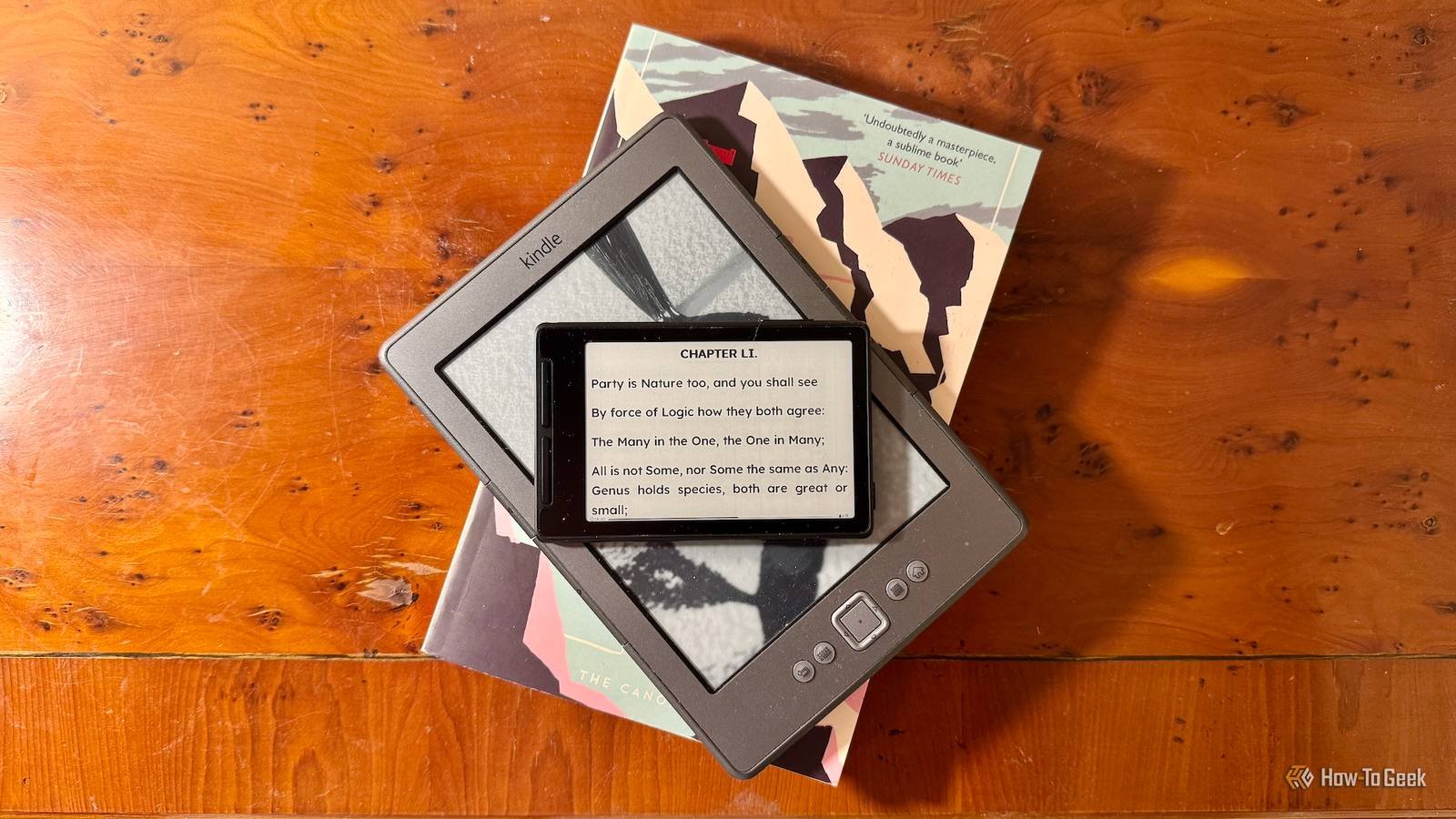
A few weeks ago, I got my hands on a compact eReader from a lesser-known brand. It wasn’t the latest Oasis or Paperwhite. It was smaller, lighter, and frankly, more portable than anything Amazon currently sells. After using it daily, I’ve come to a conclusion: the eReader market has finally diversified enough to challenge the king.

What Makes This Tiny eReader Different

The device in question measures just six inches diagonally. It fits in a shirt pocket, no problem. The build quality feels premium, with a matte finish that resists fingerprints. But the real story is what’s under the hood.

Unlike many budget readers, this one runs a clean version of Android. That means you’re not locked into one bookstore. You can load the Kindle app, Kobo, Libby, or even side-load your own EPUBs without any hassle. For readers who’ve felt trapped by Amazon’s walled garden, that’s a liberating thought.

Battery life is another surprise. I’ve been using it for two weeks on a single charge, reading about an hour a day. The E Ink display is sharp, with adjustable warm light for nighttime sessions. It’s not a revolutionary spec sheet, but the execution feels thoughtful.

Portability Without Sacrifice

Most eReaders claim to be portable, but this one actually delivers. It weighs less than 150 grams. I forgot it was in my jacket during a long flight. The screen is large enough for comfortable reading, yet the device disappears into a bag or even a large pocket.

That portability changes how you use it. I found myself grabbing it for quick reading sessions — waiting in line, riding the subway, or during a lunch break. With a bigger Kindle, I often left it at home because it felt like an extra thing to carry. This tiny reader removed that excuse.

The Rise of Kindle Alternatives

Amazon isn’t sitting still, of course. The Kindle Paperwhite remains a solid choice, and the Scribe targets note-takers. But the competition has caught up in ways that matter.

Brands like Kobo, PocketBook, and Boox now offer devices that rival or exceed Kindle’s features. Many support more open formats, which is a huge deal for anyone who buys books outside Amazon’s ecosystem. Some even have physical page-turn buttons, a feature Amazon dropped years ago and many readers still miss.

You can also find waterproofing, expandable storage, and better typography controls on non-Kindle devices. The gap in hardware quality has closed. What remains is the ecosystem advantage — and that’s shrinking.

Why the eReader Market Is Finally Shifting

The shift isn’t just about hardware. It’s about reading habits. People are more aware of where they buy their books and how they store them. Concerns about DRM and ownership have pushed some readers toward open platforms.

Libraries are another factor. Apps like Libby make borrowing digital books easy, but Kindle’s library integration is clunky in some regions. Competitors have made borrowing a first-class feature. That’s a practical advantage, not a niche one.

Price also matters. This tiny eReader cost less than a Paperwhite, and it didn’t lock me into ads or a specific store. For budget-conscious readers, that’s a compelling argument.

What to Look For in a Kindle Alternative

  • Open file format support (EPUB, PDF, MOBI)
  • Adjustable front light and warm lighting
  • Battery life of at least two weeks
  • Physical buttons for page turns (if you prefer them)
  • Waterproofing for bath or pool reading
  • Access to multiple bookstores or library apps

That list isn’t exhaustive, but it covers what most readers actually need. The days of accepting whatever Amazon gives you are over.

Is the Post-Kindle World Here?

Not entirely. Amazon still dominates in market share, and the Kindle brand carries enormous weight. But the cracks are showing. A tiny eReader from a challenger brand convinced me that consumers now have real choices — and that’s the definition of a post-Kindle world.

If you’re in the market for a new eReader, don’t default to the big name. Consider what you value: portability, openness, or price. The best device for you might not have the Amazon logo on it.

That’s a good thing. Competition breeds innovation, and readers are the ultimate winners. I’ll be keeping this little device close — and watching what comes next.

Continue Reading

Social Media

TikTok’s comment sections just got a whole lot more interactive

Published

on

TikTok voice comments

Sound was always the point. Now it’s in the comments too.

For years, TikTok’s comment section was a place to drop a quick thought or a meme. It did the job — but it never felt like part of the show. That’s changing now.

The platform announced a wave of new comment tools on Thursday, and the headline act is TikTok voice comments. Instead of typing, you can record a message up to a minute long and pin it under any video. Tap the microphone icon in the comment box, talk, and post. Anyone who scrolls by can tap to listen.

“Sound and music have shaped TikTok from the very beginning, turning songs into trends and audio clips into jokes shared across the app,” the company wrote in a blog post. “Now, we’re bringing that same energy to the comment section.”

It’s a logical move. TikTok already runs on audio — viral sounds, voiceovers, and those oddly satisfying whisper videos. Extending that into the comments makes the whole feed feel more alive, less like a message board and more like a conversation.

What’s actually new in the comment box

Voice is the big one, but it’s not the only trick TikTok is adding. Here’s the full rundown:

  • Voice comments — record up to 60 seconds of audio under any video. Rolling out globally over the next month, but only to users 18 and older.
  • Comment polls — creators can attach a poll to their own videos, with up to five options and a set voting window. Previously limited to some accounts, now it’s worldwide.
  • Photo carousel comments — you can now drop up to nine images in a single comment, where before it was one at a time. Global rollout over the next month.
  • Live Photo comments — upload a moving image that plays a quick burst of motion before settling into the full photo. Available globally now.

Why TikTok is turning comments into a messaging app

Look at these features side by side and you’ll notice something: they look a lot like the tools you’d find in a chat app. Voice notes, polls, photo sharing — that’s the vocabulary of WhatsApp and iMessage, not your typical social feed.

That’s not an accident. TikTok wants people to stay longer, comment more, and come back to check replies. A voice note feels more personal than a typed reply. A poll invites participation instead of passive scrolling. Photo carousels give commenters a reason to show off, not just speak.

The company is betting that if comments feel like a conversation with friends, users will treat the app less like a broadcast channel and more like a place to hang out.

Moderation: voice comments aren’t a free-for-all

Audio comments raise an obvious question: what stops someone from recording something hateful or harassing? TikTok says it’s on that.

A spokesperson told TechCrunch that voice comments fall under the same Community Guidelines as everything else on the platform. The moderation system combines human reviewers with automated tools, including speech-to-text transcription, to catch and remove policy violations. So yes, they’re listening — or at least, their software is.

Who gets access first

Voice comments aren’t hitting everyone at once. The rollout spans the next month, and it’s restricted to users 18 and up. That age gate is a clear nod to safety concerns — minors are more vulnerable to audio-based harassment or inappropriate content, and moderating voice at scale is harder than filtering text.

Photo carousel comments are also rolling out gradually. Live Photo comments, meanwhile, are already available everywhere.

What creators should do with polls and voice notes

If you’re a creator, these tools are worth experimenting with. Polls are the most obvious win — ask viewers to vote on your next video idea, pick an outfit, or decide what you should cook. The results show up right in the comment section, which turns a passive audience into active participants.

Voice comments, on the other hand, are a chance to add personality. A quick vocal reaction to a comment can feel more genuine than a typed reply. Think of it as a mini-podcast tucked into your comment thread.

For everyday users, the takeaway is simpler: your comments no longer have to be text. You can react with your voice, share a burst of photos, or start a poll of your own — well, if you’re the video’s creator, anyway.

The bigger picture: engagement is the currency

TikTok’s algorithm rewards interaction. More comments, more replies, more time spent — all of it feeds the recommendation engine. By making comments richer and more interactive, TikTok is essentially giving users more reasons to engage, and giving itself more signals to work with.

It’s a smart cycle. The more tools people have to talk, the more they talk. The more they talk, the longer they stay. And the longer they stay, the more ads TikTok can serve. That’s the business model, and it’s working.

So next time you’re scrolling and see a microphone icon in the comment box, don’t be shy. Record something. Start a poll. Drop a Live Photo. The comment section just became a stage of its own.

For more on how to get the most out of your feed, check out our guide to TikTok engagement strategies and the latest on TikTok algorithm updates.

Continue Reading

How To

Hulu Buried One of Its Smartest Sci-Fi Thrillers Inside a Sinister Silicon Valley Lab

Published

on

Devs on Hulu

The Accidental Discovery

I found Devs on Hulu the way I find most things worth watching now: by accident. Scrolling at 11 at night, looking for something to put on while I did the dishes. The thumbnail showed a gold Buddha statue standing in a redwood forest next to a glass office building. That combination alone was strange enough to stop me.

Two episodes later, the dishes were still in the sink. The show had me completely hooked — and I wasn’t alone. This is one of the smartest sci-fi thrillers to come out in years, yet it feels like Hulu buried it. No splashy billboards. No water-cooler buzz. Just a quiet masterpiece waiting in the algorithm’s shadows.

What Is Devs Exactly?

Created by Alex Garland — the mind behind Ex Machina and Annihilation — Devs is an eight-episode limited series that dropped in 2020. It follows Lily Chan (Sonoya Mizuno), a young software engineer at a fictional quantum computing company called Amaya, nestled in the forests of Northern California.

When her boyfriend Sergei (Karl Glusman) is hired into the company’s secretive “Devs” division and then vanishes under suspicious circumstances, Lily starts digging. What she uncovers isn’t just corporate malfeasance. It’s something far stranger — a machine that might actually predict the future by calculating the past.

The Core Premise

The Devs team, led by the enigmatic Forest (Nick Offerman, playing against type with chilling restraint), believes they’ve built a system that can simulate reality at the quantum level. If you can model every particle that ever existed, you can see anything that ever happened. And if you can see the past with perfect accuracy, the future becomes just another calculation.

That’s the setup. But Devs isn’t really about the tech. It’s about what that tech does to the people who build it — and the terrifying question of whether free will is just an illusion we tell ourselves to sleep at night.

Why Devs Stands Out in the Sci-Fi Crowd

Most sci-fi thrillers on streaming services lean on cheap twists and explosions. Devs takes the opposite approach. It’s slow, philosophical, and visually stunning — the kind of show that rewards patience and punishes distraction. You can’t watch this one with your phone in your hand.

Garland shoots the Amaya campus with an almost religious reverence. The glass buildings, the redwoods, the golden Buddha — it all feels like a tech cult’s cathedral. And in many ways, that’s exactly what it is. Forest isn’t just a CEO. He’s a prophet who lost his daughter and believes he’s found a way to see her again through the machine. That grief drives everything, and it gives the show a emotional weight that most tech thrillers never bother with.

Nick Offerman’s Career-Best Performance

If you only know Offerman from Parks and Recreation‘s Ron Swanson, his work here will knock you sideways. He’s quiet, wounded, and absolutely terrifying in moments. His monologues about determinism and loss are some of the best writing Garland has ever done — and that’s saying something.

The Science and the Philosophy

Devs doesn’t dumb things down. It throws around terms like the many-worlds interpretation and quantum superposition without apology. But it never feels like homework. Garland uses the science as a launching pad for bigger questions: If every choice you make was predetermined at the Big Bang, are you responsible for anything? And if you could see your own future, would you try to change it — or would that attempt just be part of the script?

The show’s answer is bleak, beautiful, and surprisingly moving. I won’t spoil it here, but the final episode is one of the most ambitious pieces of television I’ve ever seen. It’s the kind of ending that makes you sit in silence for a few minutes after the credits roll.

Is Devs Worth Your Time?

Absolutely — if you’re willing to meet it on its own terms. This isn’t a binge-in-one-sitting show. It’s dense, deliberate, and occasionally frustrating. But that’s also what makes it great. In a streaming world full of content engineered to be consumed passively, Devs demands active engagement. It trusts you to keep up.

If you’re a fan of thought-provoking sci-fi movies like Arrival or Blade Runner 2049, you’ll find a lot to love here. And if you’re just tired of the same recycled formulas, Devs offers something genuinely different.

So do yourself a favor. Skip the algorithm’s top picks tonight. Search for Devs on Hulu, pour yourself something strong, and let Alex Garland take you somewhere strange. The dishes can wait.

Continue Reading

Social Media

Turn Old LinkedIn Newsletters Into a Discovery Engine (Plus Video Series Tips & Industry News)

Published

on

LinkedIn discovery strategy

Why Your Old LinkedIn Newsletters Are Still Gold

Most marketers treat a newsletter like a one-and-done campaign. You write it, hit publish, and move on. That’s a mistake.

Your past LinkedIn newsletters are packed with insights your audience already engaged with. They’re proven content. So why not turn them into a discovery engine?

Here’s the idea: instead of letting older editions gather digital dust, repurpose them strategically to attract new followers and re-engage lapsed ones. It’s about working smarter, not harder.

How to Repurpose Past Newsletters for Discovery

Start by auditing your last few months of newsletters. Look for themes that performed well — high engagement, thoughtful comments, or topics that sparked conversation.

  • Create a “Best Of” edition: Curate your top insights into a single newsletter and promote it as a starting point for new subscribers.
  • Turn insights into carousel posts: Pull key stats or tips from past newsletters and turn them into a visual carousel for your feed.
  • Link back strategically: In new posts, reference older newsletters as “deep dives” — this sends engaged readers down a rabbit hole of your best content.
  • Update and refresh: If a topic is still relevant, update it with new data and republish. LinkedIn’s algorithm often gives refreshed content a second chance.

This approach turns your newsletter archive into a lead-generation tool. It’s a smart LinkedIn marketing strategy that requires zero new content creation — just smart curation.

How to Structure a Video Series for Marketing

Video is dominating social feeds, but posting random videos won’t cut it. A structured video series builds anticipation and keeps viewers coming back.

Think of it like a TV show. You need a hook, a consistent format, and a reason for people to tune in next week.

Steps to Launch a Winning Video Series

  1. Define your series theme: Pick one narrow topic you can explore deeply. For example, “Instagram Reels tips for local businesses” — not just “social media tips.”
  2. Decide on a format: Will it be a weekly Q&A, a tutorial, or a behind-the-scenes vlog? Consistency in format helps viewers know what to expect.
  3. Plan a season: Map out 4–8 episodes in advance. Each episode should stand alone but also build on the last.
  4. Promote the series: Create a trailer or announcement post. Use a consistent hashtag and posting schedule.
  5. Repurpose episodes: Turn each video into clips for TikTok, YouTube Shorts, or LinkedIn. One episode can feed multiple platforms.

A structured series also helps with audience retention. When viewers know episode 3 is coming next Tuesday, they’re more likely to follow you.

Industry News: Meta and TikTok Updates You Need to Know

The social media landscape never sleeps. Here’s what’s happening at the big platforms.

Meta’s Latest Moves

Meta continues to double down on AI-powered advertising tools. Recent updates suggest a push toward more automated campaign management, which could change how advertisers allocate budgets.

Also notable: Instagram is testing new features that blur the line between Reels and Stories. Keep an eye on your analytics — if engagement shifts, your content strategy may need to adapt.

TikTok’s Expanding Features

TikTok is rolling out more e-commerce integrations, making it easier for creators to tag products directly in videos. This is a big deal for affiliate marketers and small business owners.

Additionally, TikTok’s search functionality is improving, which means optimizing your video captions and descriptions for search is more important than ever. Think of TikTok as a search engine, not just a discovery feed.

Key Takeaways for Your Marketing Strategy

So what should you do with all this? Start by repurposing your best LinkedIn content. It’s low-hanging fruit.

Then, consider launching a video series with a clear structure. It doesn’t have to be perfect — just consistent.

Finally, stay agile with platform changes. Meta and TikTok are constantly evolving, and the marketers who adapt quickly will win.

For more on making the most of your content, check out our guide on repurposing content across platforms or our tips for building a content calendar.

Now get out there and turn your old content into new opportunities.

Continue Reading

Trending