Connect with us

How To

Instagram Notes Evolve: How Prompts, Likes, and Tags Boost Your Social Strategy

Published

on

Instagram Notes Evolve: How Prompts, Likes, and Tags Boost Your Social Strategy

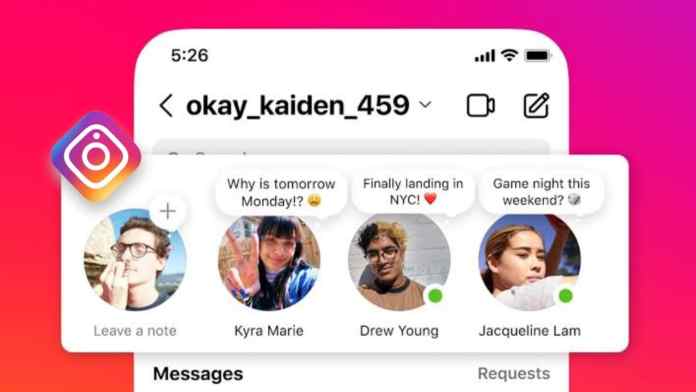
Have you noticed those fleeting thoughts appearing above your Instagram inbox? What began as a simple status update has transformed. Instagram Notes features have expanded significantly, turning casual musings into powerful engagement tools. This evolution represents a strategic shift by Instagram toward more intimate, conversation-driven interactions.

Consequently, understanding these new capabilities is crucial for anyone looking to strengthen their community on the platform. Let’s explore what’s changed and how you can use it to your advantage.

What Are Instagram Notes and Why Do They Matter?

Instagram Notes are ephemeral, text-based snippets that sit prominently in your followers’ Direct Message inbox for 24 hours. Unlike a permanent post or even a Story saved to a highlight, they offer a low-pressure way to share a mood, a song, or a quick question. This means they create a sense of immediacy and exclusivity, as only your mutual followers or Close Friends list can see them.

Building on this, the recent updates have injected new life into the feature. The platform has moved Notes beyond passive broadcasting, making them a two-way street for sparking genuine dialogue.

Breaking Down the New Instagram Notes Features

The latest rollout introduces three core interactive elements designed to foster connection. These additions fundamentally change how users can leverage their Notes.

1. Prompt Your Audience with Questions

Gone are the days of one-sided declarations. Now, you can end your Note with a prompt or a direct question. This simple addition invites your followers to slide into your DMs with a reply, effectively kick-starting a conversation. For instance, instead of just sharing “Listening to my favorite album,” you could ask, “What’s a song that instantly improves your mood?”

This approach turns your Note from a statement into an invitation. Every reply contributes to your overall engagement metrics, making it a valuable tool for creators and brands alike. For more on boosting engagement, check out our guide on editing viral Reels.

2. Express Reactions with Likes and Emojis

Previously, if a follower resonated with your Note, their only option was to send a text reply. Now, they can react with a tap, using a range of emojis similar to how you react to Stories or messages. This provides a quicker, lower-friction way for your audience to show appreciation or relate to your sentiment.

As a result, you receive a notification each time someone reacts, giving you clear, quantifiable feedback on what resonates with your community without the need for a full conversation.

3. Direct Conversations with Mentions

Perhaps the most social update is the ability to tag other users directly within your Note. By using the ‘@’ symbol followed by a username, you can send a notification to a specific follower or friend. This is perfect for asking a question directly to someone, sharing an inside joke, or collaboratively starting a discussion thread.

Therefore, this feature transforms Notes from a broadcast tool into a targeted conversation starter, strengthening individual connections within your broader follower base.

How to Access and Use the Updated Notes

Using these new Instagram Notes features is straightforward, but you need the latest version of the app. If you don’t see the option to add a prompt or tag someone, head to your device’s app store and ensure Instagram is fully updated.

To create a Note, simply navigate to your Direct Message inbox and tap on your own profile picture at the top. From there, you can compose text (up to 60 characters), select a song from Instagram’s music library, or—in a separate update—even add a short video. Before posting, you’ll see new icons to add a prompt, a reaction suggestion, or a mention.

Strategic Advantages of the New Notes

Why should you incorporate these updated Notes into your routine? The answer lies in the quality of engagement. While feed posts and Stories are fantastic for broad reach, Notes foster a more personal, inbox-level connection. They feel less curated and more like a direct line to you.

In addition, their 24-hour lifespan creates urgency. Followers know they have a limited window to join the conversation, which can prompt quicker interactions. This makes Notes an excellent tool for daily check-ins, quick polls, or sharing behind-the-scenes thoughts that don’t warrant a full Story.

For brands and creators, this is a low-effort, high-reward tactic to keep your community active. Pairing a strong feed strategy with interactive Notes can create a more holistic and engaging presence. Discover other ways to customize your presence in our article on Lock Screen productivity hacks.

Looking Ahead: The Future of Casual Social Interaction

Instagram’s investment in Notes signals a clear priority: facilitating authentic, lightweight conversations. In a digital landscape often dominated by polished content and performance pressure, Notes offer a return to simpler, text-based sharing.

This means that users who master this feature can build stronger, more conversational relationships with their audience. The combination of prompts, likes, and tags provides multiple entry points for followers to interact, lowering the barrier to engagement.

Ultimately, the expanded Instagram Notes features are more than just an update; they are a new channel for connection. By embracing their interactive potential, you can turn fleeting thoughts into meaningful conversations and deepen your bond with your community, one 60-character note at a time.

Continue Reading
Click to comment

Leave a Reply

Your email address will not be published. Required fields are marked *

How To

WhatsApp’s New Date-Based Message Search Arrives for iOS Beta Users

Published

on

WhatsApp’s New Date-Based Message Search Arrives for iOS Beta Users

For anyone who has ever scrolled endlessly through a chat history, help is on the way. WhatsApp, the ubiquitous messaging platform owned by Meta, is reportedly reviving a highly anticipated feature: the ability to search messages by a specific date. Currently in development for iOS beta testers, this tool promises to transform how users navigate their most active conversations.

What Is WhatsApp’s Search-by-Date Feature?

This new functionality introduces a simple yet powerful calendar icon within the search bar of an individual chat. Instead of relying solely on keyword recall, users can tap this icon, select a date from a calendar view, and instantly jump to all messages sent and received on that particular day. Consequently, finding a specific piece of information—like an address shared months ago or a photo from a special event—becomes a matter of seconds rather than a tedious scroll.

Building on this, the feature is designed to work in tandem with the existing keyword search. This means you could first narrow down results by date and then refine them with a keyword, or vice versa, creating a highly efficient two-step filtering system for your chat history.

A Long-Awaited Return to Development

Interestingly, this is not WhatsApp’s first attempt at building this tool. According to reports from the reliable WhatsApp news source WABetaInfo, the search-by-date feature was initially spotted in development over two years ago. For reasons never publicly disclosed, Meta paused its rollout, leaving the feature in limbo. Therefore, its reappearance in recent iOS beta builds (version 22.19.0.73) signals a renewed commitment from the development team to finally deliver this organizational upgrade to users.

How It Will Work for Beta Testers

The mechanism is elegantly simple. When you enter a chat and tap the search bar, a small calendar icon will appear alongside your typed query. Selecting it opens a date picker. After you choose a date, the view filters to show only the messages from that day. To exit this filtered view, you simply scroll up or down in the conversation, seamlessly returning to the full chat timeline. This intuitive design avoids cluttering the interface with persistent filters.

Why This Feature Matters for User Experience

On the surface, searching by date might seem like a minor convenience. However, its impact on daily usability is significant. Group chats, in particular, can become overwhelming repositories of information. Finding a specific link, decision, or piece of data from weeks or months prior often feels like searching for a needle in a haystack. This feature effectively timestamps your haystack, making retrieval straightforward.

Moreover, this update is part of a broader pattern of quality-of-life improvements from WhatsApp. The platform has steadily enhanced its core messaging experience with features like message reactions, larger file sharing, and advanced admin controls. A robust search function fits perfectly into this strategy, acknowledging that as our digital conversations grow in volume and importance, our tools for managing them must evolve. For more on how WhatsApp is improving, check out our guide on new security features for desktop.

Availability and What Comes Next

At this moment, the search-by-date feature remains under active development and is not yet available to the broader pool of iOS beta testers. There is no official launch date from Meta. Typically, after successful internal and limited beta testing, such features roll out gradually to all beta users before a eventual stable public release. This phased approach allows WhatsApp to iron out any bugs and gather feedback.

This means that while the wait isn’t over, the light is clearly visible at the end of the tunnel. The feature’s return to the development pipeline is a strong indicator that it is a priority. In the meantime, users can continue to use the keyword search function and the often-overlooked “Search in Conversation” option to find specific text.

Looking ahead, the successful implementation of date search on iOS will likely pave the way for its arrival on Android, Web, and Desktop platforms. Meta generally aims for parity across its apps, so an iOS debut is a promising sign for all users. To stay updated on this and other upcoming beta features, keep an eye on our dedicated WhatsApp updates section.

Ultimately, the introduction of a date-based search tool represents a mature step for WhatsApp. It moves beyond simply facilitating communication to helping users curate and control their communication history. As our messaging apps become digital archives of our personal and professional lives, features like this are not just nice-to-haves—they are essential tools for digital navigation.

Continue Reading

How To

Instagram DMs Not Working? Here Are 8 Effective Fixes to Get Your Messages Flowing Again

Published

on

Instagram DMs Not Working? Here Are 8 Effective Fixes to Get Your Messages Flowing Again

Few things are as frustrating as opening Instagram to find your direct messages frozen, failing to send, or refusing to load. When Instagram DMs are not working, it disrupts a core function of the platform. This guide walks you through a systematic troubleshooting process to identify and resolve the issue, whether it’s on your end or a wider server problem.

Start With the Basics: Network and Server Checks

Before diving into complex fixes, always eliminate the most common culprits. A weak or unstable internet connection is often the silent saboteur of app functionality. Consequently, your first move should be to toggle your Wi-Fi off and on, or switch between Wi-Fi and mobile data to test the connection. Try loading a webpage or another app to confirm your network is active.

Building on this, the problem might not be yours at all. Instagram’s servers occasionally experience outages. To check this, visit a site like Downdetector and search for Instagram. If you see a significant spike in reported problems, the issue is on Instagram’s side, and patience is your only remedy.

Application-Level Troubleshooting Steps

If your connection and Instagram’s servers are fine, the issue likely lies with the app instance on your device. Therefore, a series of targeted actions can often clear the blockage.

Force Stop and Restart the Instagram App

This simple step clears the app from your device’s active memory, potentially stopping a minor glitch. On Android, long-press the Instagram icon, tap ‘App Info’, and select ‘Force Stop’. On iPhone, swipe up from the bottom (or double-click the home button on older models) and swipe the Instagram app window away to close it fully. Then, relaunch the app and test your DMs.

Clear the Instagram App Cache (Android)

Over time, cached data can become corrupted and cause features like DMs to malfunction. To clear it on Android, go to Settings > Apps > Instagram > Storage & Cache, then tap ‘Clear Cache’. This does not delete your login information or personal data.

Update the Instagram App

Running an outdated version of the app can lead to compatibility issues and bugs. Navigate to the Google Play Store (Android) or App Store (iOS), search for Instagram, and tap ‘Update’ if available. Enabling automatic updates can prevent this issue in the future.

Account and Access Solutions

When basic app fixes don’t work, the problem may be tied to your account session or access method.

Log Out and Log Back In

This refreshes your account’s connection to Instagram’s servers. To log out, go to your profile, tap the menu (three lines), select ‘Settings and privacy’, scroll down, and tap ‘Log out’. After fully closing the app, reopen it and log back in with your credentials. This often resolves persistent Instagram DMs not working errors.

Use Instagram on the Web

As an immediate workaround, access your account via a desktop browser at instagram.com. This bypasses the mobile app entirely. If your DMs work perfectly on the web version, it confirms the problem is isolated to your mobile app, guiding your troubleshooting efforts.

When All Else Fails: Advanced Avenues

If you’ve tried everything and your Instagram DMs are still not working, more definitive actions are required.

Reinstall the Instagram App

Uninstalling and reinstalling the app gives you a completely fresh installation, eliminating any deep-seated corrupted files. Remember, this will log you out, so ensure you know your password beforehand.

Report the Problem to Instagram Support

Instagram provides built-in tools to report issues. From your profile, go to Settings and privacy > Help > Report a problem. You can describe the issue in detail. Alternatively, while on the problematic DM screen, shaking your phone (on some devices) can trigger the reporting menu.

On the other hand, consider if you’ve been blocked by the recipient, as this will prevent message delivery. For all other technical issues, this structured approach will almost certainly get your direct messaging back on track. Start with the simplest fix and work your way down the list until you find the solution that works for your specific situation.

Continue Reading

How To

How to Lock Specific Chats on WhatsApp for Android and iOS Users

Published

on

How to Lock Specific Chats on WhatsApp for Android and iOS Users

In today’s digital landscape, privacy concerns are paramount. WhatsApp, the popular messaging platform owned by Meta, has responded by introducing a powerful feature designed to give users more control over their private conversations. The ability to lock specific chats adds an essential layer of security, ensuring sensitive discussions remain confidential even if someone gains physical access to your device. This guide provides a comprehensive walkthrough for both Android and iOS users.

Understanding WhatsApp’s Chat Lock Feature

While WhatsApp has long offered app-level security through device passwords or biometrics, the chat lock function represents a significant evolution. This feature allows you to protect individual conversations with an additional authentication step. Consequently, even if someone unlocks your phone and opens WhatsApp, these selected chats remain hidden behind a separate lock. Building on this, the feature also conceals message previews and sender names in notifications, creating a comprehensive privacy shield.

Why You Should Use Chat Lock

Consider the common scenarios where this feature proves invaluable. Perhaps you share your device occasionally with family members, or maybe your work requires colleagues to sometimes use your phone. In such situations, having the option to lock WhatsApp chats ensures personal or sensitive business discussions stay private. This granular control means you don’t have to hide your entire WhatsApp experience—just the conversations that demand extra discretion.

Step-by-Step Guide to Locking Chats on WhatsApp

The process to enable chat lock is remarkably straightforward and consistent across both major mobile platforms. First, ensure your WhatsApp application is updated to the latest version from the Google Play Store or Apple App Store. This guarantees access to the newest privacy tools.

To begin, open the specific conversation you wish to secure. Tap on the contact’s or group’s name at the top of the screen to access the chat info page. Scroll down through the menu options until you locate “Chat Lock.” Selecting this will present you with the option to “Lock this chat with fingerprint” (on Android) or “Lock this chat with Face ID/Touch ID” (on iOS). After enabling the toggle, confirm your biometric authentication when prompted. A notification will appear, reminding you that the chat will not be locked on any linked devices, such as WhatsApp Web. Tap “OK” to finalize the process.

Accessing Your Locked WhatsApp Chats

Once you lock WhatsApp chats, they vanish from your main chat list. So, how do you find them again? The platform creates a dedicated, hidden folder for all your secured conversations. To access it, simply pull down on your main chat screen. You will see a new “Locked Chats” section appear above your archived chats. Tap this folder and authenticate with your fingerprint or face scan. This reveals all your protected conversations in one place. Importantly, when you exit this folder or return to the main chat list, the chats automatically re-lock themselves, maintaining continuous security.

Managing Notifications for Locked Chats

A key aspect of this privacy feature is its handling of notifications. To prevent information leaks, WhatsApp suppresses message previews and contact names for locked chats in your notification panel. You will only see a generic alert stating “WhatsApp: 1 new message” without revealing the sender or content. This ensures privacy is maintained even when your phone is locked and notifications are visible on the screen.

Important Considerations and Limitations

While the chat lock feature is powerful, it’s crucial to understand its scope. First, the lock only applies to the primary device where you enabled it. Conversations in locked chats will still appear normally on any linked devices, such as WhatsApp Desktop or WhatsApp Web. Therefore, for complete privacy, you should also manage your linked device sessions. Second, the feature relies on your device’s native biometric security. If you haven’t set up a fingerprint or face unlock on your phone, you won’t be able to use chat lock.

Furthermore, remember that this is a client-side security measure. It protects against someone physically using your phone, but it does not change how WhatsApp handles message encryption or data storage on its servers. For broader privacy settings, explore our guide on managing your WhatsApp privacy.

Enhancing Your Overall WhatsApp Security

Using chat lock is just one part of a robust privacy strategy. To build a more secure messaging environment, consider implementing other features WhatsApp offers. Enable two-step verification for your account to add a PIN that’s required periodically. Regularly review which devices are linked to your account and log out from unfamiliar ones. You can also control who sees your profile photo, “last seen” status, and “about” information through the app’s Privacy settings. For a deeper dive into these options, check out our article on advanced WhatsApp tips and tricks.

In conclusion, the ability to lock WhatsApp chats is a thoughtfully designed tool that puts privacy control directly in the user’s hands. By following the simple steps outlined above, you can selectively shield your most sensitive conversations from prying eyes, adding a vital layer of personal security to your daily communications. As messaging apps continue to evolve, features like this underscore the importance of user-centric privacy in the digital age.

Continue Reading

Trending