Connect with us

Artificial Intelligence

TripAdvisor’s AI summaries are smoothing over raw chicken, dead mice, and sexual harassment

Published

on

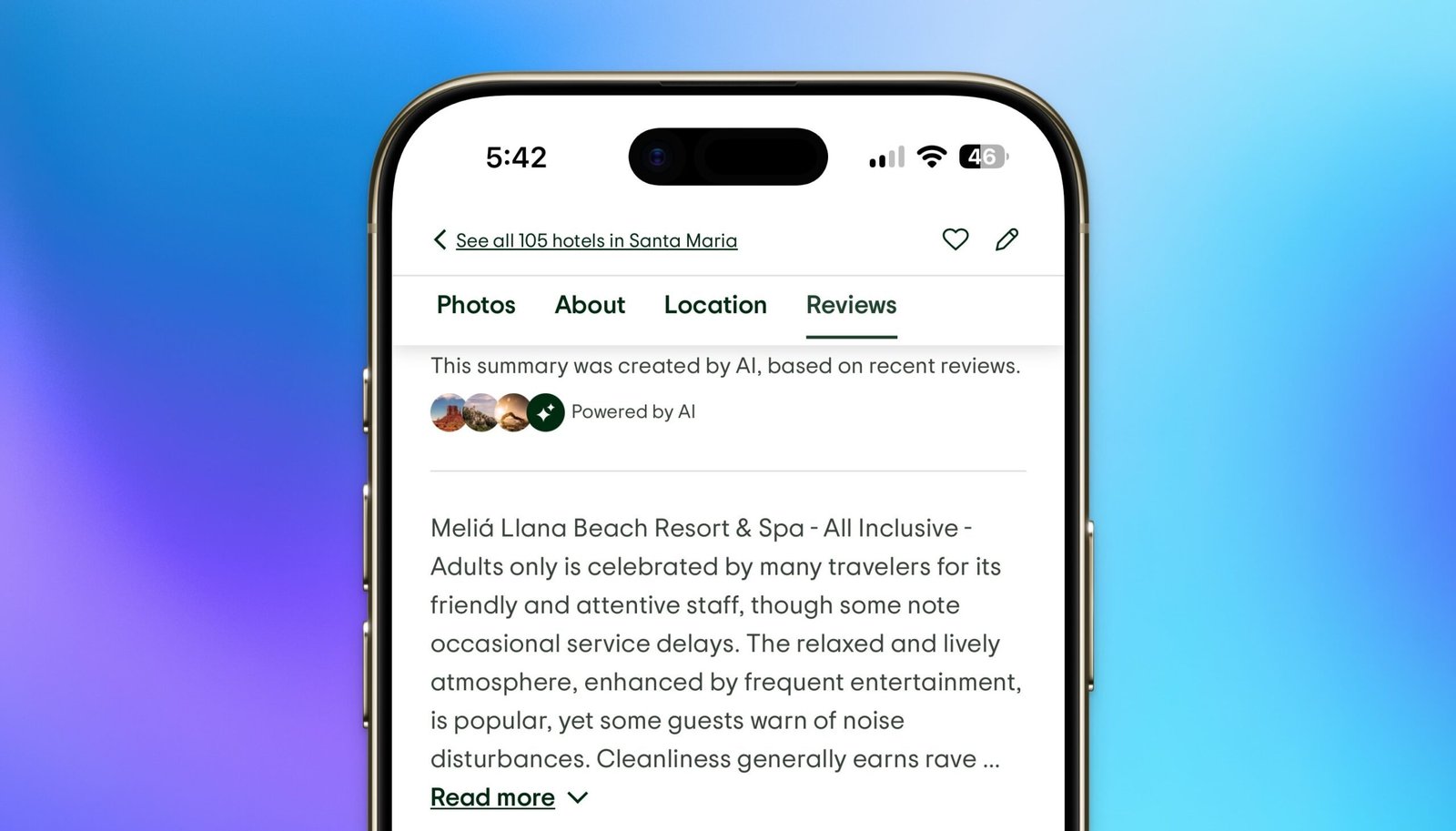
TripAdvisor AI summaries

The problem with trusting a machine to tell you about a hotel

Planning a vacation already feels like a second job. You scroll through pages of reviews, compare photos, check the star rating. Then along comes a neat little AI-generated summary that promises to do the heavy lifting for you. Sounds helpful, right?

Not so fast. An investigation by consumer group Which?, reported by The Guardian, found that TripAdvisor AI summaries are systematically filtering out the worst guest experiences — including hygiene failures, safety risks, and even sexual harassment.

In some cases, the gap between what the AI says and what real guests report is so wide it borders on dangerous misinformation.

Raw chicken, dead mice, and a cheerful summary

Take the Riu Palace Santa Maria in Cape Verde. The AI-generated overview called the resort “spotless” and said its restaurants earned “rave reviews.” Sounds like a dream.

Here’s what actual guests described: raw chicken served at the buffet, flies and birds buzzing around food stations, and dead mice near the seating area. The hotel chain is currently facing a High Court lawsuit brought by hundreds of guests who allege they fell ill due to hygiene failures at the property.

None of that — not the raw meat, not the rodents, not the lawsuit — appeared in the TripAdvisor AI summary. The company has since removed that particular overview.

When ‘friendly service’ means something else entirely

It gets worse. A hotel in Turkey had multiple guest reports of repeated sexual harassment by male staff members. The AI summary described the service as “friendly” with only “a few lapses.”

Think about that for a second. If someone booked that hotel based on the AI overview alone, they would have had no warning at all about the danger waiting for them. The summary didn’t just soften the criticism — it erased the severity of the complaint entirely.

These aren’t isolated glitches. The Which? investigation turned up multiple cases where serious safety incidents were either minimized or completely omitted from the automated summaries.

Why AI keeps sanding down the rough edges

Duncan Brumby, a professor of human-computer interaction at University College London, offered a straightforward explanation for why this keeps happening. Most of the data used to train AI language models leans toward polite, bland language. So when a guest writes an angry review about a dangerous situation, the model tends to treat it like a minor complaint.

Think of it this way: the AI has been trained on millions of sentences that say “the room was okay” and “the staff were nice.” It doesn’t have a strong framework for understanding that “I was sexually harassed” is not the same category of problem as “the Wi-Fi was slow.”

The result is a summary that flattens everything into the same polite, inoffensive tone — even when the original review is screaming about a genuine safety hazard.

What TripAdvisor says

TripAdvisor told the Guardian that it is investigating the mismatched summaries. The company says its systems are designed to suppress AI overviews when reviews mention serious safety incidents. It also stressed that these summaries were never meant to replace reading the actual reviews.

But that raises an obvious question: if the summaries are supposed to be suppressed when safety issues come up, why are so many dangerous complaints slipping through?

Don’t let an algorithm plan your next trip

None of this means you should stop using TripAdvisor entirely. The platform still contains a massive amount of useful, detailed feedback from real travelers. But the AI summaries? Treat them with serious skepticism.

Here’s a practical approach:

  • Scroll past the AI summary. It’s usually at the top of the page. Ignore it and go straight to the written reviews.
  • Sort by lowest rating first. The one-star and two-star reviews will tell you what actually goes wrong at a property. Read several of them to spot patterns.
  • Check multiple platforms. Don’t rely on a single site. Cross-reference with Google Maps reviews, Booking.com, and Expedia to get a fuller picture.
  • Look for specific details. A review that says “the bathroom was dirty” is less useful than one that says “there was mold in the shower and the toilet didn’t flush.” Specifics are harder to fake.

The same principle applies to AI-generated travel content more broadly. Whether it’s a hotel summary, a restaurant recommendation, or a suggested itinerary, algorithms are still terrible at understanding context, danger, and nuance. They can’t tell the difference between “the eggs were cold” and “I was served raw chicken.”

The bottom line on TripAdvisor AI summaries

AI tools are getting better at summarizing text. But better at summarizing is not the same as better at understanding. When it comes to something as personal and high-stakes as where you’ll sleep on vacation, the stakes are too high to outsource judgment to a machine that can’t tell the difference between a minor complaint and a major safety issue.

Read the real reviews. Ignore the AI gloss. And if a summary sounds too good to be true? It probably is.

Continue Reading
Click to comment

Leave a Reply

Your email address will not be published. Required fields are marked *

Artificial Intelligence

America’s first autonomous ground vehicles are already fighting in Ukraine—here’s what they’ve learned

Published

on

autonomous ground vehicles

More than 100 American self-driving ATVs have been quietly operating in Ukraine for nine months

The first major deployment of U.S.-built autonomous ground vehicles in active combat is happening right now—in Ukraine. Forterra, a California-based developer of self-driving technology, revealed that over 100 of its Lancer vehicles have been moving supplies, evacuating wounded soldiers, and navigating some of the most dangerous terrain on earth since last October.

Scott Sanders, Forterra’s chief growth officer and a former U.S. Marine officer, told TechCrunch the experience is a brutal reality check. “I believe this to be true of every defense technology that’s ever been created—until you hit the realities of combat, you’re just not going to know,” he said.

The vehicles are funded by U.S. defense dollars, part of a broader push to modernize the American military through support for Ukraine’s resistance against Russian forces. While aerial drones have dominated headlines, the surveillance threat they create has driven Ukrainian commanders to seek ground-based autonomy too.

Why ground robots matter when drones rule the sky

Sergeant Major Corey Wilkens, who leads a U.S. Army program developing autonomous vehicles and tactics, put it bluntly: “There’s nowhere to hide.” He explained that soldiers on the ground are extremely vulnerable to first-person view drones, artillery, mortars, and other attacks. That makes unmanned ground vehicles (UGVs) a critical tool for keeping troops out of harm’s way.

Ukraine has been building its own battery-powered UGVs, but they max out at around 250 kilograms of cargo. Forterra’s Lancer, built on a Polaris ATV chassis with a custom sensor and compute stack, runs on gasoline and can haul 750 kilograms. That extra capacity makes a real difference.

“The bottom line is that this UGV for logistics and just maintaining our defense is the most important UGV in Ukraine,” a Ukrainian soldier who works with the vehicles told TechCrunch. (His identity is withheld for security reasons.) “It’s fucking fantastic, and we are dying to get more.”

2,500 miles, 1,100 missions, 52 casualty evacuations

The numbers tell a powerful story. Since arriving in Ukraine last October, Forterra’s Lancers have driven over 2,500 miles across more than 1,100 missions. They’ve carried 777,440 pounds of cargo total and completed 52 casualty evacuations. Some vehicles have been lost—typically when they get stuck in deep mud or difficult terrain, becoming sitting targets for Russian forces.

Those losses hurt, but they’ve also taught Forterra hard lessons about electronic warfare, remote software updates, maneuvering in extreme conditions, and keeping machines running under fire. The company, which has raised over $500 million in venture funding from investors like XYZ Venture Capital and Moore Strategic Partners, is now better positioned to compete for major national security contracts.

Teleoperation still rules the battlefield

Here’s the honest part: Ukrainian soldiers are mostly teleoperating the vehicles in combat zones. The machines are too valuable to risk on full autonomy, and the technology isn’t ready for the chaos of war. The vehicles can navigate diverse terrain on their own, but they can’t yet identify unexpected enemy forces and react appropriately.

“We actually need to be able to respond to the enemy threats, live, while it’s in front of the enemy, which the autonomy doesn’t know how to do yet,” the Ukrainian soldier explained.

The hard road to full battlefield autonomy

Forterra has been working on autonomous vehicles for 20 years. The company is now trying to blend classical self-driving car algorithms with newer generative AI that can handle generalized, unpredictable situations. One major bottleneck: gathering the right data.

“There’s a lot of things you have to do that aren’t available in an open source model because they’re not things that humans do, whether that’s figuring out how to navigate a minefield or operating a weapon system,” Sanders said. “You need to be able to turn the dials and some things more of a classical robotics approach, and then leverage AI where you need to.”

Competitors are chasing similar goals. Scout AI raised $100 million earlier this year to train foundation models for military platforms including UGVs. Startups like Field AI and Overland AI are also trialing unmanned ground vehicles with the U.S. military.

What American troops can learn from Ukraine’s war

Scott Philips, Forterra’s chief innovation officer, visited a Ukrainian unit’s operations center—an area within range of Russian attacks. That hands-on visit earned him respect from the soldiers he met.

“What struck me most was seeing exactly where the seams are: which steps are still manual, where data has to be re-entered or re-verified by hand, and where the team has already found ways to automate or speed things up,” Philips said. “That’s the kind of ground truth you can’t get from a slide deck.”

American military leaders are convinced the time for ground autonomy is now. “Ground autonomy is achievable now and we’ve seen it,” Wilkens said.

The price problem: cheaper UGVs needed for mass deployment

One clear message from Ukrainian troops: Make it cheaper. Forterra’s Lancers are already relatively affordable because they use Polaris’ commercial supply chain, but they’re still too expensive to deploy as freely as drones. “Attrition is just a fact of this battlefield, and we have lost a few at this point, and it hurt, and we need more, and therefore we need them cheaper,” the Ukrainian soldier said.

That cost challenge will shape the next generation of military autonomous vehicles. For now, the Lancers are proving that ground robots can survive combat—and that there’s still a long way to go before they fight on their own.

Continue Reading

Artificial Intelligence

Gemini Spark lands on the Mac, and it wants to tackle your chores while you relax

Published

on

Gemini Spark on Mac

Google’s assistant finally breaks out of the chat bubble

Google just dropped a hefty update for Gemini Spark, and for Mac users, it’s the one they’ve been waiting for. The assistant is no longer confined to a browser tab or a phone screen. It now lives inside the dedicated Gemini macOS app — and it can touch your files.

That’s the headline. But dig a little deeper, and there’s more: deeper app connections, remote tasking from your phone, and a new monitoring feature that watches the web for you. Let’s walk through what actually changes.

What can Spark do on your Mac now?

The biggest shift is that Spark can finally step outside the chat window. On the Mac app, it can directly interact with your desktop files and folders. Got a Downloads folder that looks like a digital crime scene? You can ask Spark to sort every document, image, and PDF into properly named folders. It does it in seconds.

It also plays nice with Google Workspace. Ask it to build a budget spreadsheet from the latest invoices sitting on your hard drive, and it will — then schedule monthly updates on its own. Google is careful to note that Spark only touches files you explicitly allow. No unfettered access. You stay in control.

Remote tasking: send a command from your phone, Spark does the work on your Mac

Soon, you’ll be able to fire off a task from your phone and let Spark execute it on your Mac while you’re away. Think of it like Claude’s Cowork feature, but baked into Google’s ecosystem. You’re on the train, you remember a report needs formatting — one command, and Spark handles it on your desktop back home.

Which apps does Spark connect to?

Spark now links directly to Google Tasks and Google Keep. That means you can turn a messy Keep note into a structured action list without copy-pasting anything. The assistant also gains integrations with five new services: Canva, Dropbox, Instacart, OpenTable, and Zillow Rentals.

So you can ask Spark to design a party flyer in Canva, share a file from Dropbox, book a dinner table via OpenTable, or order groceries through Instacart — all from the same chat. According to Google, these connections roll out over the next week on web and mobile. The macOS versions follow shortly after.

Real-time monitoring: Spark watches the web for you

This one is quietly powerful. Spark can now track topics and react to events as they happen. Want to know the moment a stock hits a certain price? Or get a highlight reel after a football match ends? Spark monitors the web and sends you a notification instantly.

It’s not just a passive search. It’s a live lookout. You set the conditions, Spark does the watching. No more refreshing pages every five minutes.

Is Gemini Spark finally a do-it-all assistant?

Between the Mac app’s file-handling ability, the expanded app integrations, and the real-time tracking, Spark is quietly maturing into something close to a universal assistant. It’s not perfect — the remote tasking is still rolling out, and some integrations may take time to feel smooth. But the direction is clear: Google wants Spark to handle the busywork so you don’t have to.

Give it a spin. See if it actually cleans up that Downloads folder. And if it does, you might just find yourself relaxing while Spark does the chores.

Continue Reading

Artificial Intelligence

Your keyboard just got a lot smarter: Acti turns the space bar into an AI agent

Published

on

AI keyboard Acti

Your keyboard is about to do a lot more than type

For nearly two decades, the smartphone keyboard has done one thing: let you tap letters to form words. Autocorrect got better. Predictive text got creepily accurate. But fundamentally, the keyboard remained a passive input tool — a flat grid of keys waiting for your fingers.

A Singapore-based startup called Acti looked at that static slab of glass and asked a simple question: why can’t the keyboard actually do things? After seeing a demo of the new AI keyboard Acti, it’s clear the idea has real traction.

Acti — short for “action” — just launched on both iOS and Android. It’s what the company calls an “agentic keyboard.” That’s a buzzwordy way of saying it doesn’t just predict your next word. It can perform tasks inside the apps you already use: messages, email, social media, you name it.

How the ActiBar replaces the space bar

The centerpiece of the app is the ActiBar. It replaces your standard space bar. Tap it to type as usual. But hold it down, and something different happens.

Let’s say a friend texts asking where you are. You type the location into the chat, then hold the ActiBar. The keyboard finds that location and drops a map pin straight into the conversation. No app switching. No copy-paste dance.

The same trick works for sports scores, restaurant recommendations, or nearby events. Acti even generates live mini-apps inside the chat so the other person can browse results without leaving the conversation.

It doesn’t stop at the space bar. You can assign actions to any key. Hold N to pull up a specific Notion doc and drop it into your chat. Hold L to fetch a LinkedIn profile when someone mentions a name. The keyboard becomes a launchpad for your most-used tools.

Custom shortcuts you can build with plain English

Acti also lets users create their own shortcuts, which the company calls Skills. You describe what you want in plain language — “find the nearest coffee shop and share the address” — and the keyboard builds the action for you. No coding required.

These Skills can stay private or be shared with the community. Over time, the library of user-built shortcuts could become a powerful resource, much like shortcut communities for apps like WhatsApp or Telegram.

The app is designed to be local-first. That means your personal data — contacts, messages, documents — stays on your device unless you explicitly use a feature that needs cloud access. For privacy-conscious users, that’s a meaningful distinction in the age of always-on AI assistants.

Pricing and availability

Acti is free to download and use for basic features. The company plans to introduce subscriptions for premium capabilities down the line, though no pricing has been announced yet.

It’s worth noting that Acti isn’t doing anything technically revolutionary. Other AI agents — from Google’s Gemini to Microsoft’s Copilot — can perform similar tasks. What makes the AI keyboard Acti stand out is its placement. It lives inside the keyboard, the one screen element you already interact with hundreds of times a day. You don’t have to switch apps, open a sidebar, or remember a voice command. You just hold a key.

Is this the future of smartphone input?

The smartphone keyboard has been ripe for reinvention for years. Third-party keyboards like SwiftKey and Gboard added swiping, GIF search, and clipboard history. But none of them turned the keyboard into an active agent. Acti is the first to treat the keyboard not as a passive input surface, but as a command center.

Whether users will actually retrain their muscle memory to hold the space bar instead of just tapping it remains to be seen. But the demo suggests that once you get used to it, the friction of jumping between apps for simple tasks starts to feel archaic.

For now, Acti is available on the iOS App Store and Google Play Store. If you’ve ever wished your keyboard would just do something instead of waiting for you to type it, this is worth a download.

Continue Reading

Trending