Connect with us

How To

Degoo Cloud Storage: The Free Solution to Secure Your Private Data, Videos, and Photos

Published

on

Degoo Cloud Storage: The Free Solution to Secure Your Private Data, Videos, and Photos

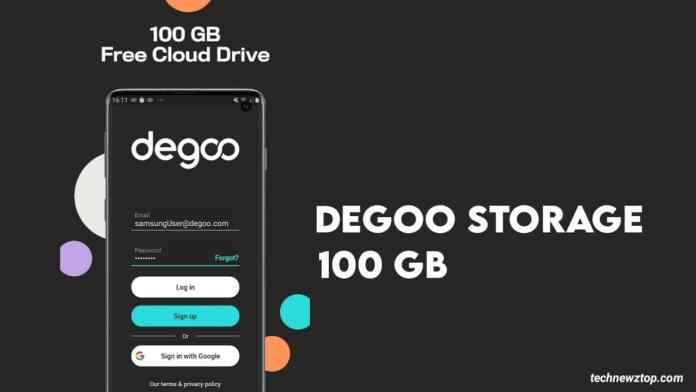
In an age where digital privacy feels increasingly fragile, finding a reliable way to secure your private data has become a top priority. Whether you are safeguarding personal documents, family videos, or cherished photos, the right tool can make all the difference. Enter Degoo Cloud Storage, a free application that offers a generous 100 GB of online space to keep your files safe. This guide will walk you through everything you need to know about using Degoo to protect your digital life.

What Exactly Is Degoo Cloud Storage?

At its core, Degoo Cloud Storage is a free online file storage service designed to help users store and access their data from anywhere. Think of it as a secure digital vault that syncs across all your devices—smartphones, tablets, and computers. Unlike some competitors that charge a premium for similar space, Degoo provides 100 GB of storage at no cost, making it an attractive option for budget-conscious users.

This means that whether you are on an Android phone, an iPhone, or a Windows laptop, your files remain accessible and synchronized. The service automatically backs up your documents, videos, and photos, ensuring that even if you lose your device, your memories and important files are not lost forever. For anyone looking for a free cloud storage app with a solid reputation, Degoo is worth considering.

How to Download and Set Up Degoo Cloud Storage

Getting started with Degoo is straightforward. The app is available for both Android and iOS platforms, and the download process takes just a few minutes. Here is a step-by-step breakdown:

Step 1: Download the App

Head to the Google Play Store or Apple App Store and search for "Degoo Cloud Storage." Look for the official app with the distinctive blue cloud icon. Tap "Install" and wait for the download to complete. The app is lightweight, so it should not take long even on slower connections.

Step 2: Create an Account

Once installed, open the app and sign up using your email address or Google account. You will immediately receive 100 GB of free storage. No credit card is required, which is a refreshing change from many "free" services that ask for payment details upfront.

Step 3: Start Uploading Files

After logging in, you can begin uploading files. The app allows you to back up photos, videos, documents, and more. Simply tap the "Upload" button and select the files you want to secure. Degoo also offers an automatic backup feature for your camera roll, so your new photos are saved without manual intervention.

For those who prefer a desktop experience, Degoo also has a web version. You can log in from any browser and manage your files there. This cross-platform flexibility is a major plus for users who switch between devices frequently.

Why Choose Degoo for Protecting Private Data?

There are dozens of cloud storage options available today, so what makes Degoo stand out? First and foremost, the 100 GB free tier is hard to beat. Services like Google Drive offer only 15 GB for free, while Dropbox gives a mere 2 GB. Degoo’s offering is significantly more generous, making it ideal for storing large video files or extensive photo libraries.

Additionally, Degoo uses encryption to protect your data during transfer and while at rest on its servers. This means that your private documents—such as tax returns, medical records, or personal letters—are shielded from unauthorized access. While no service is 100% hack-proof, encryption adds a critical layer of security.

Another advantage is the app’s user-friendly interface. Even if you are not particularly tech-savvy, you will find the layout intuitive. Files are organized in a simple folder structure, and you can create custom folders for different types of content. This makes it easy to locate specific items later.

Tips for Maximizing Your Degoo Experience

To get the most out of Degoo Cloud Storage, consider these practical tips:

  • Enable automatic backup: Turn on the auto-backup feature in the app settings. This ensures that every photo or video you take is instantly saved to the cloud, reducing the risk of data loss.
  • Organize with folders: Create separate folders for work documents, family photos, and personal videos. This keeps your storage tidy and makes searching faster.
  • Share files securely: Degoo allows you to share files with others via a link. You can set expiration dates or passwords for shared links to maintain control over who accesses your data.
  • Monitor your storage: Keep an eye on your 100 GB limit. If you are a heavy user, consider deleting old or duplicate files to free up space. You can also upgrade to a paid plan if needed.

Building on these habits, you can transform Degoo from a simple storage tool into a comprehensive data management system. The key is consistency—regular backups and organization go a long way in protecting your digital assets.

Final Thoughts: Is Degoo Right for You?

If you are searching for a secure cloud backup solution that does not break the bank, Degoo Cloud Storage is a strong contender. Its 100 GB free offering, combined with cross-device sync and encryption, makes it a practical choice for individuals and families alike. While it may not have all the advanced features of premium services like Dropbox or Google Workspace, it covers the basics effectively and then some.

Remember, the best way to protect your private data is to take action today. Download Degoo, set up your account, and start backing up your most important files. Your future self will thank you when a lost phone or crashed hard drive no longer spells disaster.

For more tips on digital security, check out our guide on how to check suspicious links before clicking and how to enable WhatsApp end-to-end encrypted backup.

Continue Reading
Click to comment

Leave a Reply

Your email address will not be published. Required fields are marked *

How To

Samsung Galaxy S25 FE Camera Details Leaked: Full Specs Revealed for the Upcoming Fan Edition

Published

on

Samsung Galaxy S25 FE Camera Specs Leaked: A Closer Look at the Upgrades

The rumor mill is buzzing again, this time with fresh details about the Samsung Galaxy S25 FE camera. Recent leaks suggest that Samsung’s next Fan Edition phone, expected to launch later this year, will bring meaningful improvements to its photography system. While the core sensor counts may mirror last year’s model, the company appears to be focusing on better image processing and a notable front-camera upgrade.

According to tipsters, the new device could debut in September or October, continuing Samsung’s tradition of releasing Fan Edition models in the fall. If you are looking for a flagship experience without the flagship price, the S25 FE might be the perfect fit. In this article, we break down everything we know so far about the Galaxy S25 FE specs, from the camera array to the display and performance.

Rear Camera Setup: Familiar Numbers, Better Results

The leaked information points to a triple-camera system on the back of the Galaxy S25 FE. The main shooter is expected to be a 50-megapixel sensor, the same resolution used in the Galaxy S24 FE. However, Samsung may have upgraded the sensor itself, which could lead to sharper images and more accurate colors.

Alongside the primary lens, there will likely be a 12-megapixel ultra-wide camera. This is ideal for capturing expansive landscapes or group shots with more background detail. The third camera is an 8-megapixel telephoto lens, capable of 3x optical zoom. While the zoom range hasn’t changed, the improved sensor technology could make a noticeable difference in low-light conditions and overall clarity.

What This Means for Photography Enthusiasts

If you are someone who takes a lot of photos, the Samsung Galaxy S25 FE camera should deliver solid performance. The combination of a high-resolution main sensor and a dedicated telephoto lens gives you flexibility for various shooting scenarios. Samsung’s software processing, including improved HDR and night mode, will likely play a big role in making these cameras shine.

Selfie Camera Gets a Big Boost

One of the most exciting changes is the front-facing camera. Previous Fan Edition models, including the S24 FE, used a 10-megapixel selfie sensor. The Galaxy S25 FE, however, is rumored to feature a 12-megapixel front camera. This upgrade should result in crisper selfies and better video call quality.

In the age of social media and remote work, a good front camera is more important than ever. Whether you are recording TikToks or hopping on a Zoom meeting, the higher resolution will capture more detail. The actual quality will also depend on the sensor type and Samsung’s tuning, but early signs are promising.

Design, Display, and Performance

On the outside, the Galaxy S25 FE will likely follow the design language of the Galaxy S25 series. Expect a clean, minimalist look with three circular camera lenses arranged vertically on the back. The front will feature a flat AMOLED display with a centered punch-hole selfie camera. Thin bezels and a 120Hz refresh rate will make scrolling and gaming feel smooth.

For performance, the phone is expected to run on Samsung’s Exynos 2400 SoC, as spotted in a recent Geekbench listing. It will likely come with 8GB of RAM and Android 16 out of the box, paired with Samsung’s One UI 8 interface. Some rumors also mention a possible MediaTek Dimensity 9400 variant for certain markets, though this hasn’t been confirmed.

Battery life and charging speeds remain unknown, but given the Fan Edition’s reputation, you can expect a solid all-day battery. The phone will also support 5G connectivity, ensuring fast download and streaming speeds.

Price and Availability: What to Expect

Samsung has not officially announced the price, but leaks suggest the Galaxy S25 FE could be priced under ₹60,000 in India. This would position it as a more affordable alternative to the flagship Galaxy S25, making it an attractive option for budget-conscious buyers who still want premium features.

The phone is expected to launch in select markets first, with a wider rollout later. As always, final specs and pricing may vary by region. Until Samsung makes an official announcement, it is best to treat these details as educated guesses.

For more on Samsung’s latest devices, check out our Galaxy S25 Ultra review and One UI 8 feature guide.

Final Thoughts on the Galaxy S25 FE Camera

To sum up, the Samsung Galaxy S25 FE camera leak paints a picture of a well-rounded smartphone. The rear setup may look familiar on paper, but sensor improvements and software tuning could elevate photo quality. The front camera upgrade is a welcome change, and the overall package—combining a premium design, solid performance, and a competitive price—makes this one of the most anticipated phones of 2025.

Are you excited about the Galaxy S25 FE? Let us know in the comments below, and stay tuned for more updates as we approach the official launch.

Continue Reading

How To

Set Dialogue Caller Ringtone: The Easiest App to Personalize Your Incoming Calls

Published

on

Set Dialogue Caller Ringtone: The Easiest App to Personalize Your Incoming Calls

Are you tired of the same old boring ringtones that everyone else uses? Do you want your phone to stand out every time someone calls? If so, you need to learn how to set dialogue caller ringtone for incoming calls. This simple guide will show you a fantastic app that makes customizing your phone fun and effortless.

Many people struggle to find good ringtones that reflect their personality. They often settle for default sounds that lack character. However, there is a solution. A dedicated app lets you choose from a huge library of dialogue clips from movies, shows, and comedy sketches. You can finally have a ringtone that makes you smile or even laugh out loud.

This article walks you through everything. From downloading the app to setting your favorite sound, we cover it all. By the end, your phone will be uniquely yours. Let’s get started.

Why You Need a Dialogue Caller Ringtone App

Standard ringtones can be dull and impersonal. A dialogue caller ringtone adds a touch of humor and creativity to your daily life. It is a simple way to express your interests without saying a word.

Furthermore, this type of app offers variety. You can switch between sounds whenever you want. Whether you prefer a classic movie line or a modern meme, there is something for everyone. It makes receiving calls more enjoyable for you and those around you.

How to Download the Set Dialogue Caller Ringtone App

Downloading this app is straightforward. Follow these simple steps to get it on your device.

Step 1: Open the Google Play Store

First, unlock your phone and locate the Google Play Store icon. Tap to open it. This is where you will find the app.

Step 2: Search for the App

Next, use the search bar at the top. Type in “Set Dialogue Caller Ringtone” and press enter. The search results will appear quickly.

Step 3: Install the Application

Look for the correct app in the list. Then, tap the green “Install” button. The download will start automatically. Once finished, the app installs on your phone without any extra steps.

Alternatively, you can use a direct download link if one is provided. This method is just as fast and reliable.

How to Use the App to Set Your Ringtone

After installation, using the app is even easier. Here is a quick guide to get your new sound ready.

Grant Necessary Permissions

When you open the app for the first time, it will ask for permissions. It needs access to your phone’s storage and settings. Grant these permissions so the app can function correctly.

Browse and Select a Dialogue

Now, browse through the extensive library. You will find categories like comedy, action, and drama. Tap on any sound to preview it. Take your time to find the perfect clip.

Set as Your Incoming Call Tone

Once you find a dialogue you love, tap the “Set as Ringtone” button. The app will instantly apply it. From now on, every incoming call will play your chosen dialogue caller ringtone.

This process is incredibly simple. You can change your ringtone as often as you like. For more tips on personalizing your device, check out our guide on changing default ringtones on Android.

Why This App Stands Out

This app is not just functional; it is also entertaining. It offers a level of customization that standard ringtone apps lack. You get access to unique audio clips that you cannot find elsewhere.

Moreover, the app is user-friendly. Even if you are not tech-savvy, you can navigate it with ease. The interface is clean and intuitive. This means you spend less time figuring out how to use it and more time enjoying your new ringtone.

Building on this, the app is regularly updated. New dialogues are added frequently. So, you will never run out of options. It is a great way to keep your phone feeling fresh and new. If you enjoy customizing your phone, you might also like our article on top Android customization apps.

Final Thoughts on Personalizing Your Phone

In conclusion, setting a dialogue caller ringtone is a fantastic way to make your phone unique. The app discussed here makes the entire process simple and enjoyable. You can download it, install it, and start using it in just a few minutes.

Do not settle for boring sounds any longer. Take control of your phone’s personality. Download the app today and enjoy a fun, personalized experience every time you get a call. If you have any questions, feel free to leave a comment below. Share this guide with friends so they can also enjoy cool ringtones.

Continue Reading

How To

What Is the Share Market? A Complete Beginner’s Guide to Investing and Learning

Published

on

What Is the Share Market? A Complete Beginner’s Guide to Investing and Learning

Have you ever wondered how people make money by buying and selling company shares? The share market basics can seem confusing at first, but once you understand the core concepts, it becomes much simpler. This guide will walk you through everything you need to know — from what a share market is, to how you can start investing safely.

What Exactly Is the Share Market?

The share market is a platform where shares of publicly listed companies are bought and sold. When you purchase a share, you are essentially buying a small piece of that company. If the company performs well and its profits rise, the value of your share may increase — potentially giving you a solid return on your investment.

However, it is not all profit. Many people also lose money in the share market. This happens when a company underperforms or when market conditions turn negative. Understanding these share market basics is essential before you put any real money at risk.

How to Invest in the Share Market: Opening a Demat Account

To begin investing, you first need a Demat account. Think of it like a digital locker for your shares. Just as you keep cash in a bank account, your shares are held safely in a Demat account. Without one, you cannot legally trade or hold shares in India.

Step-by-Step Process to Open a Demat Account

You have two main options. The first is to approach a registered broker. Many brokerage firms offer online account opening in just a few minutes. The second option is to open a Demat account directly through your bank — most major banks now provide this service.

To complete the process, you will need a few documents: a PAN card (mandatory for all investors), proof of address (such as an Aadhaar card or utility bill), and a linked savings account. Once your account is active, you can start buying and selling shares.

For a deeper dive into the process, check out our guide on how to open a Demat account online.

How to Learn the Share Market Before Investing

Jumping into the share market without proper knowledge is a common mistake. Before you invest a single rupee, take time to learn the fundamentals. Good research and planning are the backbone of successful investing.

Start by reading books, following reputable financial news websites, and taking free online courses. Many brokers also provide demo accounts where you can practice trading with virtual money. This way, you can test your strategies without any financial risk.

Additionally, always research a company thoroughly before buying its shares. Look at its financial health, management team, and future growth prospects. Avoid tips from unknown sources — rely on verified data instead. Our article on stock market research tips for beginners can help you get started.

Risks and Rewards: What Every New Investor Should Know

The share market offers the potential for high returns, but it also carries significant risk. Prices can fluctuate wildly based on news, economic data, or even global events. For example, a single disappointing earnings report can cause a stock to drop by 10% or more in one day.

To manage risk, never invest money you cannot afford to lose. Diversify your portfolio by buying shares in different industries. And most importantly, avoid emotional decisions — panic selling during a downturn often locks in losses.

Building on this, consider setting a stop-loss order for every trade. This automatically sells your share if its price falls below a certain level, limiting your downside.

Final Thoughts: Start Your Share Market Journey Wisely

Understanding share market basics is the first step toward becoming a confident investor. Open a Demat account, learn the ropes through practice and research, and always keep risk management at the forefront. The share market is not a get-rich-quick scheme — it is a long-term wealth-building tool when used correctly.

If you found this guide helpful, share it with friends who are also curious about investing. And remember: the best investment you can make is in your own knowledge. For more beginner-friendly content, explore our investing for beginners section.

Continue Reading

Trending